Codex CLI vs Claude Code: Which Has the Better Developer Ecosystem?
In-depth comparison of Codex CLI and Claude Code from a developer ecosystem perspective — skills, MCP servers, hooks, plugins, pricing, and IDE support in 2026.
%20by%20%E2%80%9ELisa%20Wischofsky%E2%80%9D%2C%20licensed%20under%20%E2%80%9ECC0%201.0%E2%80%9D%20(https%3A%2F%2Fcreativecommons.org%2Fpublicdomain%2Fzero%2F1.0%2F)%3C%2Fdc%3Arights%3E%3C%2Frdf%3ADescription%3E%3C%2Frdf%3ARDF%3E%3C%2Fmetadata%3E%3Cmask%20id%3D%22viewboxMask%22%3E%3Crect%20width%3D%22980%22%20height%3D%22980%22%20rx%3D%22490%22%20ry%3D%22490%22%20x%3D%220%22%20y%3D%220%22%20fill%3D%22%23fff%22%20%2F%3E%3C%2Fmask%3E%3Cg%20mask%3D%22url(%23viewboxMask)%22%3E%3Crect%20fill%3D%22url(%23backgroundLinear)%22%20width%3D%22980%22%20height%3D%22980%22%20x%3D%220%22%20y%3D%220%22%20%2F%3E%3Cdefs%3E%3ClinearGradient%20id%3D%22backgroundLinear%22%20gradientTransform%3D%22rotate(28%200.5%200.5)%22%3E%3Cstop%20stop-color%3D%22%23FFEDD5%22%2F%3E%3Cstop%20offset%3D%221%22%20stop-color%3D%22%23FFCCB6%22%2F%3E%3C%2FlinearGradient%3E%3C%2Fdefs%3E%3Cg%20transform%3D%22translate(10%20-60)%22%3E%3Cpath%20d%3D%22M632%20187c17%209%2033%2022%2041%2040%209%2017%2010%2035%207%2053%2015%2014%2022%2034%2024%2054%201%209%202%2020-2%2030-1%203-3%208-7%2011l-4%201-10-8c-9-12-16-24-23-37-7%2010-17%2019-28%2024l-6-3c-9-5-14-17-23-21l-5%2018c-1%203-3%206-6%206-6-1-12-3-17-6-22-10-45-20-69-27%202%206%203%2012%201%2018%200%202-2%204-4%206h-14a188%20188%200%200%200-69%200c-6%201-12%205-19%207l-48%2020-12%2026c-5%2012-9%2025-12%2037-1%203-2%207-1%2010%202%204%207%205%209%209v5c-4%2010-6%2022-7%2033-3%2016-3%2033-3%2049v21c0%203-3%206-7%206-4%201-8%200-12-2l19%2014c3%202%205%204%205%208-1%202-4%203-6%204%203%201%205%202%206%205%202%203%201%206-2%208-5%203-12%201-16-2-2-3-5-7-5-11%201-2%203-2%205-3-6-3-10-7-15-11-11-9-25-15-37-22l-11-7-4-7a322%20322%200%200%201-24-121c1-20%205-41%2011-61%205-13%2011-26%2020-36%207-10%2016-18%2028-22-3-10-4-20%200-29%204-15%2015-27%2029-35%2018-10%2037-16%2057-20%2027-5%2056-8%2083-12%2026-4%2052-11%2078-18%2019-5%2038-10%2058-11%2016%200%2032%202%2047%209Z%22%20fill%3D%22%23000000%22%2F%3E%3Cpath%20d%3D%22M495%20234c28%201%2056%206%2084%2015a201%20201%200%200%201%20100%2065c19%2025%2031%2055%2035%2086a361%20361%200%200%201%202%20101l-5%2034-4%2020c-1%202-1%202-3%202-2-4-2-8-2-12-1-15%201-29%202-44%201-24%203-48%201-72l-6-45c-7-28-20-54-40-75-18-18-40-33-63-43-22-9-44-15-67-19-18-3-36-4-54-4a277%20277%200%200%200-128%2029c-13%209-25%2020-35%2032a276%20276%200%200%200-55%20139c-1%2024%200%2047%208%2070l7%2015%2012%201%201%203c-3%202-7%202-11%203-10%202-20%206-29%2012-7%205-14%2011-18%2019-5%2010-3%2022-1%2033%205%2019%2017%2037%2033%2049%2011%209%2025%2014%2039%2016%2010%202%2020%200%2030-1%205%204%208%2012%2011%2017l18%2027a136%20136%200%200%200%2066%2050c22%209%2045%2014%2068%2019l41%208%2017%205v4h-12a535%20535%200%200%201-67-8%20255%20255%200%200%201-84-33c-11-7-21-16-29-27a214%20214%200%200%201-16%20123c-15%2027-40%2048-70%2057-3%201-7%202-10%201-2%200-2-1-2-3%201-3%204-5%206-6%2012-8%2026-14%2038-23%2013-11%2024-23%2031-38%206-15%2010-32%2012-49%202-13%203-26%202-40l-4-38-18-36-19%204a88%2088%200%200%201-75-38%2093%2093%200%200%201-20-58c0-9%203-18%208-25s12-13%2019-17c5-4%2012-6%2018-8l-9-24c-5-22-5-45-2-67a292%20292%200%200%201%2063-149c9-10%2018-19%2029-26%207-4%2014-5%2020-9%2043-19%2090-25%20137-22Z%22%20fill%3D%22%23000%22%2F%3E%3Cpath%20d%3D%22M475%20243a276%20276%200%200%201%20121%2023c23%2010%2045%2025%2063%2043%2020%2021%2033%2047%2040%2075l6%2045c2%2024%200%2048-1%2072-1%2015-3%2029-2%2044%200%204%200%208%202%2012l-1%2020c-2%205-2%2010-2%2016-2%2024-2%2049-6%2074-1%2012-3%2025-8%2036-3%209-8%2017-15%2024-12%2013-27%2024-43%2033-19%2011-39%2016-58%2024-5%202-10%204-13%208%208%201%2015%200%2023-2-5%2012-6%2024-6%2036%200%205-1%2011%201%2016%203%205%208%209%2013%2012l35%2013c22%208%2043%2018%2065%2027%202%204%205%207%206%2012%206%2011%207%2023%203%2035-5%2013-15%2024-27%2031-16%2011-36%2019-55%2024a494%20494%200%200%201-235-7c-20-7-40-14-58-24-14-8-29-18-40-31-6-8-11-19-12-29a122%20122%200%200%200%2086-107c4-24%204-49%200-73%208%2011%2018%2020%2029%2027l27%2014a331%20331%200%200%200%20124%2027h12v-4l-17-5-41-8c-23-5-46-10-68-19-13-6-27-13-39-21-10-9-19-18-27-29l-18-27c-3-5-6-13-11-17-10%201-20%203-30%201-14-2-28-7-39-16a94%2094%200%200%201-33-49c-2-11-4-23%201-33%204-8%2011-14%2018-19%209-6%2019-10%2029-12%204-1%208-1%2011-3l-1-3-12-1-7-15c-8-23-9-46-7-70a276%20276%200%200%201%2054-139c10-12%2022-23%2035-32a277%20277%200%200%201%20128-30Z%22%20fill%3D%22%23ffffff%22%2F%3E%3Cpath%20d%3D%22M260%20571c4%200%207%200%2011%202%205%201%2011%204%2014%208%202%203%202%207%200%2010-5%206-12%2010-16%2016%206%204%2014%206%2021%209%204%201%208%203%2011%206l1%203-8-2-24-7c-4-1-8-3-9-7-1-3%201-7%203-10l15-13c-4-7-15-8-19-15ZM703%20577l2%203%202%2016a483%20483%200%200%201-2%2089c-2%2011-5%2023-10%2033a198%20198%200%200%201-106%2071c-1%2014-3%2031-2%2047l5%205c8%206%2018%209%2027%2012a451%20451%200%200%201%2068%2028c7%204%2013%209%2018%2015-5%201-10-1-16-2-22-9-43-19-65-27l-35-13c-5-3-10-7-13-12-2-5-1-11-1-16%200-12%201-24%206-36-8%202-15%203-23%202%203-4%208-6%2013-8%2019-8%2039-13%2058-24%2016-9%2031-20%2043-33%207-7%2012-15%2015-24%205-11%207-24%208-36%204-25%204-50%206-74%200-6%200-11%202-16Z%22%20fill%3D%22%23000%22%2F%3E%3Cpath%20d%3D%22m693%20510-2%207c-3%205-6%209-11%2012s-11%204-17%205l-18%202c-5%200-8%203-10%206l-7%207c-2%201-5-1-4-3%201-8%207-14%2011-20%203-3%207-7%2012-7l30-5c5-1%2010-4%2016-4ZM388%20514c12-1%2021%203%2032%204%2015%202%2030%204%2045%204l24%202c8%201%2017%200%2024%204s12%2010%2016%2016c1%202%202%204%200%207-1%201-3%200-4-1-4-2-7-6-11-7l-12-1-28-1-22-1c-10-1-20-1-30-5-7-2-12-6-19-9l-12-9c-2-1-3-1-3-3Z%22%20fill%3D%22%23000000%22%2F%3E%3Cpath%20d%3D%22M492%20386c7%200%2013%200%2019%202%208%202%2015%205%2018%2013%204%207%204%2014%202%2022-1%204-4%207-9%208-8%203-17%201-26-1-7-1-15-3-22-6-6-3-12-8-13-14-2-6%202-13%207-16%207-6%2016-7%2024-8ZM658%20388c5%201%209%204%2011%209%202%203%201%208%200%2011-1%204-5%208-8%2010-5%205-11%206-18%208-5%201-12%203-18%201-2-1-6-4-7-7-3-11%203-25%2014-30%208-4%2017-4%2026-2Z%22%20fill%3D%22%23000000%22%2F%3E%3Cpath%20d%3D%22M293%20643c3-2%207-1%209%201%203%202%204%206%203%2010-2%204-7%207-12%205-3-1-5-5-4-8%200-4%201-7%204-8Z%22%20fill%3D%22%23000000%22%2F%3E%3Cpath%20d%3D%22M594%20572a37%2037%200%200%201%2019%2029c0%209-5%2018-13%2022l-17%207c-4%201-6%202-9%200-2-3-1-4%201-6%206-5%2015-7%2021-12%203-2%205-5%205-9%200-10-5-17-7-26v-5Z%22%20fill%3D%22%23000000%22%2F%3E%3Cpath%20fill-rule%3D%22evenodd%22%20clip-rule%3D%22evenodd%22%20d%3D%22M438%20634c-4%206-11%2011-19%2013%200-4%203-7%206-9%204-3%208-5%2013-4Zm14%2012%2032%205%2024%206c15%204%2029%208%2044%2010%2010%201%2020%200%2029-1%2012-2%2023-4%2036-1%206%202%2011%206%2015%2011%203%205%204%2010%202%2016s-7%2013-13%2017c-7%205-15%206-24%207l-30%203-29-2-21-5-10-3-12-3-14-4-23-8-17-10c-7-5-10-15-8-23%202-9%2010-15%2019-15Zm4%209-9%201c-4%201-7%204-8%208%200%203%202%206%203%208v1l8%208%204%202c0-9%200-19%204-27l-2-1Zm9%202a703%20703%200%200%201%2040%2010c-2%2011-5%2022-4%2033l-22-6-14-5-4-2%204-17v-13Zm87%2020c-14-1-27-5-41-8a46%2046%200%200%201-1%2018c-1%205-2%2010-5%2014l9%202%2013%204%2017%203%205%201c-3-10%200-21%202-30l1-4Zm54-5c4%200%208%200%2012%202%203%201%206%205%208%208%201%202%202%205%201%208-3%205-7%2010-12%2013s-10%204-16%205l-2%201%207-18%202-19Zm-13%2025%205-25-15%203-23%202c0%2010-2%2019-5%2029l-2%205a135%20135%200%200%200%2035-1l4-1%201-12Z%22%20fill%3D%22%23000000%22%2F%3E%3Cpath%20d%3D%22M617%20181c12%204%2024%2010%2034%2018%2012%2010%2022%2023%2027%2038a105%20105%200%200%201-16%2090c-8%2011-19%2022-32%2028-8-2-12-7-17-13-3-4-7-9-12-11l-4%2016c-1%202-2%206-5%207-2%203-7%200-10-1l-36-16-42-15c2%206%202%2012%201%2018%200%202-2%204-4%206h-14c-14-3-29-4-43-3-23%201-46%208-69%2013l-18%201-11%2027c-8%2017-14%2034-19%2052-1%203-2%207-1%2010%202%204%207%205%209%208v5c-4%2010-6%2021-7%2032-3%2018-3%2036-3%2055v17c0%203-4%206-7%206-4%201-8%200-12-2l20%2014c2%202%204%205%204%208-1%202-4%203-6%204%203%201%207%203%207%207s-3%206-6%207c-7%202-16-4-18-12%200-3%201-5%205-5-8-4-14-10-18-17-3-4-5-9-5-14%201-2%204%200%206%200-7-6-14-13-19-20-1-3-4-3-6-3l-24-6c-2-1-6-1-7-4l-5-17-8-43a370%20370%200%200%201-1-71l7-31a118%20118%200%200%201%2049-59c-4-10-5-19-2-29%204-15%2014-27%2028-35%2017-11%2037-17%2057-21%2028-6%2057-9%2085-13%2026-4%2051-10%2076-17l36-9c19-3%2037-4%2056%200Z%22%20fill%3D%22%23000000%22%2F%3E%3C%2Fg%3E%3Cg%20transform%3D%22translate(10%20-60)%22%3E%3C%2Fg%3E%3C%2Fg%3E%3C%2Fsvg%3E)
William Wang — Founder of TokRepo & GEOScore AI. Building tools for AI developer productivity and search visibility.
Quick Answer
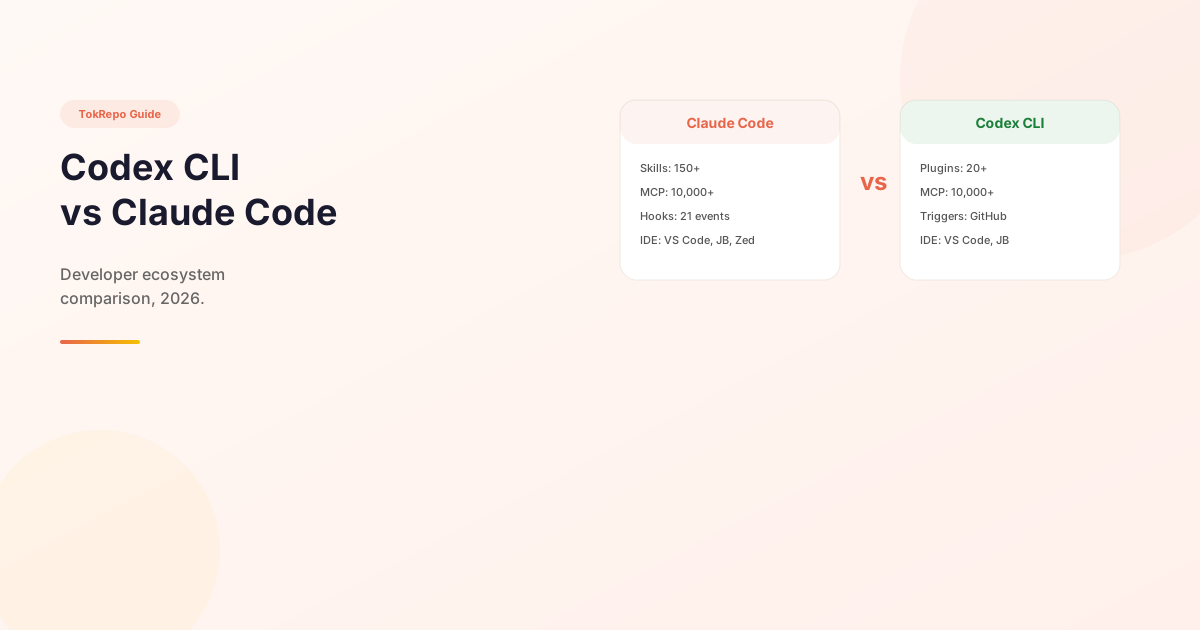
Claude Code wins on skills marketplace (150+ curated Markdown skills), hooks system (21 lifecycle events with LLM-powered handlers), and IDE breadth (VS Code, JetBrains, Zed). Codex CLI wins on token efficiency (~4x fewer tokens for complex tasks), SaaS plugin integrations (Figma, Notion, Slack), and open-source licensing. Both share the same 10,000+ MCP server ecosystem, so the real differentiator is orchestration, not extensions.
Learn how to choose between Codex CLI and Claude Code based on their developer ecosystems — skills marketplace, MCP server support, hooks system, plugin architecture, and IDE integrations. This guide compares extensibility, not just code quality.
Prerequisites
- Basic familiarity with AI coding assistants
- Understanding of what MCP (Model Context Protocol) servers do
- Optional: experience with either Claude Code or Codex CLI
Why Compare Ecosystems, Not Just Code Quality?
Most Codex CLI vs Claude Code comparisons focus on benchmark scores and pricing. But for professional developers, the real question is: which tool fits better into my existing workflow?
The answer depends on ecosystems — skills, plugins, hooks, MCP servers, and IDE integrations. A tool that scores 3% higher on SWE-bench but lacks the integrations you need is the wrong choice.
Head-to-Head Comparison
Skills & Plugins
| Feature | Claude Code | Codex CLI |
|---|---|---|
| Skills count | 150+ curated + marketplace | 20+ plugins (launched March 2026) |
| Skill format | Markdown (SKILL.md) — no code required | Plugin packages |
| Marketplace | Public marketplace + GitHub-based distribution | No public marketplace yet |
| Plugin system | 11 domain plugins (sales, legal, finance, marketing, etc.) | 20+ plugins (Figma, Notion, Gmail, Slack, etc.) |
| Skill creation | Write a markdown file, drop in .claude/skills/ | Build a package, publish to registry |
Claude Code's skill system has a clear advantage in accessibility — any developer can write a markdown file and have a working skill in minutes. Browse 500+ skills on TokRepo to see the variety.
Codex CLI's plugin system is newer but focuses on SaaS integrations — connecting to Figma, Notion, and Slack directly. This is a different value proposition.
# Claude Code: Install a skill in 10 seconds
mkdir -p .claude/skills
curl -o .claude/skills/code-reviewer.md https://tokrepo.com/raw/skill-id

# Codex CLI: Install a plugin
codex plugin install figma-connector
MCP Server Support
Both tools have full MCP support, accessing the same ecosystem of 10,000+ servers.
| Feature | Claude Code | Codex CLI |
|---|---|---|
| MCP support | Native (Anthropic created MCP) | Full support (adopted standard) |
| Config format | .mcp.json (JSON) | config.toml (TOML) |
| Server count | 10,000+ ecosystem-wide | 10,000+ (same ecosystem) |
| Install command | claude mcp add <name> | codex mcp add <name> |
// Claude Code .mcp.json
{
  "mcpServers": {
    "github": {
      "command": "npx",
      "args": ["-y", "@modelcontextprotocol/server-github"]
    }
  }
}
# Codex CLI config.toml
[mcp.github]
command = "npx"
args = ["-y", "@modelcontextprotocol/server-github"]
Browse MCP server configs on TokRepo — most configs work with both tools.
Hooks & Lifecycle Events
This is where Claude Code has a unique architectural advantage.
| Feature | Claude Code | Codex CLI |
|---|---|---|
| Lifecycle events | 21 events | GitHub Triggers only |
| Handler types | 4 (command, prompt, agent, inline) | Shell commands |
| Can block execution | Yes (PreToolUse) | No |
| LLM-based hooks | Yes (prompt/agent handlers) | No |
Claude Code's hook system lets you run LLM-powered automation on lifecycle events — for example, a PreToolUse hook that uses AI to evaluate whether a file edit is safe before allowing it. No other CLI tool offers this.
// Claude Code: Hook that blocks dangerous file edits
{
  "hooks": {
    "PreToolUse": [{
      "matcher": "Edit",
      "handler": {
        "type": "prompt",
        "prompt": "Is this edit safe? Check for credential exposure."
      }
    }]
  }
}
Codex CLI's Triggers system is different — it responds to GitHub events (issue opened → auto-fix → auto-PR), which is powerful for CI/CD but not for real-time development guardrails.
IDE Integrations
| IDE | Claude Code | Codex CLI |
|---|---|---|
| VS Code | Native extension with chat panel | Official extension with cloud delegation |
| JetBrains | Plugin (IntelliJ, PyCharm, WebStorm) | Native AI chat integration |
| Terminal | Primary interface | Primary interface |
| Cursor | Compatible via MCP | Compatible via plugin |
| Zed | Official ACP agent | Not available |
Both tools have strong IDE support. Claude Code has an edge with Zed integration; Codex CLI has an edge with deeper JetBrains native integration.
Pricing & Token Efficiency
| Plan | Claude Code | Codex CLI |
|---|---|---|
| Entry | $20/mo (Pro) | $20/mo (Plus) |
| Heavy use | $100-200/mo (Max) | $200/mo (Pro) |
| API input | $3/MTok (Sonnet 4.6) | $1.50/MTok (codex-mini) |
| API output | $15/MTok (Sonnet 4.6) | $6/MTok (codex-mini) |
| Context window | Up to 1M tokens | 256K-1M tokens |
Benchmark Performance
| Benchmark | Claude Code | Codex CLI |
|---|---|---|
| SWE-bench Verified | 80.8% (Opus 4.6) | 77.3% (Terminal-Bench) |
| Real-world coding | Strong at complex multi-file refactors | Strong at rapid iteration |
Also Consider: Cursor & Gemini CLI
Cursor (96.6K stars) takes a GUI-first approach with its own MCP marketplace (4,133+ verified servers). At $20/mo it's the most accessible option, but it's an IDE, not a CLI tool. Browse Cursor-compatible prompts on TokRepo.
Gemini CLI (96.6K stars) is fully open source (Apache 2.0) with a generous free tier (1,000 req/day). It has the largest context window (1M tokens) and built-in Google Search grounding, but no plugin or skill marketplace — it relies entirely on MCP and subagents.
Which Should You Choose?
Choose Claude Code if:
- You want the largest skill/plugin ecosystem today
- You need advanced hooks with LLM-based automation
- You work across VS Code, JetBrains, and Zed
- You value community-created, markdown-based extensibility
Choose Codex CLI if:
- You need SaaS integrations (Figma, Notion, Slack)
- Token cost efficiency is a priority
- You prefer open-source tools (Apache 2.0)
- You want GitHub Triggers for automated PR workflows
Choose Gemini CLI if:
- You want a free, open-source option
- You primarily work in terminal
- You don't need a plugin marketplace
FAQ
Q: Can I use both Claude Code and Codex CLI together?
A: Yes. OpenAI published a Claude Code plugin for Codex CLI (codex-plugin-cc), enabling cross-tool workflows. Both tools can also share MCP server configurations.
Q: Which tool has better MCP support? A: Both have full MCP support accessing the same 10,000+ server ecosystem. Claude Code has a slight edge as the protocol's creator, but in practice the experience is equivalent.
Q: Is Claude Code or Codex CLI better for beginners? A: Both have similar learning curves. Claude Code's markdown-based skills are easier to create and customize. Codex CLI's open-source nature means more community tutorials and forks to learn from.
Next Steps
- Browse 500+ Claude Code skills on TokRepo — install with one command
- Best MCP Servers for 2026 — works with both tools
- How to Create Your First Agent Skill — build a skill in 5 minutes
- Skills vs MCP vs Rules — understand the three extension models
Frequently Asked Questions
What's the difference between Codex CLI and Claude Code?+
Claude Code offers Markdown-based skills, 21 lifecycle hooks with LLM handlers, and broader IDE support (including Zed). Codex CLI offers deeper SaaS plugin integrations (Figma, Notion, Slack), ~4x better token efficiency, and fully open-source licensing. Both support the same 10,000+ MCP server ecosystem.
Can I use Claude Code and Codex CLI together?+
Yes. OpenAI published a Claude Code plugin for Codex CLI (codex-plugin-cc), enabling cross-tool workflows. Both tools can also share MCP server configurations — Claude Code uses .mcp.json (JSON) and Codex CLI uses config.toml (TOML), but the underlying server commands are identical.
Which tool is more token-efficient?+
Codex CLI uses roughly 4x fewer tokens for equivalent complex tasks (benchmarks show 1.5M vs 6.2M tokens on a Figma-to-code task). At scale this significantly impacts API costs. Claude Code has a larger context window option (up to 1M) and better long-horizon reasoning.
Which has better hooks and lifecycle events?+
Claude Code has a unique advantage with 21 lifecycle events and LLM-powered hook handlers — you can run a PreToolUse hook that uses AI to evaluate whether a file edit is safe. Codex CLI's Triggers system only responds to GitHub events (issue opened → auto-PR), which is powerful for CI/CD but not real-time development guardrails.
Which AI coding tool should a beginner choose?+
Claude Code for easier skill creation — you write a Markdown file and drop it into .claude/skills/. Codex CLI for open-source transparency and community tutorials. Both have similar learning curves, and at $20/month entry pricing the cost is identical.