%20by%20%E2%80%9ELisa%20Wischofsky%E2%80%9D%2C%20licensed%20under%20%E2%80%9ECC0%201.0%E2%80%9D%20(https%3A%2F%2Fcreativecommons.org%2Fpublicdomain%2Fzero%2F1.0%2F)%3C%2Fdc%3Arights%3E%3C%2Frdf%3ADescription%3E%3C%2Frdf%3ARDF%3E%3C%2Fmetadata%3E%3Cmask%20id%3D%22viewboxMask%22%3E%3Crect%20width%3D%22980%22%20height%3D%22980%22%20rx%3D%22490%22%20ry%3D%22490%22%20x%3D%220%22%20y%3D%220%22%20fill%3D%22%23fff%22%20%2F%3E%3C%2Fmask%3E%3Cg%20mask%3D%22url(%23viewboxMask)%22%3E%3Crect%20fill%3D%22url(%23backgroundLinear)%22%20width%3D%22980%22%20height%3D%22980%22%20x%3D%220%22%20y%3D%220%22%20%2F%3E%3Cdefs%3E%3ClinearGradient%20id%3D%22backgroundLinear%22%20gradientTransform%3D%22rotate(180%200.5%200.5)%22%3E%3Cstop%20stop-color%3D%22%23FFEDD5%22%2F%3E%3Cstop%20offset%3D%221%22%20stop-color%3D%22%23FED7AA%22%2F%3E%3C%2FlinearGradient%3E%3C%2Fdefs%3E%3Cg%20transform%3D%22translate(10%20-60)%22%3E%3Cpath%20fill-rule%3D%22evenodd%22%20clip-rule%3D%22evenodd%22%20d%3D%22M427%20120c21%203%2042%209%2058%2023%2011%208%2023%2020%2027%2034%201-10%200-20-2-30-2-8-7-13-13-19%201-3%205-2%207-1%2012%206%2020%2018%2024%2030%203%2010%203%2020%200%2029-3%2013-11%2022-21%2031a391%20391%200%200%201%20212%2079l25%2025c10%2014%2018%2029%2020%2046%202%2018%202%2037-4%2055-2%207-5%2014-10%2019l-3-1c7%2022%2010%2045%2013%2067a1185%201185%200%200%201%206%2077c-1%2022-4%2045-10%2067-4%2012-10%2024-17%2035l-5%204-1-7-6-31c-4%209-10%2018-17%2026-5%206-11%2010-18%2014l-3%203-9%206c-16%209-33%2016-50%2021a569%20569%200%200%201-207%2015v-1h-8c-19-3-38-8-55-15l-5-2-6-3c-6%206-11%2012-15%2019s-6%2016-7%2024c0%209%202%2018%205%2026v1l1%201c0%201%201%203-1%203-5-2-10-8-13-13-6-8-9-19-8-29%202-16%2010-30%2022-41l-11-7v1l-1%2014-2%203-1%201-14-13c-18-19-33-41-43-65l-6-10-3-4a296%20296%200%200%201-11-298c-8-11-11-25-11-39a115%20115%200%200%201%2063-106c6-4%2014-6%2021-7l1-1h4l4-7%202-4c11-17%2028-31%2047-39%2017-7%2036-8%2055-6Zm-6%2015c21%202%2042%209%2058%2023%208%206%2014%2014%2018%2023a89%2089%200%200%200-36-25c-17-7-36-11-54-12a118%20118%200%200%200-51%206c19-12%2042-17%2065-15Zm316%20243-1-1c0%208%200%2016-2%2024l2%206v2c5%2010%209%2020%2011%2031%202-3%201-6%201-10v-3a171%20171%200%200%200-11-49Z%22%20fill%3D%22%23000000%22%2F%3E%3Cpath%20d%3D%22M528%20244c41%206%2080%2022%20113%2047%2028%2021%2050%2049%2065%2081%2013%2028%2020%2060%2019%2091-1%2015-3%2030-8%2044h-2l1-21c1-30-2-59-13-87-10-30-28-57-50-79-42-40-98-62-156-63a243%20243%200%200%200-196%2094%20207%20207%200%200%200-40%20139l2%2025c8%200%2019%200%2025%207l-3%203-17%201c-12%201-24%205-33%2013a64%2064%200%200%200-17%2039c-5%2032%2012%2065%2039%2083%2016%2010%2036%2015%2055%209%204-2%209-5%2014-3%203%201%204%204%205%207a251%20251%200%200%200%2090%20100c8%207%2018%2013%2028%2018%2018%208%2038%2014%2057%2019l32%208c5%201%209%201%2013%203l-4%201c-25%202-48-3-72-10-12-3-23-7-34-12a306%20306%200%200%201-84-63l2%2028c1%2017%200%2035-6%2052-4%2012-11%2024-19%2034-10%2010-22%2019-34%2026-10%207-21%2014-32%2018l-16%205%209-9%2031-20%2022-17a95%2095%200%200%200%2032-56c2-14%202-28%202-43v-27c-10-14-22-29-27-46-17%208-38%207-55-1-17-7-32-19-43-33-12-17-19-36-21-56s2-40%2015-56c9-10%2022-18%2035-21-4-14-6-29-6-44a234%20234%200%200%201%2083-173%20249%20249%200%200%201%20199-55Z%22%20fill%3D%22%23000%22%2F%3E%3Cpath%20d%3D%22M653%20320c22%2022%2040%2049%2050%2079%2011%2028%2014%2057%2013%2087l-1%2021-5%2015-2%2013%202%2056c0%2021%201%2042-1%2063l-3%2047c-2%2016-7%2031-14%2045-11%2018-26%2033-44%2044-13%208-27%2012-41%2016l-38%2011-17%203c0%201%201%202%203%202%208%205%2017%205%2026%204-3%207-4%2014-2%2022%203%207%2011%2011%2017%2014%2012%206%2024%207%2036%209%207%206%2014%2014%2016%2024%202%208%202%2016-2%2023-5%2010-14%2018-24%2023-13%208-27%2014-42%2018a468%20468%200%200%201-222-1c-17-4-33-9-48-17-12-6-23-13-32-22-5-7-9-14-10-23%2011-4%2022-11%2032-18%2012-7%2024-16%2034-26%208-10%2015-22%2019-34%206-17%207-35%206-52l-2-28%2022%2023c19%2015%2040%2030%2062%2040%2011%205%2022%209%2034%2012%2024%207%2047%2012%2072%2010l4-1c-4-2-8-2-13-3l-32-8c-19-5-39-11-57-19l-29-17c-11-9-23-17-33-27a251%20251%200%200%201-56-74c-1-3-2-6-5-7-5-2-10%201-14%203-19%206-39%201-55-9a88%2088%200%200%201-39-83c1-14%207-28%2017-39%209-8%2021-12%2033-13l17-1%203-3c-6-7-17-7-25-7l-2-25a207%20207%200%200%201%2040-139%20243%20243%200%200%201%20196-94c58%201%20114%2023%20156%2063Z%22%20fill%3D%22%23ffffff%22%2F%3E%3Cpath%20d%3D%22M710%20522c3%200%203%204%204%206%203%2011%204%2023%205%2034l2%2021c1%2022%202%2043%201%2065-1%2021-1%2044-5%2065a136%20136%200%200%201-80%2099c-15%207-31%2011-48%2013v15c1%203%203%204%205%206%2012%206%2023%208%2036%2011%2012%203%2024%205%2036%2011-3%203-7%204-11%204-7%201-15-1-23-1-12-2-24-3-36-9-6-3-14-7-17-14-2-8-1-15%202-22-9%201-18%201-26-4-2%200-3-1-3-2l17-3%2038-11c14-4%2028-8%2041-16%2018-11%2033-26%2044-44%207-14%2012-29%2014-45l3-47c2-21%201-42%201-63l-2-56%202-13ZM252%20549c8%200%2017%201%2023%207%205%204%2010%209%2012%2015%201%203%200%206-2%208l-13%208c-7%206-7%2019%200%2025%206%205%2014%208%2021%2011%202%200%205%201%206%203-1%202-3%203-5%203-10%200-20-3-28-9-5-3-8-8-9-13-2-8-2-17%204-24%204-6%2011-9%2018-12-4-5-7-11-14-13-7-3-15-3-22-5l9-4Z%22%20fill%3D%22%23000%22%2F%3E%3Cpath%20d%3D%22M642%20509c6-1%2010%202%2013%207%203%207%203%2017-1%2024-3%205-10%208-16%205-5-3-6-8-7-13-1-4%200-10%202-14s5-8%209-9ZM494%20514c6-3%2011-1%2015%203%205%206%206%2015%202%2022-2%205-8%2011-14%2011-5%200-9-4-12-8-3-7-2-14%201-21%202-3%205-6%208-7Z%22%20fill%3D%22%23000000%22%2F%3E%3Cpath%20d%3D%22M480%20404c10%201%2019%200%2029%203%209%203%2018%2010%2022%2019%204%206%202%2016-6%2019-6%204-15%203-23%202-20-3-40-9-60-14l-20-4-10-2-4-4c2-4%206-6%2010-7l20-7%2018-3%2024-2ZM656%20410c8%201%2015%204%2022%207l9%204c2%202%203%206%201%208l-10%204c-17%204-33%2011-51%2012l-9%201c-3%200-6-2-8-4-3-2-4-5-4-9%200-7%202-15%208-20%204-3%2011-4%2016-5%208%200%2017%200%2026%202Z%22%20fill%3D%22%23000000%22%2F%3E%3Cpath%20d%3D%22M293%20643c3-2%207-1%209%201%203%202%204%206%203%2010-2%204-7%207-12%205-3-1-5-5-4-8%200-4%201-7%204-8Z%22%20fill%3D%22%23000000%22%2F%3E%3Cpath%20d%3D%22M609%20602c1%209-4%2016-9%2023-4%203-9%206-15%206s-13-3-19-5c-4-2-8-3-11-6l5-4c9-1%2017%203%2025%204%204%200%207-3%209-6%205-5%209-10%2015-12Z%22%20fill%3D%22%23000000%22%2F%3E%3Cpath%20d%3D%22M587%20747c7-1%2014%200%2020%202-3%203-9%204-13%205l-43%2011c-2%201-5%202-6%200-1-3%201-5%203-6%205-4%2012-7%2019-8l20-4Z%22%20fill%3D%22%23000000%22%2F%3E%3Cpath%20d%3D%22M492%20216c35%200%2070%207%20103%2017%2023%206%2045%2014%2066%2024%2023%2012%2045%2025%2063%2044%2015%2013%2027%2028%2035%2046%203%208%205%2017%206%2026%201%2013%200%2026-2%2039-2%2010-6%2022-13%2030l-2-6c0-20-5-40-12-59%201%2019-3%2040-15%2055-4%204-8%205-12%207s-9%202-13%202c-7-1-15-4-22-7-2-2-5-3-6-6-4-13-5-27-9-40l-6-17c-2%2010-4%2019-8%2028-3%2011-8%2021-15%2030l-8%207-3-14-4-17c-5-21-14-42-26-61v29c-2%2016-3%2031-10%2045-3%207-4%2014-10%2018-8%204-18%205-27%205-13%200-28%202-41-1-6-2-8-7-11-12l-14-31-11-20c-2%2022-2%2043-1%2064-1%202%200%204-2%205-1%202-3%201-5%200-9-4-16-11-23-18-9-12-19-24-25-37l2%2017c3%2012%207%2024%2012%2035l2%208-5-2c-7-5-12-12-17-19-7-12-11-27-12-41-5%2019-7%2039-8%2059l-2%2010c-1%203-3%204-6%205l-33%205h-11a670%20670%200%200%200%2013%20152l15%2061c1%203%200%205-2%207-15-8-26-23-36-38v63l-3%206a245%20245%200%200%201-64-94l-6-16a397%20397%200%200%201-27-151c1-40%209-80%2026-116a217%20217%200%200%201%2076-91l31-17c11-4%2022-9%2034-10%2010-1%2021-3%2031%200%204%201%208-1%2012-2%2020-4%2041-6%2061-6Z%22%20fill%3D%22%23000000%22%2F%3E%3C%2Fg%3E%3Cg%20transform%3D%22translate(10%20-60)%22%3E%3C%2Fg%3E%3C%2Fg%3E%3C%2Fsvg%3E)
Introduction
Mysti is an open-source coding workspace (Apache-2.0) that brings several coding agents together inside VS Code. Instead of juggling separate terminals, you address agents in one conversation with explicit tags such as @claude and @codex, see separately attributed answers, chain work with then, and keep drafts, context and permissions in one place. It also ships a Mysti coordinator backed by a DeepMyst account, plus Brainstorm discussion strategies and Proactive context gathering.
The README describes the 2.0.0 pre-release checkout, i.e. a beta. 2.0 introduces parallel opinions, cross-agent handoffs, connected tools and Proactive context on top of the single-agent experience.
What you can do
| Need | How Mysti addresses it |
|---|---|
| A direct answer or implementation | Pick a provider, or tag @claude / @codex |
| Independent perspectives | @claude @codex with a question or review request; read-only assignments run concurrently and stay separately attributed |
| An ordered handoff | @claude Write the parser, then @codex review it — the reviewer receives the completed result; a failed dependency blocks the dependent step |
| A defined perspective | Catalog roles such as @claude:critic or @codex:reviewer |
| A structured discussion | Brainstorm strategies: Quick, Debate, Red Team, Perspectives, Delphi |
| A coordinating agent | The Mysti coordinator, with optional configured local execution and delegation behind permission gates |
| Visual iteration | Canvas and Visual Test; browser setup may be required |
| Reusable project practices | Personas, skills and roles |
Concurrency follows the work: independent advisory requests may overlap, while writers sharing a workspace run serially. Model, effort and Ultracode controls are shown where the selected provider supports them.
Contributor build commands
The README lists these commands for working on Mysti itself:
npm ci
npm run typecheck
npm test
npm run watch
Use the Node version in .nvmrc; press F5 to launch the extension development host. See CONTRIBUTING.md for provider contracts, browser tests and contribution expectations.
Prerequisites
- VS Code 1.86 or newer on Windows, macOS or Linux.
- A trusted local workspace to open.
- At least one configured agent. Provider families listed by the README:
| Provider family | Available adapters |
|---|---|
| Coding agents | Claude Code, OpenAI Codex, Google Gemini CLI, GitHub Copilot CLI, Cline, Cursor |
| Additional coding tools | OpenClaw, OpenCode, Qwen Code, Hermes, Continue, Kimi Code |
| Local / API endpoints | Ollama, LocalAI, OpenRouter, MiniMax |
| Mysti coordinator | DeepMyst account, with optional configured local execution and delegation |
- For the coordinator, connected tools and cloud responsibilities: a DeepMyst account.
- For the contributor workflow: Node (version pinned in
.nvmrc), npm, and optionally a browser for Visual Test.
Permissions, data flow and limitations
- Credentials are separate. Mysti itself uses your DeepMyst account; CLI agents use their own credentials. Provider subscriptions, API access and usage charges vary by provider.
- Prompt transmission. Provider requests transmit the prompt and supplied context to the configured provider. DeepMyst features use your connected account.
- Tool connections are opt-in and scoped. Connected apps and MCP servers go through DeepMyst's Composio and Smithery catalogs; browse and authorize in DeepMyst, then manage connections from Mysti. Catalog availability and tool permissions depend on the service and your account. Local CLI access is opt-in for supported adapters. A connected app is not automatically a Proactive monitoring source.
- Proactive limits. Cloud monitoring requires DeepMyst sign-in, a supported connection and an explicitly configured responsibility. Coverage is bounded, and evidence does not prove who owns a task. Local Git watches need the editor running.
- Checkpoints are local. A checkpoint cannot undo an external action.
- Capability variance. Model availability, effort, Ultracode, attachments, native approvals and authentication are provider-specific. An adapter being included is not a claim that every provider/version/account combination has been live-tested.
- Beta status. 2.0 is a pre-release package; the Marketplace badge shows the currently published version. Review the release notes for migration and known limitations before adopting it for important work.
- Telemetry follows VS Code's telemetry setting; see
.github/SECURITY.mdfor the security policy. - The demo recordings in the README use shipped webviews with deterministic sample responses; they are not live provider runs or performance benchmarks.
FAQ
Do I need all 16 provider adapters configured? No. The README states you only need one configured agent to begin; more agents enable parallel opinions, handoffs and Brainstorm.
What is the difference between a second opinion and Brainstorm? A second opinion resends the original question to another configured agent so you can compare separately attributed answers. Brainstorm pairs two configured agents with a discussion strategy (Quick, Debate, Red Team, Perspectives, Delphi) and keeps individual reasoning visible alongside the synthesis.
What happens if one agent in a workflow fails? A failed participant stays visible; Mysti does not invent its answer or ask another agent to impersonate it, and a failed dependency blocks its dependent step.
Do agents run in parallel? Independent read-only assignments run concurrently within the configured limit; work that may edit a shared workspace runs serially.
Are the GIFs and video in the README live agent runs? No. They use shipped webviews with deterministic sample responses to demonstrate interaction and presentation, not live provider runs or benchmarks.
Complete upstream material
Install Mysti · Get started · 2.0 BETA release notes · Contribute

Mysti 2.0 BETA
An open-source coding workspace that brings your agents together inside VS Code.
Ask Claude Code and Codex for independent opinions. Give a specialist a specific task. Hand completed work to another agent for review. Keep their responses, context, permissions, and progress in one conversation.
Mysti connects the coding tools you choose—CLI agents, local model servers, and the DeepMyst-powered Mysti coordinator. Use one agent when that's enough; bring in more when another perspective helps.



2.0 is a beta. This checkout prepares the 2.0.0 pre-release package. The Marketplace badge shows the currently published version. See release status and limitations before adopting it for important work.
16 provider adapters + the Mysti coordinator · Parallel opinions · Cross-agent handoffs · Connected tools · Proactive context
See it work
The recordings below use the shipped webviews with deterministic sample responses. They demonstrate interaction and presentation; they are not live provider runs or performance benchmarks. Capture details and video downloads.
Get a second opinion without rewriting the question
An answer is a starting point. On answers with a usage or session receipt, click Second opinion, choose another configured agent, and Mysti sends it the original question. Compare separately attributed answers in the same conversation; use Brainstorm when you want a discussion and synthesis.

Ask two agents. Hear from both.
@claude @codex What are your opinions on adding a cache to this API?Explicit tags determine who does the work. Independent read-only assignments run concurrently within the configured limit. Each agent has its own live card and attributed answer—even if one of them is already your selected provider.

A failed participant stays visible. Mysti does not invent its answer or quietly ask the other agent to impersonate it.
Turn tags into a workflow
@claude Design a retry policy, then @codex review it for edge casesUse then to make the next assignment depend on the previous result. Claude designs the policy; Codex receives that result to review. Progress cards show the current step and who runs next. A failed dependency blocks its dependent step.

Add roles such as @claude:critic or @codex:reviewer to make the perspective explicit. Independent advisory work can run in parallel; work that may edit a shared workspace runs serially. Assignment and workflow guide.
Switch agents without losing your draft
Choose from 16 registered provider adapters, plus the Mysti coordinator. Move between coding CLIs, local model servers, and API providers from the composer. Your draft stays in place, and model controls follow the selected provider's capabilities.

See all providers and setup requirements.
Keep model choices close to your work
Choose the model, adjust effort, and toggle Ultracode where the provider supports it. The model menu and action menu share the same settings. Dictation adds text to your draft for review before you send.

Bring your tools into the conversation
Connect apps and MCP servers through DeepMyst's Composio and Smithery catalogs. Bring code, team discussions, email, and calendar context within reach of your agents through the tools you authorize. Browse and authorize in DeepMyst, then manage connections from Mysti.
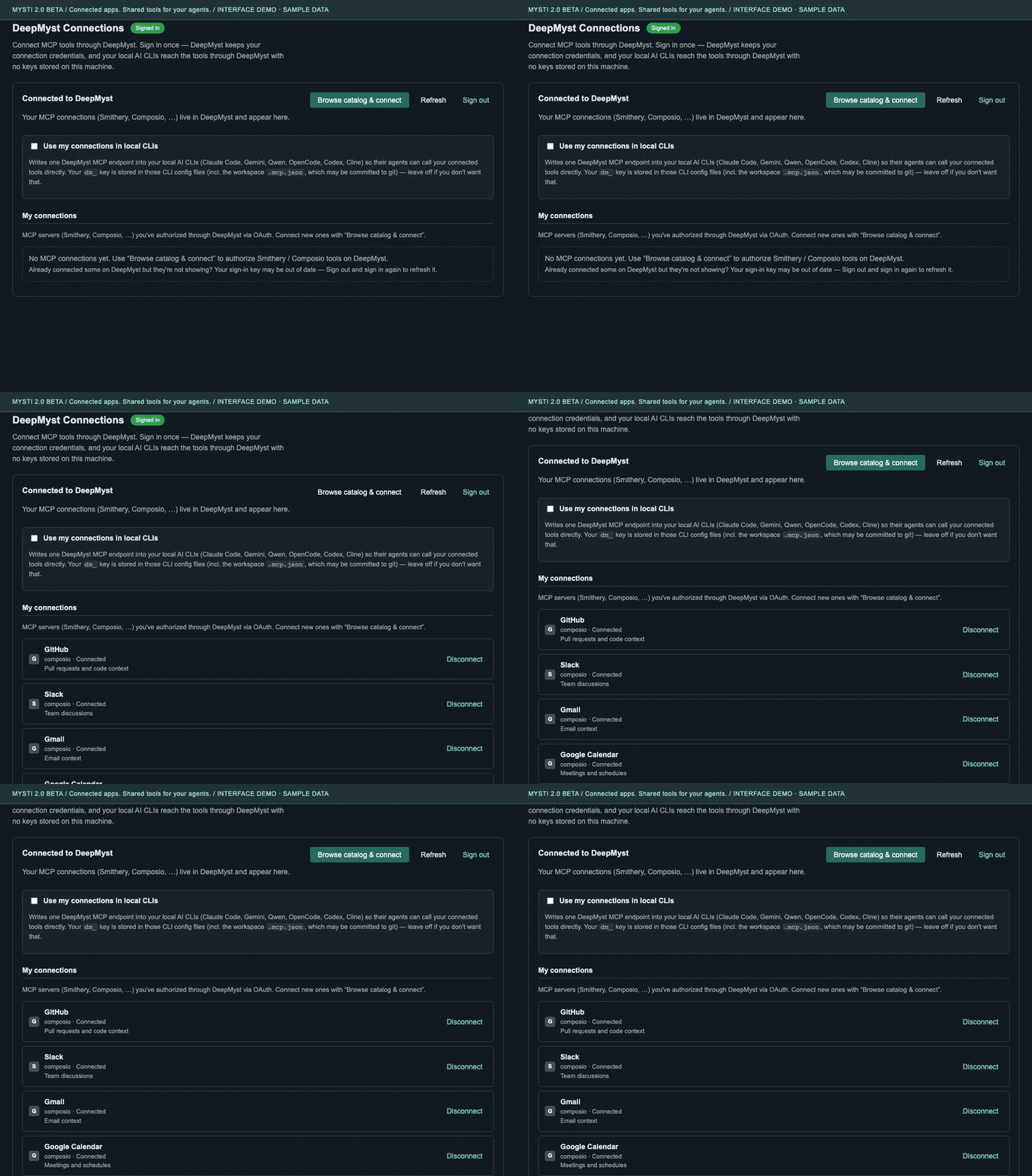
The recording shows sample authorized connections, not a live OAuth flow. Catalog availability and tool permissions depend on the service and your account; local CLI access is opt-in for supported adapters. A connected app is not automatically a Proactive monitoring source.
Get context before you start
Proactive brings selected local Git changes and DeepMyst-connected GitHub/Slack evidence into an inbox. The Before you start view helps you inspect relevant evidence for a responsibility, including source links and freshness information.
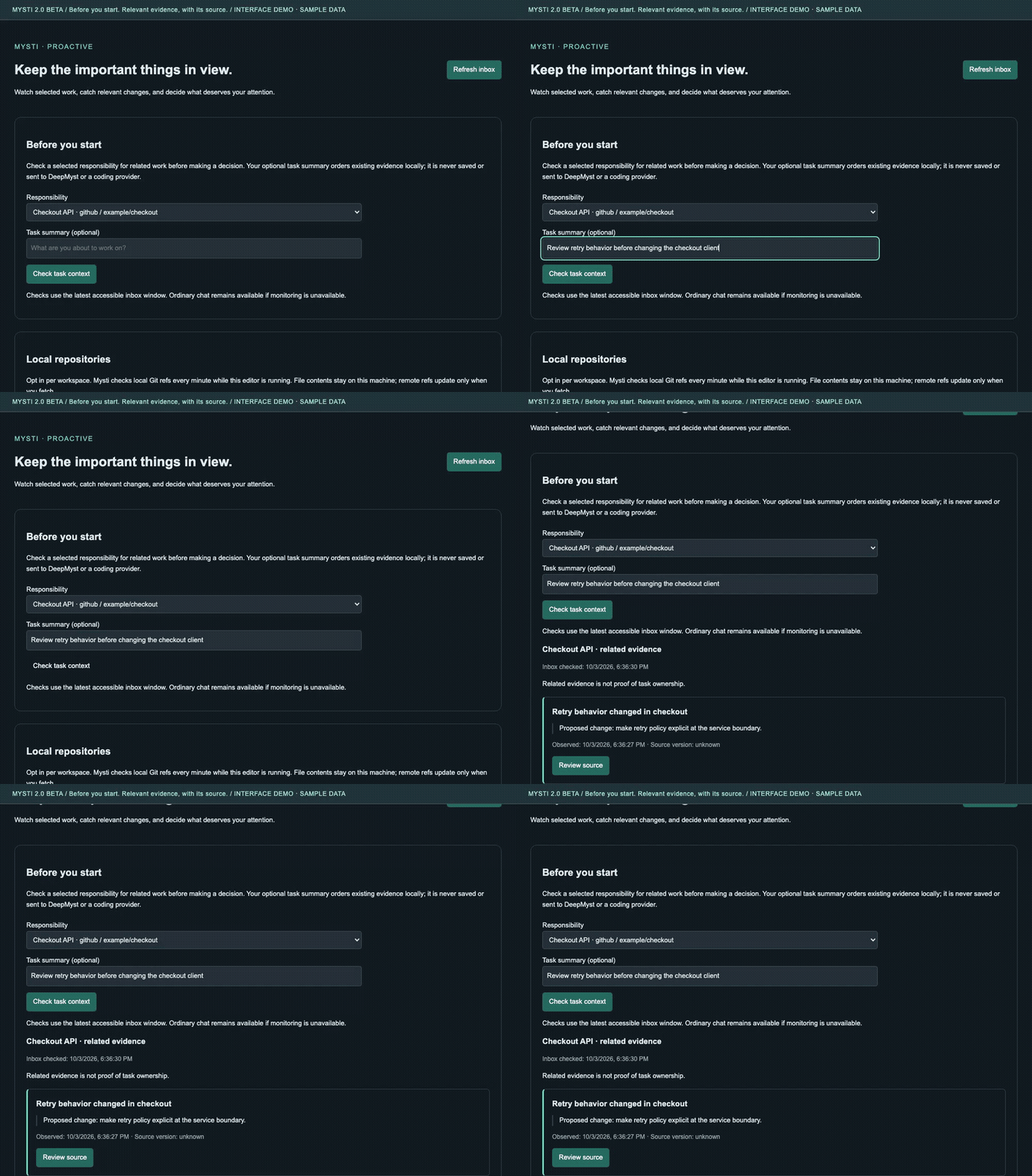
Cloud monitoring requires DeepMyst sign-in, a supported connection, and an explicitly configured responsibility. Coverage is bounded; evidence does not prove who owns a task. Proactive setup and limits.
Work through a decision with Brainstorm
Choose two configured agents and a discussion strategy. Quick collects independent analyses and synthesizes a response; Debate, Red Team, Perspectives and Delphi provide other ways to examine a proposal. Keep the individual reasoning visible alongside the synthesis.

More ways to move the work forward
| Feature | Why it matters | Explore |
|---|---|---|
| Brainstorm | Let two agents analyze, debate or challenge a proposal, then synthesize a response. | Discussion strategies |
| Canvas + Visual Test | Iterate on visual artifacts and inspect a running app alongside the code. | Visual workflows |
| Personas, skills and roles | Reuse project guidance and specialist perspectives instead of repeating instructions. | Team practices |
| Checkpoints + visible approvals | Inspect requested actions and recover supported local changes as you iterate. Checkpoints do not undo external actions. | Access and lifecycle |
| Dictation + context tools | Speak a draft, mention files, or attach diagnostics and Git context before sending. | Composer and context |
One workspace, several ways to work
| When you need… | Use… | What happens |
|---|---|---|
| A direct answer or implementation | A selected provider, or @claude / @codex |
The named agent handles the request with your access settings. |
| Independent perspectives | @claude @codex with a question or review request |
Read-only assignments run concurrently; results remain separately attributed. |
| An ordered handoff | @claude Write the parser, then @codex review it |
The reviewer receives the completed result as reference material. A failed dependency blocks the handoff. |
| A defined perspective | @claude:critic @codex:reviewer |
Catalog roles shape each response and restrict its access. |
| A structured discussion | Brainstorm | Choose a team and discussion strategy, then follow its rounds and synthesis. |
| A coordinating agent | Mysti | A DeepMyst-backed coordinator can answer, use configured tools, and delegate through permission gates. |
| Visual iteration | Canvas and Visual Test | Work with visual artifacts and inspect a running app; browser setup may be required. |
| Project-specific practices | Personas, skills, and roles | Reuse your team's guidance with explicit trust and access boundaries. |

Parallelism follows the work: independent advisory requests may overlap; writers share a workspace and run serially. Use then for an explicit dependency. Assignment syntax and troubleshooting.
Get started
- Install Mysti from the VS Code Marketplace, or install the reviewed beta VSIX with Extensions → Install from VSIX. Choose the pre-release channel when 2.0 BETA is published.
- Open a trusted local workspace. Mysti supports VS Code 1.86 or newer on Windows, macOS, and Linux. Native voice support and provider CLIs have their own host requirements.
- Open Mysti and choose your agent. The setup screen checks installation and authentication and provides the supported install, upgrade, or sign-in action. Mysti itself uses your DeepMyst account; CLI agents use their own credentials.
- Start with a small task. Try
@claude Explain the main entry point, then add@codexfor a second opinion when both are configured.
You only need one configured agent to begin. Provider subscriptions, API access, usage charges, and supported models vary. Getting started · Provider setup.
Bring your preferred agents
| Provider family | Available adapters |
|---|---|
| Coding agents | Claude Code, OpenAI Codex, Google Gemini CLI, GitHub Copilot CLI, Cline, Cursor |
| Additional coding tools | OpenClaw, OpenCode, Qwen Code, Hermes, Continue, Kimi Code |
| Local / API endpoints | Ollama, LocalAI, OpenRouter, MiniMax |
| Mysti coordinator | DeepMyst account, with optional configured local execution and delegation |
The UI follows each adapter's capabilities. Model availability, effort, Ultracode, attachments, native approvals, and authentication are provider-specific. An adapter being included is not a claim that every provider/version/account combination has been live-tested. Compatibility and setup.
Your context and your controls
- Context where it belongs: mention workspace files, inspect diagnostics with
@problems, or add a Git summary with@git. - Visible authority: read-only and approval modes, agent-specific tool activity, and cancellation across active assignments.
- Continuity: conversation history, context compaction, and workspace checkpoints for supported local changes.
- Explicit connections: choose the DeepMyst tools and sources used by connected features. Cloud responsibilities continue on the backend; local Git watches need the editor running.
Provider requests transmit the prompt and supplied context to the configured provider. DeepMyst features use your connected account. Telemetry follows VS Code's telemetry setting; see the security policy and feature-specific guides. A local checkpoint cannot undo an external action.
Explore the documentation
| Guide | What it covers |
|---|---|
| Start here | Install, configure, send your first task, troubleshoot |
| Agent assignments | Tags, roles, parallel reviews, dependent handoffs |
| Providers | Installation, authentication, models, capability differences |
| Feature guide | Chat, menus, dictation, Canvas, permissions and more |
| Brainstorm | Team discussion and synthesis |
| Personas and skills | Reusable project practices |
| Proactive | Responsibilities, evidence, notification and coverage limits |
| Architecture | Host, webview, routing and provider boundaries |
| Release notes | What's new, migration, known limitations |
| Contributing | Development, meaningful tests, demos and release work |
Translations: العربية · 中文 · 日本語 · 한국어 · Español · Português · Deutsch · Français · Türkçe · Русский. Community translations may describe an earlier release; this README is the current 2.0 BETA reference.
Build with us
Mysti is Apache-2.0 licensed. Useful contributions include reproducible routing bugs, native-provider compatibility checks, accessible UI improvements, and tested documentation corrections.
npm ci
npm run typecheck
npm test
npm run watch
Use the Node version in .nvmrc; press F5 to launch the extension development host. See CONTRIBUTING.md for provider contracts, browser tests, and contribution expectations.
Report a bug · Discuss an idea · View the roadmap
Contributors
Thanks to everyone who has helped make Mysti better!


Want to join them? Check out the contribution guide section below.
License
Apache License 2.0. Built by DeepMyst and the Mysti community. Provider names and trademarks belong to their respective owners.
Source and license
Source · License · 0df2961a227d53308093894d586944e9f656a0a8
                             Apache License
                       Version 2.0, January 2004
                    http://www.apache.org/licenses/
TERMS AND CONDITIONS FOR USE, REPRODUCTION, AND DISTRIBUTION
Definitions.
"License" shall mean the terms and conditions for use, reproduction, and distribution as defined by Sections 1 through 9 of this document.
"Licensor" shall mean the copyright owner or entity authorized by the copyright owner that is granting the License.
"Legal Entity" shall mean the union of the acting entity and all other entities that control, are controlled by, or are under common control with that entity. For the purposes of this definition, "control" means (i) the power, direct or indirect, to cause the direction or management of such entity, whether by contract or otherwise, or (ii) ownership of fifty percent (50%) or more of the outstanding shares, or (iii) beneficial ownership of such entity.
"You" (or "Your") shall mean an individual or Legal Entity exercising permissions granted by this License.
"Source" form shall mean the preferred form for making modifications, including but not limited to software source code, documentation source, and configuration files.
"Object" form shall mean any form resulting from mechanical transformation or translation of a Source form, including but not limited to compiled object code, generated documentation, and conversions to other media types.
"Work" shall mean the work of authorship, whether in Source or Object form, made available under the License, as indicated by a copyright notice that is included in or attached to the work (an example is provided in the Appendix below).
"Derivative Works" shall mean any work, whether in Source or Object form, that is based on (or derived from) the Work and for which the editorial revisions, annotations, elaborations, or other modifications represent, as a whole, an original work of authorship. For the purposes of this License, Derivative Works shall not include works that remain separable from, or merely link (or bind by name) to the interfaces of, the Work and Derivative Works thereof.
"Contribution" shall mean any work of authorship, including the original version of the Work and any modifications or additions to that Work or Derivative Works thereof, that is intentionally submitted to the Licensor for inclusion in the Work by the copyright owner or by an individual or Legal Entity authorized to submit on behalf of the copyright owner. For the purposes of this definition, "submitted" means any form of electronic, verbal, or written communication sent to the Licensor or its representatives, including but not limited to communication on electronic mailing lists, source code control systems, and issue tracking systems that are managed by, or on behalf of, the Licensor for the purpose of discussing and improving the Work, but excluding communication that is conspicuously marked or otherwise designated in writing by the copyright owner as "Not a Contribution."
"Contributor" shall mean Licensor and any individual or Legal Entity on behalf of whom a Contribution has been received by the Licensor and subsequently incorporated within the Work.
Grant of Copyright License. Subject to the terms and conditions of this License, each Contributor hereby grants to You a perpetual, worldwide, non-exclusive, no-charge, royalty-free, irrevocable copyright license to reproduce, prepare Derivative Works of, publicly display, publicly perform, sublicense, and distribute the Work and such Derivative Works in Source or Object form.
Grant of Patent License. Subject to the terms and conditions of this License, each Contributor hereby grants to You a perpetual, worldwide, non-exclusive, no-charge, royalty-free, irrevocable (except as stated in this section) patent license to make, have made, use, offer to sell, sell, import, and otherwise transfer the Work, where such license applies only to those patent claims licensable by such Contributor that are necessarily infringed by their Contribution(s) alone or by combination of their Contribution(s) with the Work to which such Contribution(s) was submitted. If You institute patent litigation against any entity (including a cross-claim or counterclaim in a lawsuit) alleging that the Work or a Contribution incorporated within the Work constitutes direct or contributory patent infringement, then any patent licenses granted to You under this License for that Work shall terminate as of the date such litigation is filed.
Redistribution. You may reproduce and distribute copies of the Work or Derivative Works thereof in any medium, with or without modifications, and in Source or Object form, provided that You meet the following conditions:
(a) You must give any other recipients of the Work or Derivative Works a copy of this License; and (b) You must cause any modified files to carry prominent notices stating that You changed the files; and (c) You must retain, in the Source form of any Derivative Works that You distribute, all copyright, patent, trademark, and attribution notices from the Source form of the Work, excluding those notices that do not pertain to any part of the Derivative Works; and (d) If the Work includes a "NOTICE" text file as part of its distribution, then any Derivative Works that You distribute must include a readable copy of the attribution notices contained within such NOTICE file, excluding any notices that do not pertain to any part of the Derivative Works, in at least one of the following places: within a NOTICE text file distributed as part of the Derivative Works; within the Source form or documentation, if provided along with the Derivative Works; or, within a display generated by the Derivative Works, if and wherever such third-party notices normally appear. The contents of the NOTICE file are for informational purposes only and do not modify the License. You may add Your own attribution notices within Derivative Works that You distribute, alongside or as an addendum to the NOTICE text from the Work, provided that such additional attribution notices cannot be construed as modifying the License. You may add Your own copyright statement to Your modifications and may provide additional or different license terms and conditions for use, reproduction, or distribution of Your modifications, or for any such Derivative Works as a whole, provided Your use, reproduction, and distribution of the Work otherwise complies with the conditions stated in this License.
Submission of Contributions. Unless You explicitly state otherwise, any Contribution intentionally submitted for inclusion in the Work by You to the Licensor shall be under the terms and conditions of this License, without any additional terms or conditions. Notwithstanding the above, nothing herein shall supersede or modify the terms of any separate license agreement you may have executed with Licensor regarding such Contributions.
Trademarks. This License does not grant permission to use the trade names, trademarks, service marks, or product names of the Licensor, except as required for reasonable and customary use in describing the origin of the Work and reproducing the content of the NOTICE file.
Disclaimer of Warranty. Unless required by applicable law or agreed to in writing, Licensor provides the Work (and each Contributor provides its Contributions) on an "AS IS" BASIS, WITHOUT WARRANTIES OR CONDITIONS OF ANY KIND, either express or implied, including, without limitation, any warranties or conditions of TITLE, NON-INFRINGEMENT, MERCHANTABILITY, or FITNESS FOR A PARTICULAR PURPOSE. You are solely responsible for determining the appropriateness of using or redistributing the Work and assume any risks associated with Your exercise of permissions under this License.
Limitation of Liability. In no event and under no legal theory, whether in tort (including negligence), contract, or otherwise, unless required by applicable law (such as deliberate and grossly negligent acts) or agreed to in writing, shall any Contributor be liable to You for damages, including any direct, indirect, special, incidental, or consequential damages of any character arising as a result of this License or out of the use or inability to use the Work (including but not limited to damages for loss of goodwill, work stoppage, computer failure or malfunction, or any and all other commercial damages or losses), even if such Contributor has been advised of the possibility of such damages.
Accepting Warranty or Additional Liability. While redistributing the Work or Derivative Works thereof, You may choose to offer, and charge a fee for, acceptance of support, warranty, indemnity, or other liability obligations and/or rights consistent with this License. However, in accepting such obligations, You may act only on Your own behalf and on Your sole responsibility, not on behalf of any other Contributor, and only if You agree to indemnify, defend, and hold each Contributor harmless for any liability incurred by, or claims asserted against, such Contributor by reason of your accepting any such warranty or additional liability.
END OF TERMS AND CONDITIONS
Copyright 2025 DeepMyst Inc
Licensed under the Apache License, Version 2.0 (the "License"); you may not use this file except in compliance with the License. You may obtain a copy of the License at
http://www.apache.org/licenses/LICENSE-2.0Unless required by applicable law or agreed to in writing, software distributed under the License is distributed on an "AS IS" BASIS, WITHOUT WARRANTIES OR CONDITIONS OF ANY KIND, either express or implied. See the License for the specific language governing permissions and limitations under the License.