%20by%20%E2%80%9ELisa%20Wischofsky%E2%80%9D%2C%20licensed%20under%20%E2%80%9ECC0%201.0%E2%80%9D%20(https%3A%2F%2Fcreativecommons.org%2Fpublicdomain%2Fzero%2F1.0%2F)%3C%2Fdc%3Arights%3E%3C%2Frdf%3ADescription%3E%3C%2Frdf%3ARDF%3E%3C%2Fmetadata%3E%3Cmask%20id%3D%22viewboxMask%22%3E%3Crect%20width%3D%22980%22%20height%3D%22980%22%20rx%3D%22490%22%20ry%3D%22490%22%20x%3D%220%22%20y%3D%220%22%20fill%3D%22%23fff%22%20%2F%3E%3C%2Fmask%3E%3Cg%20mask%3D%22url(%23viewboxMask)%22%3E%3Crect%20fill%3D%22url(%23backgroundLinear)%22%20width%3D%22980%22%20height%3D%22980%22%20x%3D%220%22%20y%3D%220%22%20%2F%3E%3Cdefs%3E%3ClinearGradient%20id%3D%22backgroundLinear%22%20gradientTransform%3D%22rotate(85%200.5%200.5)%22%3E%3Cstop%20stop-color%3D%22%23FFD7BA%22%2F%3E%3Cstop%20offset%3D%221%22%20stop-color%3D%22%23FED7AA%22%2F%3E%3C%2FlinearGradient%3E%3C%2Fdefs%3E%3Cg%20transform%3D%22translate(10%20-60)%22%3E%3Cpath%20fill-rule%3D%22evenodd%22%20clip-rule%3D%22evenodd%22%20d%3D%22m555%20134-4-1-18%203a266%20266%200%200%200-97%2046c-12%208-23%2018-32%2029a121%20121%200%200%200-43-36l-17-9-7-2c-2%200-4%203-5%205%200%203%202%207%204%2010l4%206%208%2013%2012%2017%2011%2015a248%20248%200%200%200-21%209l-14%207-10%205c-10%204-20%2010-29%2015l-4%202-19%2012-3%203c-10%207-20%2013-28%2022-10%2010-19%2021-25%2034a203%20203%200%200%200-21%2076l-1%206-4%2038v75c0%2010%201%2020-1%2029l-8%2053c-6%2031-11%2062-13%2094a185%20185%200%200%200%2038%20138l11%208-3-6-4-5-8-18-2-3a291%20291%200%200%201-16-51%20206%20206%200%200%200%2052%2079c9%208%2019%2015%2031%2018%204%200%207%200%209-3v-8l-1-7-2-9c14%2011%2029%2018%2046%2021%2010%203%2021%202%2031%200l14-1%208-1%2049-4a1209%201209%200%200%201%20118-8c15%201%2030%204%2045%207h10l6-1c13-2%2025-5%2038-9a179%20179%200%200%200%2046-25%20164%20164%200%200%201-19%2044l-3%205c6%202%2011%204%2016%203%2014-2%2025-10%2036-18l6-3%205-2a134%20134%200%200%200%2059-55c12-22%2020-48%2021-74%200-23-3-45-10-67l-14-37-3-9a2009%202009%200%200%201-20-53%20455%20455%200%200%201-21-75v-1c3-16%205-33%205-50-1-16-6-31-12-46a276%20276%200%200%201%2042%2092%20241%20241%200%200%201%203%2074c0%205-1%2011%202%2015l4-5%204-9%202-7c11-25%2015-54%2013-82-2-35-14-70-33-100-20-34-47-62-78-86a353%20353%200%200%200-215-71l21-22v-1a140%20140%200%200%201%2041-34l13-7%206-6-2-1Zm215%20484-6-14%201%204c3%2020%207%2040%208%2061%202%2027%202%2054-2%2080-3%2021-8%2043-19%2062-5%2010-12%2019-19%2028a174%20174%200%200%200%2061-120c0-18-2-36-7-54l-17-47Z%22%20fill%3D%22%23000000%22%2F%3E%3Cpath%20d%3D%22M486%20236c57-2%20115%2018%20159%2056a209%20209%200%200%201%2073%20190c-1%204-1%208-4%2012l-1-3v-33a215%20215%200%200%200-172-206%20235%20235%200%200%200-270%20153c-12%2037-14%2078-6%20116%206-2%2012-2%2017-2%202%201%205%201%206%203s0%203-1%204l-12%204c-14%203-27%208-37%2018a63%2063%200%200%200-22%2045c0%2012%203%2024%208%2035%208%2013%2019%2024%2033%2031%2018%2010%2041%2013%2062%207%202-1%204-2%206-1s3%204%204%206l15%2030a215%20215%200%200%200%2072%2063c28%2015%2059%2021%2090%2026%203%201%208%201%2010%204%201%202%200%203-2%204l-11%201a231%20231%200%200%201-147-62c5%2018%208%2036%208%2054%200%2012-2%2023-6%2034-5%2010-11%2018-19%2026a196%20196%200%200%201-60%2043c-1-1%201-2%202-3l17-14c13-12%2025-23%2035-38a93%2093%200%200%200%2017-65l-4-39-2-10-12-17c-5-10-11-20-13-31a93%2093%200%200%201-96-31%2081%2081%200%200%201-19-51c0-12%203-23%208-34%209-16%2023-29%2040-36-8-31-8-62-3-93%208-40%2026-77%2051-108%2045-54%20115-87%20186-88Z%22%20fill%3D%22%23000%22%2F%3E%3Cpath%20d%3D%22M541%20252a214%20214%200%200%201%20172%20206v33c-1%205-2%2010-1%2015-2%202-3%203-3%205-3%2018-1%2037%201%2055%204%2029%206%2059%202%2088-3%2028-13%2056-30%2079-16%2021-38%2034-62%2043-15%206-30%209-45%2013-11%202-22%204-32%208%201%202%204%201%206%202%2012%201%2024-1%2036-2-5%208-8%2017-9%2026-2%2010%202%2019%209%2026%206%207%2015%2011%2024%2014%205%202%2011%203%2017%203%207%209%2013%2018%2014%2030%202%2012-1%2024-8%2034-9%2014-22%2023-37%2030-18%209-38%2015-57%2018a352%20352%200%200%201-192-23c-18-10-38-23-48-42-4-7-8-16-6-24%2018-10%2033-23%2047-38%208-8%2014-16%2019-26%204-11%206-22%206-34%200-18-3-36-8-54a235%20235%200%200%200%20147%2062l11-1c2-1%203-2%202-4-2-3-7-3-10-4-31-5-62-11-90-26-18-10-36-22-50-37-8-8-16-17-22-26l-15-30c-1-2-2-5-4-6s-4%200-6%201a82%2082%200%200%201-95-38c-5-11-8-23-8-35%201-17%209-34%2022-45%2010-10%2023-15%2037-18l12-4c1-1%202-2%201-4s-4-2-6-3c-5%200-11%200-17%202-8-38-6-79%206-116a236%20236%200%200%201%20270-153Z%22%20fill%3D%22%23ffffff%22%2F%3E%3Cpath%20d%3D%22m712%20506%203%203%201%2013%203%2045c3%2020%205%2040%205%2060%200%2016-1%2032-5%2047-6%2028-20%2056-40%2076a174%20174%200%200%201-88%2046c-1%209-4%2016-4%2025-1%206%202%2010%205%2015%208%208%2018%2014%2028%2019l18%209c-3%203-8%201-12%202-6%200-12-1-17-3-9-3-18-7-24-14-7-7-11-16-9-26%201-9%204-18%209-26-12%201-24%203-36%202-2-1-5%200-6-2%2010-4%2021-6%2032-8%2015-4%2030-7%2045-13%2024-9%2046-22%2062-43%2017-23%2027-51%2030-79%204-29%202-59-2-88-2-18-4-37-1-55%200-2%201-3%203-5ZM262%20566c6%200%2012%201%2015%206%202%203%202%207%201%2010-3%208-9%2014-11%2022-1%204%200%207%203%209%207%205%2016%207%2024%2010l-2%202h-11c-6-1-12-2-17-5-5-4-9-11-7-18%202-9%209-15%2012-23-7-4-14-2-20-8%203-4%208-6%2013-5Z%22%20fill%3D%22%23000%22%2F%3E%3Cpath%20d%3D%22M479%20474c8%203%2015%206%2019%2013h-5c-13-2-25-8-38-9-11-2-22-2-33%200%201-4%206-6%2010-7%2015-4%2032-3%2047%203ZM675%20476l1%201-18%202c-9%201-17%205-26%208l-6%203c0-3%203-5%205-7l15-8c9-4%2019-3%2029%201ZM680%20485c6%201%2012%203%2016%208%203%203%205%209%202%2013s-8%205-12%202c-3-3-3-6-3-9-8-5-16-4-25-1%202%202%205%203%206%206%204%205%204%2011%202%2017-5%208-15%2014-25%2013-7-2-12-8-13-15l-8%2010-4%205c-3-3-2-6-1-10%205-12%2015-21%2026-28%2011-8%2025-13%2039-11ZM446%20488c24%202%2047%2011%2066%2026%204%203%209%208%2010%2013%201%203-1%206-4%206l-6-5c-3-4-8-6-12-9%201%208%200%2015-5%2020-3%205-8%207-13%207-8%201-16-2-22-8-9-10-8-26%201-36-10-2-19-3-28-2-6%201-12%204-16%208-2%202-1%204-2%206-1%204-5%207-9%206-4%200-8-3-9-7-1-5%201-11%205-14%205-5%2013-7%2019-9%209-1%2017-3%2025-2Z%22%20fill%3D%22%23000000%22%2F%3E%3Cpath%20d%3D%22M479%20386c16%201%2033%207%2046%2017%203%203%207%205%208%209%201%202-1%205-3%204-8-1-15-5-23-7-7-3-15-5-23-5-7-1-15%200-22%201-15%202-30%209-43%2016l-21%209-1-1c1-4%203-9%206-12%206-10%2017-16%2027-21%2015-7%2032-11%2049-10ZM673%20390c5%202%2011%205%2015%2010%204%204%205%209%204%2015l-23-7c-7-2-13-1-20-2-7%200-15%201-21%205l-13%208h-3c-1-3%200-6%202-8%205-9%2013-15%2022-18%2012-4%2024-6%2037-3Z%22%20fill%3D%22%23000000%22%2F%3E%3Cpath%20d%3D%22M216%20569c5%200%2010-1%2014%202%203%202%205%205%204%209-2%204-6%207-11%207h-16c-5-1-9-3-11-7-1-4%202-7%205-9%205-2%2010-1%2015-2ZM229%20592c3%201%207%203%207%207%200%203-1%206-4%207-5%204-11%204-17%206-5%201-10%202-14-1s-3-9%200-12c4-4%208-4%2013-5s10-3%2015-2ZM301%20644h8c3%201%206%204%206%208%200%205-4%209-9%2010-5%202-9-2-11-6-1-5%201-11%206-12Z%22%20fill%3D%22%23000000%22%2F%3E%3Cpath%20d%3D%22M607%20606c0%203-2%206-4%209-4%206-11%2010-18%2012-5%201-9-2-13%200-4%200-8%201-12-1-2-1-2-4%200-6%203-4%208-7%2012-7%204-1%207-1%2010%202l1%207c5-2%207-5%2011-8l13-8Z%22%20fill%3D%22%23000000%22%2F%3E%3Cpath%20d%3D%22M632%20656c-5%205-12%209-18%2013-11%208-23%2015-36%2020-3%201-6%203-10%203l-17-2h-23l-23-2c-6%200-11-4-15-9l-13%201c-3-1-6-4-4-7s7-5%2010-7c5-1%2011-2%2016%201%203%202%204%206%206%208l5%201c15%201%2031%201%2046%204%205%201%2010%204%2015%202%205-1%2010-4%2014-6%2013-6%2025-13%2038-18%203-1%206-3%209-2Z%22%20fill%3D%22%23000000%22%2F%3E%3Cpath%20fill-rule%3D%22evenodd%22%20clip-rule%3D%22evenodd%22%20d%3D%22m550%20141%207-6c-5-3-10-2-15-1h-2c-25%206-49%2014-71%2026-25%2014-47%2030-65%2051a119%20119%200%200%200-40-34%20390%20390%200%200%201-22-12h-8c-2%202-2%205-1%207a36%2036%200%200%200%205%2011%20707%20707%200%200%201%2022%2031l11%2017h-2l-17%208-6%203-12%206-19%2010-11%206-23%2013-1%201-25%2017c-10%208-19%2018-26%2028-8%2013-10%2027-13%2041l-1%204-6%2045-3%2033-1%2020-2%2032-1%2021c0%2015-2%2030-3%2044a4695%204695%200%200%200-3%2044c0%2027%201%2054%206%2081%203%2015%209%2030%2016%2044a115%20115%200%200%200%2028%2039l6%205%207-7%2024-37a296%20296%200%200%200%2061%2080%20255%20255%200%200%200%2044%2030c3%201%206%203%209%202%202%200%202-2%202-4l-6-6-6-6a305%20305%200%200%201-38-105%20557%20557%200%200%201-7-148c8%2030%2020%2059%2036%2085l2%203%2016%2025%201%201c3%204%205%207%209%209l-2-9-1-4a452%20452%200%200%201-14-208%20366%20366%200%200%200%20134-130c11-15%2021-30%2030-46l6%204c4%2024%202%2047-1%2070v8c-3%2020-8%2039-17%2057l-1%203-3%205c2%201%203%202%205%201%204-1%206-4%209-7l16-31c11-29%2013-60%2012-90a406%20406%200%200%201%2071%2083%20273%20273%200%200%201%2025%2068%20257%20257%200%200%201-3%20134c-1%203-2%206-1%209%205%200%209-3%2012-6%206-6%2011-14%2016-21l1-1a204%20204%200%200%200%2033-75%20582%20582%200%200%200%2010-84c-1-16-5-30-11-45a287%20287%200%200%201%2044%20110c2%2015%203%2031%202%2046v6l-1%2011v2c0%203%200%205%203%207l3-7%204-7%202-6c11-26%2015-56%2013-85-3-37-16-73-36-103-20-31-46-58-75-80a357%20357%200%200%200-215-72l5-5%2025-28a122%20122%200%200%201%2032-24l12-7ZM438%20385c16-23%2032-47%2045-72l-6%206-17%2016a234%20234%200%200%200-63%20104c15-16%2029-35%2041-54Z%22%20fill%3D%22%23000000%22%2F%3E%3C%2Fg%3E%3Cg%20transform%3D%22translate(10%20-60)%22%3E%3C%2Fg%3E%3C%2Fg%3E%3C%2Fsvg%3E)
Setup
Prerequisites, per the README:
- Git, Node.js, and (for the full flow) Claude Code, per the quick-start path.
- Minimum 4 GiB free RAM while Claude Code (or another agent) runs on top of IWE; the README notes that lower memory can cause tool read/write failures with a
PreToolUse hook did not respond before its timeoutmessage, and thatbash scripts/iwe-audit.shreports available memory in a "Доступная память" section. - A GitHub account and
ghCLI for the fork-based quick start.
Quick start (Git, Node.js, Claude Code already installed):
mkdir -p ~/IWE && cd ~/IWE
gh repo fork TserenTserenov/FMT-exocortex-template --clone
cd FMT-exocortex-template
bash setup.sh
After setup:
cd ~/IWE
claude
Then tell Claude: «Проведём первую стратегическую сессию» to walk through goal setting, the first plan, and environment configuration.
Full installation from a clean computer is documented in docs/SETUP-GUIDE.md (30–60 minutes, all dependencies). A minimal setup.sh --core variant is documented as working with any AI CLI, without agent-specific binding. Readers not on macOS and not using Claude Code are pointed to docs/PORTABILITY.md.
Customization
IWE is updated as a distribution: platform updates arrive without losing personal settings.
Extensions (extensions/) add blocks to protocols:
# Добавить рефлексию в конце дня
echo "## Рефлексия дня
- Что было сложным?
- Что бы сделал иначе?
- За что похвалить?" > extensions/day-close.after.md
Parameters (params.yaml) toggle protocol steps:
reflection_enabled: true    # Включить рефлексию
video_check: false          # Отключить проверку видео
multiplier_enabled: true    # Мультипликатор IWE
Updates — bash update.sh updates the platform while preserving your extensions/, params.yaml, and edits to CLAUDE.md (3-way merge).
See extensions/README.md for details.
Repository Families
According to the README, the exocortex is not one repository but a set of clearly bounded families: code, domain knowledge, and personal data are not mixed. setup.sh creates a minimal start (your own strategy repository plus 3 base principle repositories); the rest is added as needed.
| Family | Stores | Example name |
|---|---|---|
Base (ZP/FPF/SPF/FMT-*) |
Platform principles and formats — supplied ready-made | ZP, FPF |
PACK-* |
Formalized domain knowledge (source-of-truth) | PACK-my-domain |
DS-* |
Code, plans, courses — derived from Pack | DS-strategy |
PD-* |
Personal data of a single type (no code) | PD-persona, PD-metrics |
MC-* |
Agent data (dialogues, service logs) — not read by humans day-to-day | MC-sessions |
The full data-domain map and rationale are in docs/adr/ADR-004-data-domain-map.md.
Permissions and Limitations
- License: MIT (Copyright (c) 2026 Tseren Tserenov). Forking and customization are the intended model.
- Data handling: the README describes three protection zones — local, GitHub (private repos), and platform (per-user isolation) — and points to
docs/DATA-POLICY.mdanddocs/DATA-RESIDENCY.mdfor details. - Platform notes: macOS and Linux have first-class scenarios (launchd and systemd respectively; GitHub Actions for cloud). On Windows, only parts are validated via Git Bash with native Python (the Strategist lock, issue #1030);
session-guard.shand session opening require WSL2 because of thefcntlUnix lock (issue #1032). Full installation and updates on Windows remain unverified. - The full setup is stated to take 30–60 minutes from a clean machine; quick start about 15 minutes.
- No runtime verification was performed for this guide.
Check the Output
After bash setup.sh and starting claude from ~/IWE, the README's described first-run output is a guided strategic session covering goals, a first plan, and environment setup. Verify the checkout landed in ~/IWE rather than ~: the README notes that running install commands in a fresh terminal starts from ~ and requires deleting the stray folder and repeating from cd ~/IWE. Memory headroom can be checked with bash scripts/iwe-audit.sh.
FAQ
Q: Is an Anthropic subscription required?
A: For the full installation (Claude Code), the README recommends Claude Pro ($20/mo), with a possible move to Claude Max (~$100/mo) for unrestricted work. The minimal setup.sh --core path is documented as working with any AI CLI. See docs/SETUP-GUIDE.md.
Q: Does it work with AI tools other than Claude?
A: Yes, three agents are documented out of the box: Claude Code (full support via CLAUDE.md, skills, hooks), Kimi Code in VS Code (reads AGENTS.md automatically; customization via extensions/ or AGENTS-agent-blocks.md; skills like /day-open via Claude Code), and Hermes Agent (connect Aisystant MCP in Hermes settings). Other agents such as Cursor, Copilot, and Gemini require adaptation. See docs/PORTABILITY.md.
Q: How does IWE differ from Obsidian, Notion, or Logseq?
A: The README describes Obsidian as a note store, while IWE is a working environment with protocols, AI agents, and knowledge formalization. A separate governance repository (DS-strategy) can be opened in Obsidian as a vault, but the IWE root (~/IWE) is not supported as an Obsidian vault because it may contain very large Markdown files, such as FPF/FPF-Spec.md, that cause Obsidian to show a white screen. The whole workspace is viewable through VS Code.
Complete upstream material
IWE — Intellectual Work Environment


-lightgrey.svg)

An operating system for intellectual work. Your knowledge. Your experience. Your environment — runs on top of any AI platform.
Repository type:
Base/Форматы(FMT) — a distribution template. After forking, it becomes your personal environment with AI agents.
The Problem
AI assistants can generate text, code, and answers. But most users share the same problems:
- Context is lost. Each new session with AI starts from a blank slate. Yesterday's decisions, plans, agreements — forgotten.
- Knowledge stays in your head. You took a course, read a book, solved a problem — but a month later you can't reproduce your train of thought.
- AI replaces thinking instead of amplifying it. You get an answer, but you don't become more competent. Without AI — back to zero.
- There is no system. Plans are in notes, tasks are in your head, knowledge is in chats. Everything is fragmented.
- Time leaks away. It's unclear what you worked on, what you did, where you're heading.
The Solution: An IDE, but for Thinking
IWE (Intellectual Work Environment) — an intellectual work environment.
Just as an IDE unites an editor, a compiler, and a debugger into one environment for a programmer — so IWE unites knowledge, planning, and AI agents into one environment for thinking.
| IDE (for code) | IWE (for thinking) |
|---|---|
| Editor → you write code | Exocortex → you record knowledge |
| Compiler → checks syntax | Principles → check the correctness of decisions |
| Debugger → finds errors | ORZ protocols (Open→Work→Close) → find losses of knowledge and context |
| Linter → improves quality | ArchGate → evaluates architectural decisions |
| Git → change history | Strategist → history and work planning |
Key principle: an exoskeleton, not a prosthesis. IWE amplifies your thinking rather than replacing it. After each session you become more competent, rather than merely getting a result. More details: principles-vs-skills.md.
Key IWE Terms
| Term | What it is |
|---|---|
| Exocortex | Your external memory — files with plans, context, conclusions that Claude reads in every session |
| Pack | A formalized knowledge base for your domain — the single source-of-truth for domain knowledge |
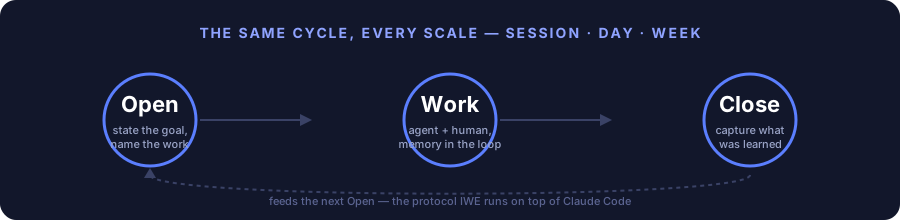
| ORZ | Open → Work → Close — a ritual for every session and every day, prevents loss of context |
| ArchGate | A structured evaluation of architectural decisions across 7 characteristics (instead of "I think this is good") |
| Strategist | An AI agent that automatically composes day/week plans and tracks progress |
| 5 repository families | A recommended structure for separating code, knowledge, and data — see below |
Full glossary: ONTOLOGY.md
5 repository families
The exocortex is not one repository, but a set of clearly bounded families: code, domain knowledge, and personal data are not mixed. setup.sh creates a minimal start (your own strategy repository + 3 base principle repositories); the rest is created as needed.
| Family | What it stores | Example name |
|---|---|---|
Base (ZP/FPF/SPF/FMT-*) |
Platform principles and formats — supplied ready-made | ZP, FPF |
PACK-* |
Formalized domain knowledge (source-of-truth) | PACK-my-domain |
DS-* |
Code, plans, courses — derived from Pack | DS-strategy |
PD-* |
Personal user data of a single type (no code) | PD-persona, PD-metrics |
MC-* |
Agent data (dialogues, service logs) — humans do not read day-to-day | MC-sessions |
The detailed data-domain map and rationale: ADR-004.
Work culture — a new style of interaction with AI
IWE is not a set of prompts. It is a work culture: 14 elements (protocols, skills, formats) that turn chaotic interaction with AI into a manageable process. More details: DP.M.008 — IWE Operating Rules.
The ORZ protocol (Opening → Work → Closing)
Each session and each day pass through three stages:
- Opening — Claude checks the plan, determines the task, agrees on the approach. You don't start work "from a clean slate" — the AI knows the context.
- Work — as work proceeds, Claude captures valuable knowledge (Capture-to-Pack). Insights are not lost.
- Closing — the result is recorded, the plan is updated, and the next session will start from where you left off.
Skipping Opening = unplanned work. Skipping Closing = lost result.
Exocortex — external memory
Your knowledge, principles, distinctions, plans, and context are stored in files that Claude reads in every session. This is not a "prompt" — it is an accumulated base that grows together with you.
Knowledge formalization (Pack)
What you have learned does not stay in your head. Valuable knowledge is formalized into a Pack — a passport of the subject domain. The Pack is the only source-of-truth for domain knowledge. More details: LEARNING-PATH.md.
Who it is for
Every professional drowns in information: 12+ tools (Notion, Google Docs, Slack, ChatGPT, courses...), knowledge is smeared around, nothing is connected. AI answers questions but does not know your context — every time from scratch.
IWE is for those who want to change this:
- Entrepreneurs and executives — you strategize, make decisions, manage projects. IWE gives you a system: from weekly planning to formalization of subject-domain knowledge
- Engineers and developers — you work with code and architecture. IWE preserves context between sessions, the AI knows your codebase, tech debt, roadmap
- Researchers and analysts — you study, synthesize, publish. IWE turns scattered notes into a structured knowledge base that grows together with you
- Everyone who does intellectual work — and wants a symbiosis with AI, not a dependence on it. An exoskeleton for thinking, not a prosthesis
Usage scenarios
Work projects
| Scenario | What happens | More details |
|---|
| Product development | Claude knows the architecture, tech debt, and roadmap. Each session is a continuation, not a start from scratch | SC.013, SC.015 | | Maintaining documentation | Knowledge is captured into the Pack as you work. No need to "write the docs later" — they get written as you work | SC.004, SC.014 | | Project coordination | WeekPlan, DayPlan, a registry of work products — the Strategist helps plan and track progress | SC.001, SC.002 | | Review and refactoring | The ArchGate evaluates decisions against 7 characteristics. Not "it feels good to me", but a structured evaluation | SC.015 |
Personal development
| Scenario | What happens | More details |
|---|---|---|
| Taking a course | Claude helps capture key ideas, asks questions to check understanding, connects the new with what you already know | SC.003 |
| Writing articles | A creative pipeline: note → draft → preparation → publication. Every artifact is tracked | SC.005 |
| Strategizing | A weekly session: review of the past week, planning the new one, checking against goals. The Strategist prepares a draft — you make the decisions | SC.011 |
| Building a knowledge base | Your Pack grows. Six months later you have a formalized knowledge base for the domain, not a collection of notes | SC.014 |
The full catalog of 15 scenarios: USE-CASES.md
What it looks like in practice
- In the morning — the Strategist drew up a plan: a Telegram notification + a DayPlan file in the repository
- You open VS Code →
claude→ Claude knows what is in the plan and suggests starting with the priority item - You work — Claude captures knowledge as you go (Capture-to-Pack)
- You close the session — the result is recorded, the plan is updated
- On Monday — the Strategist prepares a draft weekly plan, and you discuss it in a strategizing session
Machine requirements
A minimum of 4 GiB of free RAM while Claude Code (or another agent) runs on top of IWE. With less — especially on shared servers with multiple users — file read/write tools may intermittently fail with a message like PreToolUse hook did not respond before its timeout. This message indicates a shortage of memory in the host process, not a breakage of the template's hooks (issue #461) — bash scripts/iwe-audit.sh shows the current level of available memory in the "Доступная память" section.
Get started
Quick start (Git, Node.js, Claude Code already installed): QUICK-START.md -- 15 minutes to the first session.
Full installation from a clean computer: SETUP-GUIDE.md -- 30-60 minutes including installing all dependencies.
Not on macOS or not using Claude Code? Read PORTABILITY.md — instructions for Kimi Code, Hermes Agent, and others.
Another agent or LLM? IWE is not tied to Claude. If your agent can see the files in the repo folder and can edit files, it will work. How to connect it → PORTABILITY.md.
mkdir -p ~/IWE && cd ~/IWE
gh repo fork TserenTserenov/FMT-exocortex-template --clone
cd FMT-exocortex-template
bash setup.sh
After installation:
cd ~/IWE
claude
Tell Claude: «Проведём первую стратегическую сессию» -- and it will walk you through defining goals, creating a first plan, and setting up the environment.
Customization
IWE is updated as a distribution — you receive platform updates without losing your settings.
Extensions (extensions/) — add your own blocks to protocols:
# Добавить рефлексию в конце дня
echo "## Рефлексия дня
- Что было сложным?
- Что бы сделал иначе?
- За что похвалить?" > extensions/day-close.after.md
Parameters (params.yaml) — toggle protocol steps on/off:
reflection_enabled: true    # Включить рефлексию
video_check: false          # Отключить проверку видео
multiplier_enabled: true    # Мультипликатор IWE
Updates — bash update.sh updates the platform while preserving your extensions/, params.yaml, and edits to CLAUDE.md (3-way merge).
More details: extensions/README.md
Documentation
| Document | What's inside |
|---|---|
| Beginner's guide | Start here if you're hearing about IWE for the first time. What it is, why, what it consists of — without technical terms |
| Quick start | 15 minutes from git clone to the first session. For those who already have Git and Claude Code |
| SETUP-GUIDE.md | Step-by-step installation from a clean computer. Requirements, modes (core/full), verification |
| LEARNING-PATH.md | The IWE learning path: architecture, principles, protocols, Pack, roles |
| DATA-POLICY.md | Data policy: what is collected, where it is stored, how to delete it |
| DATA-RESIDENCY.md | The residency principle: data you bring to IWE from outside (health, calendar, working hours) — where it may and may not go |
| IWE-HELP.md | Quick reference and FAQ |
| principles-vs-skills.md | Why principles matter more than skills: the generative hierarchy |
| ONTOLOGY.md | Ontology: all IWE terms and abbreviations |
| CHANGELOG.md | History of changes to the template |
Two documents cover related topics:
DATA-POLICY.md— about the data the platform collects about you;DATA-RESIDENCY.md— about the data you yourself bring to IWE from outside.
FAQ
Q: Is an Anthropic subscription required?
A: For the full installation (Claude Code) — Claude Pro ($20/mo) is recommended. If needed, you can move to Claude Max (~$100/mo) to work without restrictions. For the minimal one (setup.sh --core) — it works with any AI CLI. More details: SETUP-GUIDE.md.
Q: Does it work with other AIs (not Claude)? A: Yes, three agents are supported out of the box:
- Claude Code — full support: reads
CLAUDE.md, all skills and hooks work. - Kimi Code (VS Code) — reads
AGENTS.mdautomatically when opening the repo. Customization:extensions/orAGENTS-agent-blocks.md. Skills (/day-openand others) via Claude Code. - Hermes Agent — connect Aisystant MCP through the Hermes settings, and it will receive the instructions automatically.
For other agents (Cursor, Copilot, Gemini), adaptation will be required. More details: PORTABILITY.md.
The minimal installation (setup.sh --core) works without binding to a specific agent.
Q: Does it work on Linux/Windows?
A: On macOS and Linux the standard scenarios work; the Strategist automation uses launchd and systemd respectively, and the cloud variant uses GitHub Actions. On Windows, individual parts have been tested via Git Bash with native Python (the Strategist lock, #1030), but session-guard.sh and session opening require WSL2: in native Git Bash they refuse in advance due to the Unix fcntl lock (#1032). Full installation and updating of IWE on Windows remain unverified — more details: SETUP-GUIDE.md § Windows.
Q: What if the computer is turned off or asleep — will the automation stop?
A: Cloud Scheduler (GitHub Actions) works in the cloud even when the computer is off. For local agents: scripts automatically prevent sleep during operation (macOS: caffeinate, Linux: systemd-inhibit). For laptops, it is recommended to configure automatic wake and disable idle sleep — see SETUP-GUIDE.md.
Q: What is a Pack? A: A formalized domain of knowledge — the single source-of-truth for domain knowledge. More details: LEARNING-PATH.md.
Q: Is my data safe? A: Three protection zones: local, GitHub (private repos), platform (per-user isolation). More details: DATA-POLICY.md.
Q: How does IWE differ from Obsidian / Notion / Logseq?
A: Obsidian is a note store. IWE is a working environment with protocols, AI agents, and knowledge formalization. For notes, you can open a separate governance repository (DS-strategy) in Obsidian — that folder as a vault. The IWE root (~/IWE) is not supported as an Obsidian vault: it may contain very large Markdown files (for example, FPF/FPF-Spec.md), which cause Obsidian to show a white screen. The whole workspace is safe to view through VS Code.
Q: Do I need to program? A: No. The template is a ready-made configuration. Installation via setup.sh. Work is done through Claude Code in natural language.
Q: Can I use it without the Strategist? A: Yes. Claude Code + CLAUDE.md + memory/ work fully. The Strategist is planning automation. Without it, you plan manually.
Q: How do I set the strategy day?
A: In memory/day-rhythm-config.yaml, change strategy_day: sunday to the desired day. More details: LEARNING-PATH.md.
Q: The clone ended up in ~ instead of ~/IWE?
A: All installation commands must be run in one terminal. If you opened a new one, it starts from ~. Delete the folder from ~ and repeat starting from cd ~/IWE. More details: SETUP-GUIDE.md.
Full FAQ with detailed answers: DP.IWE.002 §11. Practical reference: LEARNING-PATH §11.
IWE Community
IWE is an environment you build alone. But you develop it together.
The IWE Community is a closed chat of practitioners who work by the same system: ORZ, Pack, exocortex. A place where people discuss not "how to prompt better," but how to build intellectual work seriously.
What happens there
- Reviews of work products — participants show real Packs, plans, retrospectives. They get feedback from people who understand what "closing without recording the result" means
- Experience installing and customizing IWE — what broke, how it was fixed, which extensions turned out to be useful
- Discussion of methods — the ORZ fractal, ArchGate, Capture-to-Pack in practice: what works, where theory diverges from reality
- Links and findings — tools, patterns, SOTA that fit the IWE philosophy
Why it matters
You can study the system alone. But most questions arise at the application stage: "How do I formalize this domain of knowledge?", "Am I using ORZ correctly?", "Who has experience with this tool?"
In the community, these questions get answers from people who have already been through it.
Free channels
- GitHub Discussions — questions, ideas, show your setup
- Issues — bug reports and feature requests
Private community (Telegram)
Deep practice, reviews of work products, direct support. Entry — via the seminar «IWE for practitioners» (5000₽) in the bot @aist_me_bot.
Contributing
See CONTRIBUTING.md — how to help the project.
For developers of the IWE team (level T4+): the single entry point is Where to start as a developer. In 10 minutes you will understand the development pipeline (6 stations, double output) and complete your first task.
License
MIT
Source and license
Source · License · 2a2913335a0b5578e30486d394ab833702722590
MIT License
Copyright (c) 2026 Tseren Tserenov
Permission is hereby granted, free of charge, to any person obtaining a copy of this software and associated documentation files (the "Software"), to deal in the Software without restriction, including without limitation the rights to use, copy, modify, merge, publish, distribute, sublicense, and/or sell copies of the Software, and to permit persons to whom the Software is furnished to do so, subject to the following conditions:
The above copyright notice and this permission notice shall be included in all copies or substantial portions of the Software.
THE SOFTWARE IS PROVIDED "AS IS", WITHOUT WARRANTY OF ANY KIND, EXPRESS OR IMPLIED, INCLUDING BUT NOT LIMITED TO THE WARRANTIES OF MERCHANTABILITY, FITNESS FOR A PARTICULAR PURPOSE AND NONINFRINGEMENT. IN NO EVENT SHALL THE AUTHORS OR COPYRIGHT HOLDERS BE LIABLE FOR ANY CLAIM, DAMAGES OR OTHER LIABILITY, WHETHER IN AN ACTION OF CONTRACT, TORT OR OTHERWISE, ARISING FROM, OUT OF OR IN CONNECTION WITH THE SOFTWARE OR THE USE OR OTHER DEALINGS IN THE SOFTWARE.