# IWE: An Intellectual Work Environment Template
> MIT-licensed template for an AI-augmented exocortex: ORZ session rituals, knowledge Packs, Strategist planning, and environment-scoped memory.
## Install
Copy the content below into your project:
# IWE: An Intellectual Work Environment Template
MIT-licensed template for an AI-augmented exocortex: ORZ session rituals, knowledge Packs, Strategist planning, and environment-scoped memory.
# IWE: An Intellectual Work Environment Template
## Quick Use
IWE (Intellectual Work Environment) is an MIT-licensed repository template from TserenTserenov/FMT-exocortex-template (version 0.41.4) that turns a fork of the repository into a personal environment where AI agents operate with persistent context.
The project positions IWE as an IDE for thinking rather than for code: instead of editor/compiler/debugger, it pairs an exocortex (files of plans, context, conclusions) with principles, the ORZ ritual (Open → Work → Close), and an architectural gate. The environment is described as a platform-agnostic layer that runs on top of any AI platform, with documented support for Claude Code, Kimi Code, and Hermes Agent.
Source reviewed; runtime not tested.
## Setup
Prerequisites, per the README:
- Git, Node.js, and (for the full flow) Claude Code, per the quick-start path.
- Minimum 4 GiB free RAM while Claude Code (or another agent) runs on top of IWE; the README notes that lower memory can cause tool read/write failures with a `PreToolUse hook did not respond before its timeout` message, and that `bash scripts/iwe-audit.sh` reports available memory in a "Доступная память" section.
- A GitHub account and `gh` CLI for the fork-based quick start.
Quick start (Git, Node.js, Claude Code already installed):
```bash
mkdir -p ~/IWE && cd ~/IWE
gh repo fork TserenTserenov/FMT-exocortex-template --clone
cd FMT-exocortex-template
bash setup.sh
```
After setup:
```bash
cd ~/IWE
claude
```
Then tell Claude: **«Проведём первую стратегическую сессию»** to walk through goal setting, the first plan, and environment configuration.
Full installation from a clean computer is documented in `docs/SETUP-GUIDE.md` (30–60 minutes, all dependencies). A minimal `setup.sh --core` variant is documented as working with any AI CLI, without agent-specific binding. Readers not on macOS and not using Claude Code are pointed to `docs/PORTABILITY.md`.
## Customization
IWE is updated as a distribution: platform updates arrive without losing personal settings.
**Extensions (`extensions/`)** add blocks to protocols:
```bash
# Добавить рефлексию в конце дня
echo "## Рефлексия дня
- Что было сложным?
- Что бы сделал иначе?
- За что похвалить?" > extensions/day-close.after.md
```
**Parameters (`params.yaml`)** toggle protocol steps:
```yaml
reflection_enabled: true # Включить рефлексию
video_check: false # Отключить проверку видео
multiplier_enabled: true # Мультипликатор IWE
```
**Updates** — `bash update.sh` updates the platform while preserving your `extensions/`, `params.yaml`, and edits to `CLAUDE.md` (3-way merge).
See `extensions/README.md` for details.
## Repository Families
According to the README, the exocortex is not one repository but a set of clearly bounded families: code, domain knowledge, and personal data are not mixed. `setup.sh` creates a minimal start (your own strategy repository plus 3 base principle repositories); the rest is added as needed.
| Family | Stores | Example name |
|---|---|---|
| Base (`ZP`/`FPF`/`SPF`/`FMT-*`) | Platform principles and formats — supplied ready-made | `ZP`, `FPF` |
| `PACK-*` | Formalized domain knowledge (source-of-truth) | `PACK-my-domain` |
| `DS-*` | Code, plans, courses — derived from Pack | `DS-strategy` |
| `PD-*` | Personal data of a single type (no code) | `PD-persona`, `PD-metrics` |
| `MC-*` | Agent data (dialogues, service logs) — not read by humans day-to-day | `MC-sessions` |
The full data-domain map and rationale are in `docs/adr/ADR-004-data-domain-map.md`.
## Permissions and Limitations
- License: MIT (Copyright (c) 2026 Tseren Tserenov). Forking and customization are the intended model.
- Data handling: the README describes three protection zones — local, GitHub (private repos), and platform (per-user isolation) — and points to `docs/DATA-POLICY.md` and `docs/DATA-RESIDENCY.md` for details.
- Platform notes: macOS and Linux have first-class scenarios (launchd and systemd respectively; GitHub Actions for cloud). On Windows, only parts are validated via Git Bash with native Python (the Strategist lock, issue #1030); `session-guard.sh` and session opening require WSL2 because of the `fcntl` Unix lock (issue #1032). Full installation and updates on Windows remain unverified.
- The full setup is stated to take 30–60 minutes from a clean machine; quick start about 15 minutes.
- No runtime verification was performed for this guide.
## Check the Output
After `bash setup.sh` and starting `claude` from `~/IWE`, the README's described first-run output is a guided strategic session covering goals, a first plan, and environment setup. Verify the checkout landed in `~/IWE` rather than `~`: the README notes that running install commands in a fresh terminal starts from `~` and requires deleting the stray folder and repeating from `cd ~/IWE`. Memory headroom can be checked with `bash scripts/iwe-audit.sh`.
## FAQ
**Q: Is an Anthropic subscription required?**
A: For the full installation (Claude Code), the README recommends Claude Pro ($20/mo), with a possible move to Claude Max (~$100/mo) for unrestricted work. The minimal `setup.sh --core` path is documented as working with any AI CLI. See `docs/SETUP-GUIDE.md`.
**Q: Does it work with AI tools other than Claude?**
A: Yes, three agents are documented out of the box: Claude Code (full support via `CLAUDE.md`, skills, hooks), Kimi Code in VS Code (reads `AGENTS.md` automatically; customization via `extensions/` or `AGENTS-agent-blocks.md`; skills like `/day-open` via Claude Code), and Hermes Agent (connect Aisystant MCP in Hermes settings). Other agents such as Cursor, Copilot, and Gemini require adaptation. See `docs/PORTABILITY.md`.
**Q: How does IWE differ from Obsidian, Notion, or Logseq?**
A: The README describes Obsidian as a note store, while IWE is a working environment with protocols, AI agents, and knowledge formalization. A separate governance repository (`DS-strategy`) can be opened in Obsidian as a vault, but the IWE root (`~/IWE`) is not supported as an Obsidian vault because it may contain very large Markdown files, such as `FPF/FPF-Spec.md`, that cause Obsidian to show a white screen. The whole workspace is viewable through VS Code.
## Source and Thanks
Source: [TserenTserenov/FMT-exocortex-template](https://github.com/TserenTserenov/FMT-exocortex-template) — README reviewed at commit `2a2913335a0b5578e30486d394ab833702722590`. Licensed under MIT, Copyright (c) 2026 Tseren Tserenov. Thanks to the author and the IWE community for documenting this environment publicly. Source reviewed; runtime not tested.
## Complete upstream material
# IWE — Intellectual Work Environment
[](LICENSE)
[](CHANGELOG.md)
[-lightgrey.svg)]()
[](https://github.com/TserenTserenov/FMT-exocortex-template/tree/en-draft)
 > An operating system for intellectual work. Your knowledge. Your experience. Your environment — runs on top of any AI platform.
>
> **Repository type:** `Base/Форматы` (FMT) — a distribution template. After forking, it becomes your personal environment with AI agents.
---
## The Problem
AI assistants can generate text, code, and answers. But most users share the same problems:
- **Context is lost.** Each new session with AI starts from a blank slate. Yesterday's decisions, plans, agreements — forgotten.
- **Knowledge stays in your head.** You took a course, read a book, solved a problem — but a month later you can't reproduce your train of thought.
- **AI replaces thinking instead of amplifying it.** You get an answer, but you don't become more competent. Without AI — back to zero.
- **There is no system.** Plans are in notes, tasks are in your head, knowledge is in chats. Everything is fragmented.
- **Time leaks away.** It's unclear what you worked on, what you did, where you're heading.
---
## The Solution: An IDE, but for Thinking
**IWE (Intellectual Work Environment)** — an intellectual work environment.
Just as an IDE unites an editor, a compiler, and a debugger into one environment for a programmer — so IWE unites knowledge, planning, and AI agents into one environment for thinking.
| IDE (for code) | IWE (for thinking) |
|---------------|-------------------|
| Editor → you write code | Exocortex → you record knowledge |
| Compiler → checks syntax | Principles → check the correctness of decisions |
| Debugger → finds errors | ORZ protocols (Open→Work→Close) → find losses of knowledge and context |
| Linter → improves quality | ArchGate → evaluates architectural decisions |
| Git → change history | Strategist → history and work planning |
> **Key principle: an exoskeleton, not a prosthesis.** IWE amplifies your thinking rather than replacing it. After each session you become more competent, rather than merely getting a result. More details: [principles-vs-skills.md](https://github.com/TserenTserenov/FMT-exocortex-template/blob/2a2913335a0b5578e30486d394ab833702722590/docs/principles-vs-skills.md).
## Key IWE Terms
| Term | What it is |
|--------|---------|
| **Exocortex** | Your external memory — files with plans, context, conclusions that Claude reads in every session |
| **Pack** | A formalized knowledge base for your domain — the single source-of-truth for domain knowledge |
| **ORZ** | Open → Work → Close — a ritual for every session and every day, prevents loss of context |
| **ArchGate** | A structured evaluation of architectural decisions across 7 characteristics (instead of "I think this is good") |
| **Strategist** | An AI agent that automatically composes day/week plans and tracks progress |
| **5 repository families** | A recommended structure for separating code, knowledge, and data — see below |
Full glossary: [ONTOLOGY.md](https://github.com/TserenTserenov/FMT-exocortex-template/blob/2a2913335a0b5578e30486d394ab833702722590/ONTOLOGY.md)
### 5 repository families
The exocortex is not one repository, but a set of clearly bounded families: code, domain knowledge, and personal data are not mixed. `setup.sh` creates a minimal start (your own strategy repository + 3 base principle repositories); the rest is created as needed.
| Family | What it stores | Example name |
|---|---|---|
| Base (`ZP`/`FPF`/`SPF`/`FMT-*`) | Platform principles and formats — supplied ready-made | `ZP`, `FPF` |
| `PACK-*` | Formalized domain knowledge (source-of-truth) | `PACK-my-domain` |
| `DS-*` | Code, plans, courses — derived from Pack | `DS-strategy` |
| `PD-*` | Personal user data of a single type (no code) | `PD-persona`, `PD-metrics` |
| `MC-*` | Agent data (dialogues, service logs) — humans do not read day-to-day | `MC-sessions` |
The detailed data-domain map and rationale: [ADR-004](https://github.com/TserenTserenov/FMT-exocortex-template/blob/2a2913335a0b5578e30486d394ab833702722590/docs/adr/ADR-004-data-domain-map.md).
---
## Work culture — a new style of interaction with AI
IWE is not a set of prompts. It is a **work culture**: 14 elements (protocols, skills, formats) that turn chaotic interaction with AI into a manageable process. More details: [DP.M.008 — IWE Operating Rules](https://github.com/TserenTserenov/PACK-digital-platform/blob/main/pack/digital-platform/03-methods/DP.M.008-iwe-operating-rules.md).
### The ORZ protocol (Opening → Work → Closing)
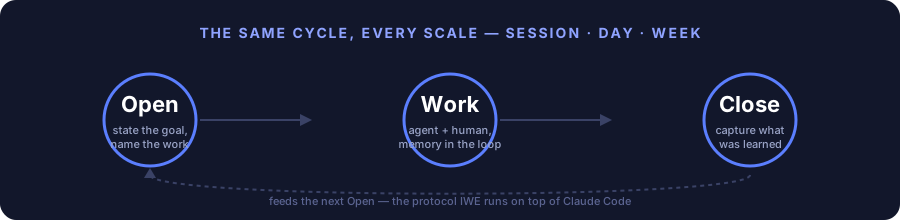
Each session and each day pass through three stages:
- **Opening** — Claude checks the plan, determines the task, agrees on the approach. You don't start work "from a clean slate" — the AI knows the context.
- **Work** — as work proceeds, Claude captures valuable knowledge (Capture-to-Pack). Insights are not lost.
- **Closing** — the result is recorded, the plan is updated, and the next session will start from where you left off.
Skipping Opening = unplanned work. Skipping Closing = lost result.
### Exocortex — external memory
Your knowledge, principles, distinctions, plans, and context are stored in files that Claude reads in every session. This is not a "prompt" — it is an **accumulated base** that grows together with you.
### Knowledge formalization (Pack)
What you have learned does not stay in your head. Valuable knowledge is formalized into a Pack — a passport of the subject domain. The Pack is the only source-of-truth for domain knowledge. More details: [LEARNING-PATH.md](https://github.com/TserenTserenov/FMT-exocortex-template/blob/2a2913335a0b5578e30486d394ab833702722590/docs/LEARNING-PATH.md).
---
## Who it is for
Every professional drowns in information: 12+ tools (Notion, Google Docs, Slack, ChatGPT, courses...), knowledge is smeared around, nothing is connected. AI answers questions but does not know *your* context — every time from scratch.
IWE is for those who want to change this:
- **Entrepreneurs and executives** — you strategize, make decisions, manage projects. IWE gives you a system: from weekly planning to formalization of subject-domain knowledge
- **Engineers and developers** — you work with code and architecture. IWE preserves context between sessions, the AI knows your codebase, tech debt, roadmap
- **Researchers and analysts** — you study, synthesize, publish. IWE turns scattered notes into a structured knowledge base that grows together with you
- **Everyone who does intellectual work** — and wants a **symbiosis with AI**, not a dependence on it. An exoskeleton for thinking, not a prosthesis
---
## Usage scenarios
### Work projects
| Scenario | What happens | More details |
|----------|---------------|-----------|
| **Product development** | Claude knows the architecture, tech debt, and roadmap. Each session is a continuation, not a start from scratch | [SC.013](https://github.com/TserenTserenov/FMT-exocortex-template/blob/2a2913335a0b5578e30486d394ab833702722590/docs/use-cases/USE-CASES.md#sc013-рабочая-сессия-с-claude-code), [SC.015](https://github.com/TserenTserenov/FMT-exocortex-template/blob/2a2913335a0b5578e30486d394ab833702722590/docs/use-cases/USE-CASES.md#sc015-развитие-системы-ds) |
| **Maintaining documentation** | Knowledge is captured into the Pack as you work. No need to "write the docs later" — they get written as you work | [SC.004](https://github.com/TserenTserenov/FMT-exocortex-template/blob/2a2913335a0b5578e30486d394ab833702722590/docs/use-cases/USE-CASES.md#sc004-фиксация-и-экстракция-знаний), [SC.014](https://github.com/TserenTserenov/FMT-exocortex-template/blob/2a2913335a0b5578e30486d394ab833702722590/docs/use-cases/USE-CASES.md#sc014-формализация-знаний-pack) |
| **Project coordination** | WeekPlan, DayPlan, a registry of work products — the Strategist helps plan and track progress | [SC.001](https://github.com/TserenTserenov/FMT-exocortex-template/blob/2a2913335a0b5578e30486d394ab833702722590/docs/use-cases/USE-CASES.md#sc001-планирование-дня), [SC.002](https://github.com/TserenTserenov/FMT-exocortex-template/blob/2a2913335a0b5578e30486d394ab833702722590/docs/use-cases/USE-CASES.md#sc002-планирование-и-ревью-недели) |
| **Review and refactoring** | The ArchGate evaluates decisions against 7 characteristics. Not "it feels good to me", but a structured evaluation | [SC.015](https://github.com/TserenTserenov/FMT-exocortex-template/blob/2a2913335a0b5578e30486d394ab833702722590/docs/use-cases/USE-CASES.md#sc015-развитие-системы-ds) |
### Personal development
| Scenario | What happens | More details |
|----------|---------------|-----------|
| **Taking a course** | Claude helps capture key ideas, asks questions to check understanding, connects the new with what you already know | [SC.003](https://github.com/TserenTserenov/FMT-exocortex-template/blob/2a2913335a0b5578e30486d394ab833702722590/docs/use-cases/USE-CASES.md#sc003-обучение-и-развитие) |
| **Writing articles** | A creative pipeline: note → draft → preparation → publication. Every artifact is tracked | [SC.005](https://github.com/TserenTserenov/FMT-exocortex-template/blob/2a2913335a0b5578e30486d394ab833702722590/docs/use-cases/USE-CASES.md#sc005-публикация-контента) |
| **Strategizing** | A weekly session: review of the past week, planning the new one, checking against goals. The Strategist prepares a draft — you make the decisions | [SC.011](https://github.com/TserenTserenov/FMT-exocortex-template/blob/2a2913335a0b5578e30486d394ab833702722590/docs/use-cases/USE-CASES.md#sc011-стратегирование) |
| **Building a knowledge base** | Your Pack grows. Six months later you have a formalized knowledge base for the domain, not a collection of notes | [SC.014](https://github.com/TserenTserenov/FMT-exocortex-template/blob/2a2913335a0b5578e30486d394ab833702722590/docs/use-cases/USE-CASES.md#sc014-формализация-знаний-pack) |
> The full catalog of 15 scenarios: **[USE-CASES.md](https://github.com/TserenTserenov/FMT-exocortex-template/blob/2a2913335a0b5578e30486d394ab833702722590/docs/use-cases/USE-CASES.md)**
---
## What it looks like in practice
- In the morning — the Strategist drew up a plan: a Telegram notification + a DayPlan file in the repository
- You open VS Code → `claude` → Claude knows what is in the plan and suggests starting with the priority item
- You work — Claude captures knowledge as you go (Capture-to-Pack)
- You close the session — the result is recorded, the plan is updated
- On Monday — the Strategist prepares a draft weekly plan, and you discuss it in a strategizing session
---
## Machine requirements
A minimum of **4 GiB of free RAM** while Claude Code (or another agent) runs on top of IWE. With less — especially on shared servers with multiple users — file read/write tools may intermittently fail with a message like `PreToolUse hook did not respond before its timeout`. This message indicates a shortage of memory in the host process, not a breakage of the template's hooks (issue [#461](https://github.com/TserenTserenov/FMT-exocortex-template/issues/461)) — `bash scripts/iwe-audit.sh` shows the current level of available memory in the "Доступная память" section.
## Get started
**Quick start** (Git, Node.js, Claude Code already installed): **[QUICK-START.md](https://github.com/TserenTserenov/FMT-exocortex-template/blob/2a2913335a0b5578e30486d394ab833702722590/docs/QUICK-START.md)** -- 15 minutes to the first session.
**Full installation** from a clean computer: **[SETUP-GUIDE.md](https://github.com/TserenTserenov/FMT-exocortex-template/blob/2a2913335a0b5578e30486d394ab833702722590/docs/SETUP-GUIDE.md)** -- 30-60 minutes including installing all dependencies.
**Not on macOS or not using Claude Code?** Read **[PORTABILITY.md](https://github.com/TserenTserenov/FMT-exocortex-template/blob/2a2913335a0b5578e30486d394ab833702722590/docs/PORTABILITY.md)** — instructions for Kimi Code, Hermes Agent, and others.
**Another agent or LLM?** IWE is not tied to Claude. If your agent can see the files in the repo folder and can edit files, it will work. How to connect it → [PORTABILITY.md](https://github.com/TserenTserenov/FMT-exocortex-template/blob/2a2913335a0b5578e30486d394ab833702722590/docs/PORTABILITY.md).
```bash
mkdir -p ~/IWE && cd ~/IWE
gh repo fork TserenTserenov/FMT-exocortex-template --clone
cd FMT-exocortex-template
bash setup.sh
```
After installation:
```bash
cd ~/IWE
claude
```
Tell Claude: **«Проведём первую стратегическую сессию»** -- and it will walk you through defining goals, creating a first plan, and setting up the environment.
---
## Customization
IWE is updated as a distribution — you receive platform updates without losing your settings.
**Extensions (extensions/)** — add your own blocks to protocols:
```bash
# Добавить рефлексию в конце дня
echo "## Рефлексия дня
- Что было сложным?
- Что бы сделал иначе?
- За что похвалить?" > extensions/day-close.after.md
```
**Parameters (`params.yaml`)** — toggle protocol steps on/off:
```yaml
reflection_enabled: true # Включить рефлексию
video_check: false # Отключить проверку видео
multiplier_enabled: true # Мультипликатор IWE
```
**Updates** — `bash update.sh` updates the platform while preserving your extensions/, params.yaml, and edits to CLAUDE.md (3-way merge).
More details: [extensions/README.md](https://github.com/TserenTserenov/FMT-exocortex-template/blob/2a2913335a0b5578e30486d394ab833702722590/extensions/README.md)
---
## Documentation
| Document | What's inside |
|----------|-----------|
| **[Beginner's guide](https://github.com/TserenTserenov/FMT-exocortex-template/blob/2a2913335a0b5578e30486d394ab833702722590/docs/onboarding/onboarding-guide.md)** | Start here if you're hearing about IWE for the first time. What it is, why, what it consists of — without technical terms |
| **[Quick start](https://github.com/TserenTserenov/FMT-exocortex-template/blob/2a2913335a0b5578e30486d394ab833702722590/docs/QUICK-START.md)** | 15 minutes from `git clone` to the first session. For those who already have Git and Claude Code |
| **[SETUP-GUIDE.md](https://github.com/TserenTserenov/FMT-exocortex-template/blob/2a2913335a0b5578e30486d394ab833702722590/docs/SETUP-GUIDE.md)** | Step-by-step installation from a clean computer. Requirements, modes (core/full), verification |
| **[LEARNING-PATH.md](https://github.com/TserenTserenov/FMT-exocortex-template/blob/2a2913335a0b5578e30486d394ab833702722590/docs/LEARNING-PATH.md)** | The IWE learning path: architecture, principles, protocols, Pack, roles |
| **[DATA-POLICY.md](https://github.com/TserenTserenov/FMT-exocortex-template/blob/2a2913335a0b5578e30486d394ab833702722590/docs/DATA-POLICY.md)** | Data policy: what is collected, where it is stored, how to delete it |
| **[DATA-RESIDENCY.md](https://github.com/TserenTserenov/FMT-exocortex-template/blob/2a2913335a0b5578e30486d394ab833702722590/docs/DATA-RESIDENCY.md)** | The residency principle: data you bring to IWE from outside (health, calendar, working hours) — where it may and may not go |
| **[IWE-HELP.md](https://github.com/TserenTserenov/FMT-exocortex-template/blob/2a2913335a0b5578e30486d394ab833702722590/docs/IWE-HELP.md)** | Quick reference and FAQ |
| **[principles-vs-skills.md](https://github.com/TserenTserenov/FMT-exocortex-template/blob/2a2913335a0b5578e30486d394ab833702722590/docs/principles-vs-skills.md)** | Why principles matter more than skills: the generative hierarchy |
| **[ONTOLOGY.md](https://github.com/TserenTserenov/FMT-exocortex-template/blob/2a2913335a0b5578e30486d394ab833702722590/ONTOLOGY.md)** | Ontology: all IWE terms and abbreviations |
| **[CHANGELOG.md](https://github.com/TserenTserenov/FMT-exocortex-template/blob/2a2913335a0b5578e30486d394ab833702722590/CHANGELOG.md)** | History of changes to the template |
> Two documents cover related topics: `DATA-POLICY.md` — about the data the platform collects about you; `DATA-RESIDENCY.md` — about the data you yourself bring to IWE from outside.
---
## FAQ
**Q: Is an Anthropic subscription required?**
A: For the full installation (Claude Code) — Claude Pro ($20/mo) is recommended. If needed, you can move to Claude Max (~$100/mo) to work without restrictions. For the minimal one (`setup.sh --core`) — it works with any AI CLI. More details: [SETUP-GUIDE.md](https://github.com/TserenTserenov/FMT-exocortex-template/blob/2a2913335a0b5578e30486d394ab833702722590/docs/SETUP-GUIDE.md).
**Q: Does it work with other AIs (not Claude)?**
A: Yes, three agents are supported out of the box:
- **Claude Code** — full support: reads `CLAUDE.md`, all skills and hooks work.
- **Kimi Code** (VS Code) — reads `AGENTS.md` automatically when opening the repo. Customization: `extensions/` or `AGENTS-agent-blocks.md`. Skills (`/day-open` and others) via Claude Code.
- **Hermes Agent** — connect Aisystant MCP through the Hermes settings, and it will receive the instructions automatically.
For other agents (Cursor, Copilot, Gemini), adaptation will be required. More details: [PORTABILITY.md](https://github.com/TserenTserenov/FMT-exocortex-template/blob/2a2913335a0b5578e30486d394ab833702722590/docs/PORTABILITY.md).
The minimal installation (`setup.sh --core`) works without binding to a specific agent.
**Q: Does it work on Linux/Windows?**
A: On macOS and Linux the standard scenarios work; the Strategist automation uses launchd and systemd respectively, and the cloud variant uses GitHub Actions. On Windows, individual parts have been tested via Git Bash with native Python (the Strategist lock, #1030), but `session-guard.sh` and session opening require WSL2: in native Git Bash they refuse in advance due to the Unix `fcntl` lock (#1032). Full installation and updating of IWE on Windows remain unverified — more details: [SETUP-GUIDE.md](https://github.com/TserenTserenov/FMT-exocortex-template/blob/2a2913335a0b5578e30486d394ab833702722590/docs/SETUP-GUIDE.md) § Windows.
**Q: What if the computer is turned off or asleep — will the automation stop?**
A: Cloud Scheduler (GitHub Actions) works in the cloud even when the computer is off. For local agents: scripts automatically prevent sleep during operation (macOS: `caffeinate`, Linux: `systemd-inhibit`). For laptops, it is recommended to configure automatic wake and disable idle sleep — see [SETUP-GUIDE.md](https://github.com/TserenTserenov/FMT-exocortex-template/blob/2a2913335a0b5578e30486d394ab833702722590/docs/SETUP-GUIDE.md).
**Q: What is a Pack?**
A: A formalized domain of knowledge — the single source-of-truth for domain knowledge. More details: [LEARNING-PATH.md](https://github.com/TserenTserenov/FMT-exocortex-template/blob/2a2913335a0b5578e30486d394ab833702722590/docs/LEARNING-PATH.md).
**Q: Is my data safe?**
A: Three protection zones: local, GitHub (private repos), platform (per-user isolation). More details: [DATA-POLICY.md](https://github.com/TserenTserenov/FMT-exocortex-template/blob/2a2913335a0b5578e30486d394ab833702722590/docs/DATA-POLICY.md).
**Q: How does IWE differ from Obsidian / Notion / Logseq?**
A: Obsidian is a note store. IWE is a **working environment** with protocols, AI agents, and knowledge formalization. For notes, you can open a separate governance repository (`DS-strategy`) in Obsidian — that folder as a vault. The IWE root (`~/IWE`) is not supported as an Obsidian vault: it may contain very large Markdown files (for example, `FPF/FPF-Spec.md`), which cause Obsidian to show a white screen. The whole workspace is safe to view through VS Code.
**Q: Do I need to program?**
A: No. The template is a ready-made configuration. Installation via setup.sh. Work is done through Claude Code in natural language.
**Q: Can I use it without the Strategist?**
A: Yes. Claude Code + CLAUDE.md + memory/ work fully. The Strategist is planning automation. Without it, you plan manually.
**Q: How do I set the strategy day?**
A: In `memory/day-rhythm-config.yaml`, change `strategy_day: sunday` to the desired day. More details: [LEARNING-PATH.md](https://github.com/TserenTserenov/FMT-exocortex-template/blob/2a2913335a0b5578e30486d394ab833702722590/docs/LEARNING-PATH.md).
**Q: The clone ended up in `~` instead of `~/IWE`?**
A: All installation commands must be run in one terminal. If you opened a new one, it starts from `~`. Delete the folder from `~` and repeat starting from `cd ~/IWE`. More details: [SETUP-GUIDE.md](https://github.com/TserenTserenov/FMT-exocortex-template/blob/2a2913335a0b5578e30486d394ab833702722590/docs/SETUP-GUIDE.md).
> Full FAQ with detailed answers: [DP.IWE.002 §11](https://github.com/TserenTserenov/PACK-digital-platform/blob/main/pack/digital-platform/02-domain-entities/DP.IWE.002-iwe-template-and-setup.md#11-частые-вопросы-faq). Practical reference: [LEARNING-PATH §11](https://github.com/TserenTserenov/FMT-exocortex-template/blob/2a2913335a0b5578e30486d394ab833702722590/docs/LEARNING-PATH.md#11-быстрый-справочник).
---
## IWE Community
IWE is an environment you build alone. But you develop it together.
**The IWE Community** is a closed chat of practitioners who work by the same system: ORZ, Pack, exocortex. A place where people discuss not "how to prompt better," but how to build intellectual work seriously.
### What happens there
- **Reviews of work products** — participants show real Packs, plans, retrospectives. They get feedback from people who understand what "closing without recording the result" means
- **Experience installing and customizing IWE** — what broke, how it was fixed, which extensions turned out to be useful
- **Discussion of methods** — the ORZ fractal, ArchGate, Capture-to-Pack in practice: what works, where theory diverges from reality
- **Links and findings** — tools, patterns, SOTA that fit the IWE philosophy
### Why it matters
You can study the system alone. But most questions arise at the application stage: "How do I formalize this domain of knowledge?", "Am I using ORZ correctly?", "Who has experience with this tool?"
In the community, these questions get answers from people who have already been through it.
### Free channels
- [GitHub Discussions](https://github.com/TserenTserenov/FMT-exocortex-template/discussions) — questions, ideas, show your setup
- [Issues](https://github.com/TserenTserenov/FMT-exocortex-template/issues) — bug reports and feature requests
### Private community (Telegram)
Deep practice, reviews of work products, direct support. Entry — via the seminar **«IWE for practitioners»** (5000₽) in the bot [@aist_me_bot](https://t.me/aist_me_bot).
---
## Contributing
See [CONTRIBUTING.md](https://github.com/TserenTserenov/FMT-exocortex-template/blob/2a2913335a0b5578e30486d394ab833702722590/CONTRIBUTING.md) — how to help the project.
**For developers of the IWE team (level T4+):** the single entry point is [Where to start as a developer](https://github.com/TserenTserenov/FMT-exocortex-template/blob/2a2913335a0b5578e30486d394ab833702722590/docs/developer/). In 10 minutes you will understand the development pipeline (6 stations, double output) and complete your first task.
---
## License
MIT
## Source and license
[Source](https://github.com/TserenTserenov/FMT-exocortex-template/blob/2a2913335a0b5578e30486d394ab833702722590/README.md) · [License](https://github.com/TserenTserenov/FMT-exocortex-template/blob/2a2913335a0b5578e30486d394ab833702722590/LICENSE) · `2a2913335a0b5578e30486d394ab833702722590`
MIT License
Copyright (c) 2026 Tseren Tserenov
Permission is hereby granted, free of charge, to any person obtaining a copy
of this software and associated documentation files (the "Software"), to deal
in the Software without restriction, including without limitation the rights
to use, copy, modify, merge, publish, distribute, sublicense, and/or sell
copies of the Software, and to permit persons to whom the Software is
furnished to do so, subject to the following conditions:
The above copyright notice and this permission notice shall be included in all
copies or substantial portions of the Software.
THE SOFTWARE IS PROVIDED "AS IS", WITHOUT WARRANTY OF ANY KIND, EXPRESS OR
IMPLIED, INCLUDING BUT NOT LIMITED TO THE WARRANTIES OF MERCHANTABILITY,
FITNESS FOR A PARTICULAR PURPOSE AND NONINFRINGEMENT. IN NO EVENT SHALL THE
AUTHORS OR COPYRIGHT HOLDERS BE LIABLE FOR ANY CLAIM, DAMAGES OR OTHER
LIABILITY, WHETHER IN AN ACTION OF CONTRACT, TORT OR OTHERWISE, ARISING FROM,
OUT OF OR IN CONNECTION WITH THE SOFTWARE OR THE USE OR OTHER DEALINGS IN THE
SOFTWARE.
---
# IWE:智能工作环境模板
MIT 许可的智能工作环境模板:通过 ОРЗ 会话仪式、Pack 知识形式化、Стратег 规划与外部记忆目录,让 AI 会话延续先前上下文。
# IWE:智能工作环境模板
## 快速使用
IWE(Intellectual Work Environment,智能工作环境)是来自 TserenTserenov/FMT-exocortex-template 的 MIT 许可仓库模板(版本 0.41.4)。通过 fork 该仓库,它会成为你的个人环境,让 AI 智能体带着持续上下文工作。
项目把 IWE 定位为“面向思考的 IDE”,而非面向代码的 IDE:以外部记忆(exocortex,存放计划、上下文、结论的文件)、原则、ОРЗ 仪式(Открытие → Работа → Закрытие)与架构门(АрхГейт)替代编辑器/编译器/调试器。环境被描述为可运行在任何 AI 平台之上的平台无关层,文档中记录了 Claude Code、Kimi Code 与 Hermes Agent 的支持情况。
source reviewed; runtime not tested(已审阅来源;未做运行验证)。
## 安装设置
README 中的前提条件:
- 按快速开始路径需要 Git、Node.js,完整流程还需要 Claude Code。
- 在 IWE 之上运行 Claude Code(或其他智能体)时,至少需要 4 GiB 空闲内存;README 指出,内存不足时工具读写可能间歇失败并出现 `PreToolUse hook did not respond before its timeout` 提示,`bash scripts/iwe-audit.sh` 会在「Доступная память」一节显示可用内存。
- 快速开始使用 fork 方式,需要 GitHub 账号与 `gh` CLI。
快速开始(已安装 Git、Node.js、Claude Code):
```bash
mkdir -p ~/IWE && cd ~/IWE
gh repo fork TserenTserenov/FMT-exocortex-template --clone
cd FMT-exocortex-template
bash setup.sh
```
安装完成后:
```bash
cd ~/IWE
claude
```
然后对 Claude 说:**«Проведём первую стратегическую сессию»**,它会带你确定目标、制定第一个计划并配置环境。
从干净电脑开始的完整安装见 `docs/SETUP-GUIDE.md`(30–60 分钟,包含所有依赖)。最小化的 `setup.sh --core` 变体被记录为可与任何 AI CLI 配合使用,不绑定特定智能体。不在 macOS 或不用 Claude Code 的读者可参见 `docs/PORTABILITY.md`。
## 自定义
IWE 以发行版方式更新:平台更新不会丢失个人设置。
**扩展(`extensions/`)** 可为协议添加自定义块:
```bash
# Добавить рефлексию в конце дня
echo "## Рефлексия дня
- Что было сложным?
- Что бы сделал иначе?
- За что похвалить?" > extensions/day-close.after.md
```
**参数(`params.yaml`)** 可开关协议步骤:
```yaml
reflection_enabled: true # Включить рефлексию
video_check: false # Отключить проверку видео
multiplier_enabled: true # Мультипликатор IWE
```
**更新** —— `bash update.sh` 更新平台,同时保留你的 `extensions/`、`params.yaml` 与对 `CLAUDE.md` 的修改(三方合并)。
细节见 `extensions/README.md`。
## 仓库家族
根据 README,外部记忆不是一个仓库,而是一组边界清晰的文件家族:代码、领域知识与个人数据不混在一起。`setup.sh` 创建最小起点(你自己的战略仓库 + 3 个基础原则仓库),其余按需创建。
| 家族 | 存放内容 | 示例名称 |
|---|---|---|
| Base(`ZP`/`FPF`/`SPF`/`FMT-*`) | 平台的原则与格式 —— 现成提供 | `ZP`、`FPF` |
| `PACK-*` | 形式化的领域知识(source-of-truth) | `PACK-my-domain` |
| `DS-*` | 代码、计划、课程 —— Pack 的衍生内容 | `DS-strategy` |
| `PD-*` | 单一类型的个人数据(不含代码) | `PD-persona`、`PD-metrics` |
| `MC-*` | 智能体数据(对话、服务日志)—— 人不会日常阅读 | `MC-sessions` |
完整的数据域地图与理由见 `docs/adr/ADR-004-data-domain-map.md`。
## 权限与限制
- 许可:MIT(Copyright (c) 2026 Tseren Tserenov)。Fork 与自定义是预期的使用方式。
- 数据处理:README 描述三层保护区域——本地、GitHub(私有仓库)、平台(按用户隔离),细节见 `docs/DATA-POLICY.md` 与 `docs/DATA-RESIDENCY.md`。
- 平台说明:macOS 与 Linux 有完整场景(分别使用 launchd 与 systemd,云端使用 GitHub Actions)。Windows 上仅部分功能通过 Git Bash 配合原生 Python 验证(Стратег 锁,issue #1030);由于 `fcntl` 的 Unix 锁,`session-guard.sh` 与会话开启需要 WSL2(issue #1032)。Windows 上的完整安装与更新仍未验证。
- 完整安装从干净电脑开始被描述为需 30–60 分钟;快速开始约 15 分钟。
- 本指南未进行任何运行验证。
## 检查输出
在执行 `bash setup.sh` 并从 `~/IWE` 启动 `claude` 之后,README 描述的首轮结果是引导式战略会话:确定目标、制定第一个计划、配置环境。请确认克隆落在 `~/IWE` 而不是 `~`:README 指出,在新终端执行安装命令会从 `~` 开始,需要删除误建的文件夹并从 `cd ~/IWE` 重来。内存余量可用 `bash scripts/iwe-audit.sh` 检查。
## 常见问题
**Q:需要 Anthropic 订阅吗?**
A:完整安装(Claude Code)建议 Claude Pro($20/月),必要时可转为 Claude Max(约 $100/月)以无限制工作。最小化的 `setup.sh --core` 路径被记录为可与任何 AI CLI 配合。见 `docs/SETUP-GUIDE.md`。
**Q:能否配合 Claude 以外的 AI 工具?**
A:可以,开箱即用记录了三种智能体:Claude Code(通过 `CLAUDE.md` 提供完整支持,技能与钩子可用)、VS Code 中的 Kimi Code(打开仓库时自动读取 `AGENTS.md`;可通过 `extensions/` 或 `AGENTS-agent-blocks.md` 自定义;`/day-open` 等技能通过 Claude Code 使用)、Hermes Agent(在 Hermes 设置中连接 Aisystant MCP)。Cursor、Copilot、Gemini 等其他智能体需要适配。见 `docs/PORTABILITY.md`。
**Q:IWE 与 Obsidian、Notion、Logseq 有何不同?**
A:README 把 Obsidian 归为笔记存储,而 IWE 是带协议、AI 智能体与知识形式化的工作环境。可以把独立的治理仓库(`DS-strategy`)作为 Obsidian vault 打开,但 IWE 根目录(`~/IWE`)不支持作为 Obsidian vault,因为它可能含非常大的 Markdown 文件(例如 `FPF/FPF-Spec.md`),会导致 Obsidian 白屏。整个 workspace 可通过 VS Code 安全浏览。
## 来源与致谢
来源:[TserenTserenov/FMT-exocortex-template](https://github.com/TserenTserenov/FMT-exocortex-template) —— README 审阅于提交 `2a2913335a0b5578e30486d394ab833702722590`。MIT 许可,Copyright (c) 2026 Tseren Tserenov。感谢作者与 IWE 社区公开记录这一环境。source reviewed; runtime not tested(已审阅来源;未做运行验证)。
## 完整上游材料译文
# IWE — 智能工作环境
[](LICENSE)
[](CHANGELOG.md)
[-lightgrey.svg)]()
[](https://github.com/TserenTserenov/FMT-exocortex-template/tree/en-draft)
> 智能工作的操作系统。你的知识。你的经验。你的环境 —— 可运行在任何 AI 平台之上。
>
> **仓库类型:** `Base/Форматы`(FMT)—— 模板发行版。Fork 之后,它将成为你带有 AI 智能体的个人环境。
---
## 问题
AI 助手能够生成文本、代码和答案。但大多数用户面临同样的几个问题:
- **上下文丢失。** 每次与 AI 的新会话都从零开始。昨天的决策、计划、约定 —— 全被遗忘。
- **知识停留在脑子里。** 你上过一门课、读过一本书、解决过一个问题 —— 但一个月后却无法重现当时的思路。
- **AI 取代了思考,而不是增强思考。** 你得到了答案,却没有变得更有能力。没有 AI 时 —— 又回到零。
- **没有系统。** 计划在笔记里,任务在脑子里,知识在聊天记录里。全都分散零乱。
- **时间在流失。** 不清楚自己做过什么、完成了什么、要走向哪里。
---
## 解决方案:面向思考的 IDE
**IWE(Intellectual Work Environment)** —— 智能工作环境。
正如 IDE 把编辑器、编译器和调试器整合为程序员的统一环境 —— IWE 把知识、规划与 AI 智能体整合为面向思考的统一环境。
| IDE(面向代码) | IWE(面向思考) |
|---------------|-------------------|
| 编辑器 → 编写代码 | 外部记忆 → 记录知识 |
| 编译器 → 检查语法 | 原则 → 检查决策的正确性 |
| 调试器 → 查找错误 | ОРЗ 协议(Открытие→Работа→Закрытие,即开启→工作→关闭)→ 查找知识与上下文的流失 |
| 静态检查器(Linter)→ 提升质量 | АрхГейт(架构门)→ 评估架构决策 |
| Git → 变更历史 | Стратег(战略家)→ 工作历史与规划 |
> **核心原则:外骨骼,而非假肢。** IWE 增强你的思考,而不是取代它。每次会话结束后你会变得更有能力,而不只是拿到一个结果。更多细节:[principles-vs-skills.md](https://github.com/TserenTserenov/FMT-exocortex-template/blob/2a2913335a0b5578e30486d394ab833702722590/docs/principles-vs-skills.md)。
## IWE 关键术语
| 术语 | 是什么 |
|--------|---------|
| **Экзокортекс(外部记忆)** | 你的外部记忆 —— 存放计划、上下文、结论的文件,Claude 在每次会话中都会读取 |
| **Pack** | 针对你所在领域的形式化知识库 —— 领域知识的唯一 source-of-truth |
| **ОРЗ** | Открытие → Работа → Закрытие(开启 → 工作 → 关闭)—— 每次会话、每一天的仪式,防止上下文丢失 |
| **АрхГейт(架构门)** | 按 7 项特征对架构决策进行结构化评估(替代「我觉得这不错」) |
| **Стратег(战略家)** | 自动制定日/周计划并跟踪进度的 AI 智能体 |
| **5 个仓库家族** | 用于分离代码、知识和数据的推荐结构 —— 见下文 |
完整词汇表:[ONTOLOGY.md](https://github.com/TserenTserenov/FMT-exocortex-template/blob/2a2913335a0b5578e30486d394ab833702722590/ONTOLOGY.md)
### 5 个仓库家族
外部记忆不是一个仓库,而是一组边界清晰的文件家族:代码、领域知识与个人数据不混在一起。`setup.sh` 创建最小起点(你自己的战略仓库 + 3 个基础原则仓库),其余按需创建。
| 家族 | 存放内容 | 示例名称 |
|---|---|---|
| Base(`ZP`/`FPF`/`SPF`/`FMT-*`) | 平台的原则与格式 —— 现成提供 | `ZP`、`FPF` |
| `PACK-*` | 形式化的领域知识(source-of-truth) | `PACK-my-domain` |
| `DS-*` | 代码、计划、课程 —— Pack 的衍生内容 | `DS-strategy` |
| `PD-*` | 单一类型的用户个人数据(不含代码) | `PD-persona`、`PD-metrics` |
| `MC-*` | 智能体数据(对话、服务日志)—— 人不会日常阅读 | `MC-sessions` |
完整的数据域地图与理由:[ADR-004](https://github.com/TserenTserenov/FMT-exocortex-template/blob/2a2913335a0b5578e30486d394ab833702722590/docs/adr/ADR-004-data-domain-map.md)。
---
## 工作文化 —— 与 AI 互动的新风格
IWE 不是一组提示词。它是一种**工作文化**:14 个要素(协议、技能、格式),把与 AI 的混乱互动变成可管理的过程。更多细节:[DP.M.008 — IWE 运营规则](https://github.com/TserenTserenov/PACK-digital-platform/blob/main/pack/digital-platform/03-methods/DP.M.008-iwe-operating-rules.md)。
### ОРЗ 协议(Открытие → Работа → Закрытие)
每个会话和每一天都经过三个阶段:
- **Открытие(开启)** —— Claude 检查计划、确定任务、对齐方法。你不是「从零开始」工作——AI 知道上下文。
- **Работа(工作)** —— 随着工作推进,Claude 记录有价值的知识(Capture-to-Pack)。洞察不会丢失。
- **Закрытие(关闭)** —— 结果被记录、计划被更新,下一次会话将从你停下的地方开始。
跳过 Открытие = 未计划的工作。跳过 Закрытие = 丢失的结果。
### Экзокортекс —— 外部记忆
你的知识、原则、区分、计划和上下文都保存在 Claude 每次会话都会读取的文件中。这不是「提示词」——这是一座**随你一起成长的积累库**。
### 知识形式化(Pack)
你学到的东西不会只留在脑子里。有价值的知识被形式化到 Pack —— 领域护照。Pack 是领域知识的唯一 source-of-truth。更多细节:[LEARNING-PATH.md](https://github.com/TserenTserenov/FMT-exocortex-template/blob/2a2913335a0b5578e30486d394ab833702722590/docs/LEARNING-PATH.md)。
---
## 适用对象
每个专业人士都淹没在信息里:12+ 个工具(Notion、Google Docs、Slack、ChatGPT、课程……),知识散落各处,什么也没关联起来。AI 能回答问题,但不知道*你的*上下文 —— 每次都是从零开始。
IWE 适合想改变这一点的人:
- **创业者与管理者** —— 你制定战略、做决策、管理项目。IWE 给出一套系统:从每周计划到领域知识的形式化
- **工程师与开发者** —— 你处理代码与架构。IWE 在会话之间保留上下文,AI 知道你的代码库、技术债、路线图
- **研究者与分析者** —— 你研究、综合、发表。IWE 把零散笔记变成随你一起成长的结构化知识库
- **所有从事智力工作的人** —— 并且想要**与 AI 共生**,而不是依赖它。是思考的外骨骼,不是假肢
---
## 使用场景
### 工作项目
| 场景 | 会发生什么 | 更多细节 |
|----------|---------------|-----------|
| **产品开发** | Claude 了解架构、技术债与路线图。每次会话都是延续,而不是从零开始 | [SC.013](https://github.com/TserenTserenov/FMT-exocortex-template/blob/2a2913335a0b5578e30486d394ab833702722590/docs/use-cases/USE-CASES.md#sc013-рабочая-сессия-с-claude-code),[SC.015](https://github.com/TserenTserenov/FMT-exocortex-template/blob/2a2913335a0b5578e30486d394ab833702722590/docs/use-cases/USE-CASES.md#sc015-развитие-системы-ds) |
| **维护文档** | 知识在工作过程中被记录进 Pack。不需要「以后再写文档」—— 它们在工作时就写好了 | [SC.004](https://github.com/TserenTserenov/FMT-exocortex-template/blob/2a2913335a0b5578e30486d394ab833702722590/docs/use-cases/USE-CASES.md#sc004-фиксация-и-экстракция-знаний),[SC.014](https://github.com/TserenTserenov/FMT-exocortex-template/blob/2a2913335a0b5578e30486d394ab833702722590/docs/use-cases/USE-CASES.md#sc014-формализация-знаний-pack) |
| **项目协调** | WeekPlan、DayPlan、工作产品注册表 —— 战略师帮助规划并跟踪进度 | [SC.001](https://github.com/TserenTserenov/FMT-exocortex-template/blob/2a2913335a0b5578e30486d394ab833702722590/docs/use-cases/USE-CASES.md#sc001-планирование-дня),[SC.002](https://github.com/TserenTserenov/FMT-exocortex-template/blob/2a2913335a0b5578e30486d394ab833702722590/docs/use-cases/USE-CASES.md#sc002-планирование-и-ревью-недели) |
| **评审与重构** | 架构门(АрхГейт)按 7 项特征评估决策。不是「我觉得不错」,而是结构化评估 | [SC.015](https://github.com/TserenTserenov/FMT-exocortex-template/blob/2a2913335a0b5578e30486d394ab833702722590/docs/use-cases/USE-CASES.md#sc015-развитие-системы-ds) |
### 个人发展
| 场景 | 会发生什么 | 详情 |
|----------|---------------|-----------|
| **完成课程** | Claude 帮助记录关键想法,提出问题以检验理解,并把新知识与你已知的内容联系起来 | [SC.003](https://github.com/TserenTserenov/FMT-exocortex-template/blob/2a2913335a0b5578e30486d394ab833702722590/docs/use-cases/USE-CASES.md#sc003-обучение-и-развитие) |
| **撰写文章** | 创作流水线:笔记 → 草稿 → 半成品 → 发布。每个产物都被跟踪 | [SC.005](https://github.com/TserenTserenov/FMT-exocortex-template/blob/2a2913335a0b5578e30486d394ab833702722590/docs/use-cases/USE-CASES.md#sc005-публикация-контента) |
| **战略规划** | 每周会话:回顾上一周,规划新一周,与目标对齐。战略师准备草稿 —— 你来决策 | [SC.011](https://github.com/TserenTserenov/FMT-exocortex-template/blob/2a2913335a0b5578e30486d394ab833702722590/docs/use-cases/USE-CASES.md#sc011-стратегирование) |
| **构建知识库** | 你的 Pack 会不断增长。半年后你拥有的是形式化的领域知识库,而不是一堆笔记的集合 | [SC.014](https://github.com/TserenTserenov/FMT-exocortex-template/blob/2a2913335a0b5578e30486d394ab833702722590/docs/use-cases/USE-CASES.md#sc014-формализация-знаний-pack) |
> 15 个场景的完整目录:**[USE-CASES.md](https://github.com/TserenTserenov/FMT-exocortex-template/blob/2a2913335a0b5578e30486d394ab833702722590/docs/use-cases/USE-CASES.md)**
---
## 实践中的样子
- 早上 —— 战略师已拟定计划:Telegram 通知 + 仓库中的 DayPlan 文件
- 打开 VS Code → `claude` → Claude 知道计划里有什么,并建议从优先事项开始
- 工作中 —— Claude 随工作进程记录知识(Capture-to-Pack)
- 关闭会话 —— 结果已记录,计划已更新
- 周一 —— 战略师准备周计划草稿,你在战略规划会话中讨论它
---
## 对机器的要求
在 IWE 之上运行 Claude Code(或其他智能体)期间,至少需要 **4 GiB 空闲内存**。内存更少时 —— 尤其是在多用户共享服务器上 —— 文件读写工具可能间歇性失败,并出现类似 `PreToolUse hook did not respond before its timeout` 的消息。该消息表明宿主进程内存不足,而不是模板钩子损坏(issue [#461](https://github.com/TserenTserenov/FMT-exocortex-template/issues/461))—— `bash scripts/iwe-audit.sh` 会在「Доступная память」一节显示当前可用内存水平。
## 开始
**快速开始**(已安装 Git、Node.js、Claude Code):**[QUICK-START.md](https://github.com/TserenTserenov/FMT-exocortex-template/blob/2a2913335a0b5578e30486d394ab833702722590/docs/QUICK-START.md)** —— 15 分钟到达第一次会话。
**完整安装**,从干净电脑开始:**[SETUP-GUIDE.md](https://github.com/TserenTserenov/FMT-exocortex-template/blob/2a2913335a0b5578e30486d394ab833702722590/docs/SETUP-GUIDE.md)** —— 30-60 分钟,包含安装所有依赖。
**不在 macOS 上,或不用 Claude Code?** 请阅读 **[PORTABILITY.md](https://github.com/TserenTserenov/FMT-exocortex-template/blob/2a2913335a0b5578e30486d394ab833702722590/docs/PORTABILITY.md)** —— 针对 Kimi Code、Hermes Agent 及其他工具的说明。
**使用其他智能体或 LLM?** IWE 并不绑定 Claude。如果你的智能体能看见仓库文件夹中的文件并能编辑文件,它就能用。如何接入 → [PORTABILITY.md](https://github.com/TserenTserenov/FMT-exocortex-template/blob/2a2913335a0b5578e30486d394ab833702722590/docs/PORTABILITY.md)。
```bash
mkdir -p ~/IWE && cd ~/IWE
gh repo fork TserenTserenov/FMT-exocortex-template --clone
cd FMT-exocortex-template
bash setup.sh
```
安装完成后:
```bash
cd ~/IWE
claude
```
对 Claude 说:**«Проведём первую стратегическую сессию»** —— 它会带你确定目标、制定第一个计划并配置环境。
---
## 自定义
IWE 以发行版方式更新 —— 你可以在不丢失个人设置的情况下获得平台更新。
**扩展(extensions/)** —— 为协议添加你自己的块:
```bash
# Добавить рефлексию в конце дня
echo "## Рефлексия дня
- Что было сложным?
- Что бы сделал иначе?
- За что похвалить?" > extensions/day-close.after.md
```
**参数(`params.yaml`)** —— 启用/停用协议步骤:
```yaml
reflection_enabled: true # Включить рефлексию
video_check: false # Отключить проверку видео
multiplier_enabled: true # Мультипликатор IWE
```
**更新** —— `bash update.sh` 更新平台,同时保留你的 extensions/、params.yaml 与对 CLAUDE.md 的修改(三方合并)。
细节见 [extensions/README.md](https://github.com/TserenTserenov/FMT-exocortex-template/blob/2a2913335a0b5578e30486d394ab833702722590/extensions/README.md)。
---
## 文档
| 文档 | 内容 |
|----------|-----------|
| **[新手引导](https://github.com/TserenTserenov/FMT-exocortex-template/blob/2a2913335a0b5578e30486d394ab833702722590/docs/onboarding/onboarding-guide.md)** | 如果你第一次听说 IWE,从这里开始。它是什么、为什么、由什么组成——不含技术术语 |
| **[快速开始](https://github.com/TserenTserenov/FMT-exocortex-template/blob/2a2913335a0b5578e30486d394ab833702722590/docs/QUICK-START.md)** | 从 `git clone` 到第一次会话共 15 分钟。适合已经拥有 Git 和 Claude Code 的人 |
| **[SETUP-GUIDE.md](https://github.com/TserenTserenov/FMT-exocortex-template/blob/2a2913335a0b5578e30486d394ab833702722590/docs/SETUP-GUIDE.md)** | 从干净电脑开始的逐步安装。要求、模式(core/full)、验证 |
| **[LEARNING-PATH.md](https://github.com/TserenTserenov/FMT-exocortex-template/blob/2a2913335a0b5578e30486d394ab833702722590/docs/LEARNING-PATH.md)** | IWE 学习路径:架构、原则、协议、Pack、角色 |
| **[DATA-POLICY.md](https://github.com/TserenTserenov/FMT-exocortex-template/blob/2a2913335a0b5578e30486d394ab833702722590/docs/DATA-POLICY.md)** | 数据政策:收集什么、存放在哪里、如何删除 |
| **[DATA-RESIDENCY.md](https://github.com/TserenTserenov/FMT-exocortex-template/blob/2a2913335a0b5578e30486d394ab833702722590/docs/DATA-RESIDENCY.md)** | 驻地原则:你从外部带入 IWE 的数据(健康、日历、工作时间)——哪些地方可以、哪些地方不可以流向 |
| **[IWE-HELP.md](https://github.com/TserenTserenov/FMT-exocortex-template/blob/2a2913335a0b5578e30486d394ab833702722590/docs/IWE-HELP.md)** | 快速参考与 FAQ |
| **[principles-vs-skills.md](https://github.com/TserenTserenov/FMT-exocortex-template/blob/2a2913335a0b5578e30486d394ab833702722590/docs/principles-vs-skills.md)** | 为什么原则比技能更重要:生成式层级 |
| **[ONTOLOGY.md](https://github.com/TserenTserenov/FMT-exocortex-template/blob/2a2913335a0b5578e30486d394ab833702722590/ONTOLOGY.md)** | 本体论:IWE 的全部术语与缩写 |
| **[CHANGELOG.md](https://github.com/TserenTserenov/FMT-exocortex-template/blob/2a2913335a0b5578e30486d394ab833702722590/CHANGELOG.md)** | 模板的变更历史 |
> 两份文档覆盖相关主题:`DATA-POLICY.md` —— 关于平台收集的你的数据;`DATA-RESIDENCY.md` —— 关于你自己从外部带入 IWE 的数据。
---
## 常见问题
**Q:需要 Anthropic 订阅吗?**
A:对于完整安装(Claude Code)—— 建议 Claude Pro($20/月)。如有需要,可转为 Claude Max(约 $100/月)以无限制工作。对于最小化安装(`setup.sh --core`)—— 可与任何 AI CLI 配合使用。更多细节:[SETUP-GUIDE.md](https://github.com/TserenTserenov/FMT-exocortex-template/blob/2a2913335a0b5578e30486d394ab833702722590/docs/SETUP-GUIDE.md)。
**Q:能否配合其他 AI(非 Claude)?**
A:可以,开箱即支持三种智能体:
- **Claude Code** —— 完整支持:读取 `CLAUDE.md`,所有技能与钩子均可用。
- **Kimi Code**(VS Code)—— 打开仓库时自动读取 `AGENTS.md`。自定义:`extensions/` 或 `AGENTS-agent-blocks.md`。技能(`/day-open` 等)通过 Claude Code 使用。
- **Hermes Agent** —— 通过 Hermes 设置连接 Aisystant MCP,它便会自动获得指令。
对于其他智能体(Cursor、Copilot、Gemini),需要适配。更多细节:[PORTABILITY.md](https://github.com/TserenTserenov/FMT-exocortex-template/blob/2a2913335a0b5578e30486d394ab833702722590/docs/PORTABILITY.md)。
最小化安装(`setup.sh --core`)不绑定特定智能体即可工作。
**Q:能在 Linux/Windows 上运行吗?**
A:在 macOS 和 Linux 上,标准场景可用;Стратег 的自动化分别使用 launchd 和 systemd,云端方案使用 GitHub Actions。在 Windows 上,部分功能已通过 Git Bash 配合原生 Python 验证(Стратег 锁,#1030),但 `session-guard.sh` 与会话开启需要 WSL2:在原生 Git Bash 中,由于 Unix 的 `fcntl` 锁,它们会提前拒绝(#1032)。在 Windows 上完整安装与更新 IWE 仍未验证 —— 更多细节:[SETUP-GUIDE.md](https://github.com/TserenTserenov/FMT-exocortex-template/blob/2a2913335a0b5578e30486d394ab833702722590/docs/SETUP-GUIDE.md) § Windows。
**Q:如果电脑关机或休眠,自动化会停止吗?**
A:Cloud Scheduler(GitHub Actions)在云端运行,即使电脑关机也能工作。对于本地智能体:脚本会在运行期间自动防止休眠(macOS:`caffeinate`,Linux:`systemd-inhibit`)。对于笔记本电脑,建议配置自动唤醒并禁止 idle sleep——见 [SETUP-GUIDE.md](https://github.com/TserenTserenov/FMT-exocortex-template/blob/2a2913335a0b5578e30486d394ab833702722590/docs/SETUP-GUIDE.md)。
**Q:什么是 Pack?**
A:形式化的知识领域——领域知识的唯一 source-of-truth。详见:[LEARNING-PATH.md](https://github.com/TserenTserenov/FMT-exocortex-template/blob/2a2913335a0b5578e30486d394ab833702722590/docs/LEARNING-PATH.md)。
**Q:我的数据安全吗?**
A:三层保护区域:本地、GitHub(私有仓库)、平台(按用户隔离)。详见:[DATA-POLICY.md](https://github.com/TserenTserenov/FMT-exocortex-template/blob/2a2913335a0b5578e30486d394ab833702722590/docs/DATA-POLICY.md)。
**Q:IWE 与 Obsidian / Notion / Logseq 有何不同?**
A:Obsidian 是笔记存储。IWE 是**工作环境**,带有协议、AI 智能体与知识形式化。做笔记时,可以在 Obsidian 中打开单独的治理仓库(`DS-strategy`)——就把这个文件夹作为 vault。IWE 根目录(`~/IWE`)不支持作为 Obsidian vault:其中可能含非常大的 Markdown 文件(例如 `FPF/FPF-Spec.md`),会导致 Obsidian 白屏。整个 workspace 可通过 VS Code 安全浏览。
**Q:需要编程吗?**
A:不需要。模板是现成配置。通过 setup.sh 安装。工作通过 Claude Code 以自然语言进行。
**Q:可以不用 Стратег 吗?**
A:可以。Claude Code + CLAUDE.md + memory/ 完全可以工作。Стратег 是规划自动化。没有它,就手动规划。
**Q:如何设置策略日?**
A:在 `memory/day-rhythm-config.yaml` 中把 `strategy_day: sunday` 改为所需的那一天。详见:[LEARNING-PATH.md](https://github.com/TserenTserenov/FMT-exocortex-template/blob/2a2913335a0b5578e30486d394ab833702722590/docs/LEARNING-PATH.md)。
**Q:克隆落到了 `~` 而不是 `~/IWE`?**
A:所有安装命令必须在同一个终端中执行。如果打开了新终端——它会从 `~` 开始。删除 `~` 中的文件夹,并从 `cd ~/IWE` 重来。详见:[SETUP-GUIDE.md](https://github.com/TserenTserenov/FMT-exocortex-template/blob/2a2913335a0b5578e30486d394ab833702722590/docs/SETUP-GUIDE.md)。
> 带详细回答的完整 FAQ:[DP.IWE.002 §11](https://github.com/TserenTserenov/PACK-digital-platform/blob/main/pack/digital-platform/02-domain-entities/DP.IWE.002-iwe-template-and-setup.md#11-частые-вопросы-faq)。实用参考:[LEARNING-PATH §11](https://github.com/TserenTserenov/FMT-exocortex-template/blob/2a2913335a0b5578e30486d394ab833702722590/docs/LEARNING-PATH.md#11-быстрый-справочник)。
---
## IWE 社区
IWE 是你独自搭建的环境。但你是和大家一起发展它的。
**IWE 社区**——一个由实践者组成的封闭聊天群,他们按同一套系统工作:ОРЗ、Pack、外部记忆(экзокортекс)。在这里讨论的不是「怎么更好地写提示词」,而是如何认真构建智能工作。
### 那里在发生什么
- **工作成果拆解**——成员展示真实的 Pack、计划、回顾。他们从理解「没有固化结果的关闭」意味着什么的人那里获得反馈
- **IWE 安装与自定义经验**——哪里坏了、怎么修的、哪些扩展有用
- **方法讨论**——ОРЗ 分形、АрхГейт、Capture-to-Pack 的实际运用:什么有效,理论在哪里与现实脱节
- **链接与发现**——符合 IWE 哲学的工具、模式、SOTA
### 为什么这很重要
独自研究这套系统——可以。但大多数问题出现在应用阶段:「如何形式化这个知识领域?」「我用 ОРЗ 用对了吗?」「谁有这个工具的经验?」
在社区里,这些问题能从已经走过这条路的人那里得到回答。
### 免费频道
- [GitHub Discussions](https://github.com/TserenTserenov/FMT-exocortex-template/discussions) —— 提问、想法、展示你的配置
- [Issues](https://github.com/TserenTserenov/FMT-exocortex-template/issues) —— 缺陷报告与功能请求
### 封闭社区(Telegram)
深度实践、工作成果拆解、直接支持。入口——通过机器人 [@aist_me_bot](https://t.me/aist_me_bot) 中的研讨会 **«IWE для практиков»**(5000₽)。
---
## 参与开发
见 [CONTRIBUTING.md](https://github.com/TserenTserenov/FMT-exocortex-template/blob/2a2913335a0b5578e30486d394ab833702722590/CONTRIBUTING.md) —— 如何帮助项目。
**IWE 团队开发者(T4+ 级别):** 统一起点是 [С чего начать разработчику](https://github.com/TserenTserenov/FMT-exocortex-template/blob/2a2913335a0b5578e30486d394ab833702722590/docs/developer/)。10 分钟内你将理解开发流水线(6 个站点、双重输出)并完成第一个任务。
---
## 许可证
MIT
## 来源与许可证
[Source](https://github.com/TserenTserenov/FMT-exocortex-template/blob/2a2913335a0b5578e30486d394ab833702722590/README.md) · [License](https://github.com/TserenTserenov/FMT-exocortex-template/blob/2a2913335a0b5578e30486d394ab833702722590/LICENSE) · `2a2913335a0b5578e30486d394ab833702722590`
MIT License
Copyright (c) 2026 Tseren Tserenov
Permission is hereby granted, free of charge, to any person obtaining a copy
of this software and associated documentation files (the "Software"), to deal
in the Software without restriction, including without limitation the rights
to use, copy, modify, merge, publish, distribute, sublicense, and/or sell
copies of the Software, and to permit persons to whom the Software is
furnished to do so, subject to the following conditions:
The above copyright notice and this permission notice shall be included in all
copies or substantial portions of the Software.
THE SOFTWARE IS PROVIDED "AS IS", WITHOUT WARRANTY OF ANY KIND, EXPRESS OR
IMPLIED, INCLUDING BUT NOT LIMITED TO THE WARRANTIES OF MERCHANTABILITY,
FITNESS FOR A PARTICULAR PURPOSE AND NONINFRINGEMENT. IN NO EVENT SHALL THE
AUTHORS OR COPYRIGHT HOLDERS BE LIABLE FOR ANY CLAIM, DAMAGES OR OTHER
LIABILITY, WHETHER IN AN ACTION OF CONTRACT, TORT OR OTHERWISE, ARISING FROM,
OUT OF OR IN CONNECTION WITH THE SOFTWARE OR THE USE OR OTHER DEALINGS IN THE
SOFTWARE.
---
Source: https://tokrepo.com/en/workflows/iwe-intellectual-work-environment-template-b3c7568c
Author: Prompt Lab
> An operating system for intellectual work. Your knowledge. Your experience. Your environment — runs on top of any AI platform.
>
> **Repository type:** `Base/Форматы` (FMT) — a distribution template. After forking, it becomes your personal environment with AI agents.
---
## The Problem
AI assistants can generate text, code, and answers. But most users share the same problems:
- **Context is lost.** Each new session with AI starts from a blank slate. Yesterday's decisions, plans, agreements — forgotten.
- **Knowledge stays in your head.** You took a course, read a book, solved a problem — but a month later you can't reproduce your train of thought.
- **AI replaces thinking instead of amplifying it.** You get an answer, but you don't become more competent. Without AI — back to zero.
- **There is no system.** Plans are in notes, tasks are in your head, knowledge is in chats. Everything is fragmented.
- **Time leaks away.** It's unclear what you worked on, what you did, where you're heading.
---
## The Solution: An IDE, but for Thinking
**IWE (Intellectual Work Environment)** — an intellectual work environment.
Just as an IDE unites an editor, a compiler, and a debugger into one environment for a programmer — so IWE unites knowledge, planning, and AI agents into one environment for thinking.
| IDE (for code) | IWE (for thinking) |
|---------------|-------------------|
| Editor → you write code | Exocortex → you record knowledge |
| Compiler → checks syntax | Principles → check the correctness of decisions |
| Debugger → finds errors | ORZ protocols (Open→Work→Close) → find losses of knowledge and context |
| Linter → improves quality | ArchGate → evaluates architectural decisions |
| Git → change history | Strategist → history and work planning |
> **Key principle: an exoskeleton, not a prosthesis.** IWE amplifies your thinking rather than replacing it. After each session you become more competent, rather than merely getting a result. More details: [principles-vs-skills.md](https://github.com/TserenTserenov/FMT-exocortex-template/blob/2a2913335a0b5578e30486d394ab833702722590/docs/principles-vs-skills.md).
## Key IWE Terms
| Term | What it is |
|--------|---------|
| **Exocortex** | Your external memory — files with plans, context, conclusions that Claude reads in every session |
| **Pack** | A formalized knowledge base for your domain — the single source-of-truth for domain knowledge |
| **ORZ** | Open → Work → Close — a ritual for every session and every day, prevents loss of context |
| **ArchGate** | A structured evaluation of architectural decisions across 7 characteristics (instead of "I think this is good") |
| **Strategist** | An AI agent that automatically composes day/week plans and tracks progress |
| **5 repository families** | A recommended structure for separating code, knowledge, and data — see below |
Full glossary: [ONTOLOGY.md](https://github.com/TserenTserenov/FMT-exocortex-template/blob/2a2913335a0b5578e30486d394ab833702722590/ONTOLOGY.md)
### 5 repository families
The exocortex is not one repository, but a set of clearly bounded families: code, domain knowledge, and personal data are not mixed. `setup.sh` creates a minimal start (your own strategy repository + 3 base principle repositories); the rest is created as needed.
| Family | What it stores | Example name |
|---|---|---|
| Base (`ZP`/`FPF`/`SPF`/`FMT-*`) | Platform principles and formats — supplied ready-made | `ZP`, `FPF` |
| `PACK-*` | Formalized domain knowledge (source-of-truth) | `PACK-my-domain` |
| `DS-*` | Code, plans, courses — derived from Pack | `DS-strategy` |
| `PD-*` | Personal user data of a single type (no code) | `PD-persona`, `PD-metrics` |
| `MC-*` | Agent data (dialogues, service logs) — humans do not read day-to-day | `MC-sessions` |
The detailed data-domain map and rationale: [ADR-004](https://github.com/TserenTserenov/FMT-exocortex-template/blob/2a2913335a0b5578e30486d394ab833702722590/docs/adr/ADR-004-data-domain-map.md).
---
## Work culture — a new style of interaction with AI
IWE is not a set of prompts. It is a **work culture**: 14 elements (protocols, skills, formats) that turn chaotic interaction with AI into a manageable process. More details: [DP.M.008 — IWE Operating Rules](https://github.com/TserenTserenov/PACK-digital-platform/blob/main/pack/digital-platform/03-methods/DP.M.008-iwe-operating-rules.md).
### The ORZ protocol (Opening → Work → Closing)
Each session and each day pass through three stages:
- **Opening** — Claude checks the plan, determines the task, agrees on the approach. You don't start work "from a clean slate" — the AI knows the context.
- **Work** — as work proceeds, Claude captures valuable knowledge (Capture-to-Pack). Insights are not lost.
- **Closing** — the result is recorded, the plan is updated, and the next session will start from where you left off.
Skipping Opening = unplanned work. Skipping Closing = lost result.
### Exocortex — external memory
Your knowledge, principles, distinctions, plans, and context are stored in files that Claude reads in every session. This is not a "prompt" — it is an **accumulated base** that grows together with you.
### Knowledge formalization (Pack)
What you have learned does not stay in your head. Valuable knowledge is formalized into a Pack — a passport of the subject domain. The Pack is the only source-of-truth for domain knowledge. More details: [LEARNING-PATH.md](https://github.com/TserenTserenov/FMT-exocortex-template/blob/2a2913335a0b5578e30486d394ab833702722590/docs/LEARNING-PATH.md).
---
## Who it is for
Every professional drowns in information: 12+ tools (Notion, Google Docs, Slack, ChatGPT, courses...), knowledge is smeared around, nothing is connected. AI answers questions but does not know *your* context — every time from scratch.
IWE is for those who want to change this:
- **Entrepreneurs and executives** — you strategize, make decisions, manage projects. IWE gives you a system: from weekly planning to formalization of subject-domain knowledge
- **Engineers and developers** — you work with code and architecture. IWE preserves context between sessions, the AI knows your codebase, tech debt, roadmap
- **Researchers and analysts** — you study, synthesize, publish. IWE turns scattered notes into a structured knowledge base that grows together with you
- **Everyone who does intellectual work** — and wants a **symbiosis with AI**, not a dependence on it. An exoskeleton for thinking, not a prosthesis
---
## Usage scenarios
### Work projects
| Scenario | What happens | More details |
|----------|---------------|-----------|
| **Product development** | Claude knows the architecture, tech debt, and roadmap. Each session is a continuation, not a start from scratch | [SC.013](https://github.com/TserenTserenov/FMT-exocortex-template/blob/2a2913335a0b5578e30486d394ab833702722590/docs/use-cases/USE-CASES.md#sc013-рабочая-сессия-с-claude-code), [SC.015](https://github.com/TserenTserenov/FMT-exocortex-template/blob/2a2913335a0b5578e30486d394ab833702722590/docs/use-cases/USE-CASES.md#sc015-развитие-системы-ds) |
| **Maintaining documentation** | Knowledge is captured into the Pack as you work. No need to "write the docs later" — they get written as you work | [SC.004](https://github.com/TserenTserenov/FMT-exocortex-template/blob/2a2913335a0b5578e30486d394ab833702722590/docs/use-cases/USE-CASES.md#sc004-фиксация-и-экстракция-знаний), [SC.014](https://github.com/TserenTserenov/FMT-exocortex-template/blob/2a2913335a0b5578e30486d394ab833702722590/docs/use-cases/USE-CASES.md#sc014-формализация-знаний-pack) |
| **Project coordination** | WeekPlan, DayPlan, a registry of work products — the Strategist helps plan and track progress | [SC.001](https://github.com/TserenTserenov/FMT-exocortex-template/blob/2a2913335a0b5578e30486d394ab833702722590/docs/use-cases/USE-CASES.md#sc001-планирование-дня), [SC.002](https://github.com/TserenTserenov/FMT-exocortex-template/blob/2a2913335a0b5578e30486d394ab833702722590/docs/use-cases/USE-CASES.md#sc002-планирование-и-ревью-недели) |
| **Review and refactoring** | The ArchGate evaluates decisions against 7 characteristics. Not "it feels good to me", but a structured evaluation | [SC.015](https://github.com/TserenTserenov/FMT-exocortex-template/blob/2a2913335a0b5578e30486d394ab833702722590/docs/use-cases/USE-CASES.md#sc015-развитие-системы-ds) |
### Personal development
| Scenario | What happens | More details |
|----------|---------------|-----------|
| **Taking a course** | Claude helps capture key ideas, asks questions to check understanding, connects the new with what you already know | [SC.003](https://github.com/TserenTserenov/FMT-exocortex-template/blob/2a2913335a0b5578e30486d394ab833702722590/docs/use-cases/USE-CASES.md#sc003-обучение-и-развитие) |
| **Writing articles** | A creative pipeline: note → draft → preparation → publication. Every artifact is tracked | [SC.005](https://github.com/TserenTserenov/FMT-exocortex-template/blob/2a2913335a0b5578e30486d394ab833702722590/docs/use-cases/USE-CASES.md#sc005-публикация-контента) |
| **Strategizing** | A weekly session: review of the past week, planning the new one, checking against goals. The Strategist prepares a draft — you make the decisions | [SC.011](https://github.com/TserenTserenov/FMT-exocortex-template/blob/2a2913335a0b5578e30486d394ab833702722590/docs/use-cases/USE-CASES.md#sc011-стратегирование) |
| **Building a knowledge base** | Your Pack grows. Six months later you have a formalized knowledge base for the domain, not a collection of notes | [SC.014](https://github.com/TserenTserenov/FMT-exocortex-template/blob/2a2913335a0b5578e30486d394ab833702722590/docs/use-cases/USE-CASES.md#sc014-формализация-знаний-pack) |
> The full catalog of 15 scenarios: **[USE-CASES.md](https://github.com/TserenTserenov/FMT-exocortex-template/blob/2a2913335a0b5578e30486d394ab833702722590/docs/use-cases/USE-CASES.md)**
---
## What it looks like in practice
- In the morning — the Strategist drew up a plan: a Telegram notification + a DayPlan file in the repository
- You open VS Code → `claude` → Claude knows what is in the plan and suggests starting with the priority item
- You work — Claude captures knowledge as you go (Capture-to-Pack)
- You close the session — the result is recorded, the plan is updated
- On Monday — the Strategist prepares a draft weekly plan, and you discuss it in a strategizing session
---
## Machine requirements
A minimum of **4 GiB of free RAM** while Claude Code (or another agent) runs on top of IWE. With less — especially on shared servers with multiple users — file read/write tools may intermittently fail with a message like `PreToolUse hook did not respond before its timeout`. This message indicates a shortage of memory in the host process, not a breakage of the template's hooks (issue [#461](https://github.com/TserenTserenov/FMT-exocortex-template/issues/461)) — `bash scripts/iwe-audit.sh` shows the current level of available memory in the "Доступная память" section.
## Get started
**Quick start** (Git, Node.js, Claude Code already installed): **[QUICK-START.md](https://github.com/TserenTserenov/FMT-exocortex-template/blob/2a2913335a0b5578e30486d394ab833702722590/docs/QUICK-START.md)** -- 15 minutes to the first session.
**Full installation** from a clean computer: **[SETUP-GUIDE.md](https://github.com/TserenTserenov/FMT-exocortex-template/blob/2a2913335a0b5578e30486d394ab833702722590/docs/SETUP-GUIDE.md)** -- 30-60 minutes including installing all dependencies.
**Not on macOS or not using Claude Code?** Read **[PORTABILITY.md](https://github.com/TserenTserenov/FMT-exocortex-template/blob/2a2913335a0b5578e30486d394ab833702722590/docs/PORTABILITY.md)** — instructions for Kimi Code, Hermes Agent, and others.
**Another agent or LLM?** IWE is not tied to Claude. If your agent can see the files in the repo folder and can edit files, it will work. How to connect it → [PORTABILITY.md](https://github.com/TserenTserenov/FMT-exocortex-template/blob/2a2913335a0b5578e30486d394ab833702722590/docs/PORTABILITY.md).
```bash
mkdir -p ~/IWE && cd ~/IWE
gh repo fork TserenTserenov/FMT-exocortex-template --clone
cd FMT-exocortex-template
bash setup.sh
```
After installation:
```bash
cd ~/IWE
claude
```
Tell Claude: **«Проведём первую стратегическую сессию»** -- and it will walk you through defining goals, creating a first plan, and setting up the environment.
---
## Customization
IWE is updated as a distribution — you receive platform updates without losing your settings.
**Extensions (extensions/)** — add your own blocks to protocols:
```bash
# Добавить рефлексию в конце дня
echo "## Рефлексия дня
- Что было сложным?
- Что бы сделал иначе?
- За что похвалить?" > extensions/day-close.after.md
```
**Parameters (`params.yaml`)** — toggle protocol steps on/off:
```yaml
reflection_enabled: true # Включить рефлексию
video_check: false # Отключить проверку видео
multiplier_enabled: true # Мультипликатор IWE
```
**Updates** — `bash update.sh` updates the platform while preserving your extensions/, params.yaml, and edits to CLAUDE.md (3-way merge).
More details: [extensions/README.md](https://github.com/TserenTserenov/FMT-exocortex-template/blob/2a2913335a0b5578e30486d394ab833702722590/extensions/README.md)
---
## Documentation
| Document | What's inside |
|----------|-----------|
| **[Beginner's guide](https://github.com/TserenTserenov/FMT-exocortex-template/blob/2a2913335a0b5578e30486d394ab833702722590/docs/onboarding/onboarding-guide.md)** | Start here if you're hearing about IWE for the first time. What it is, why, what it consists of — without technical terms |
| **[Quick start](https://github.com/TserenTserenov/FMT-exocortex-template/blob/2a2913335a0b5578e30486d394ab833702722590/docs/QUICK-START.md)** | 15 minutes from `git clone` to the first session. For those who already have Git and Claude Code |
| **[SETUP-GUIDE.md](https://github.com/TserenTserenov/FMT-exocortex-template/blob/2a2913335a0b5578e30486d394ab833702722590/docs/SETUP-GUIDE.md)** | Step-by-step installation from a clean computer. Requirements, modes (core/full), verification |
| **[LEARNING-PATH.md](https://github.com/TserenTserenov/FMT-exocortex-template/blob/2a2913335a0b5578e30486d394ab833702722590/docs/LEARNING-PATH.md)** | The IWE learning path: architecture, principles, protocols, Pack, roles |
| **[DATA-POLICY.md](https://github.com/TserenTserenov/FMT-exocortex-template/blob/2a2913335a0b5578e30486d394ab833702722590/docs/DATA-POLICY.md)** | Data policy: what is collected, where it is stored, how to delete it |
| **[DATA-RESIDENCY.md](https://github.com/TserenTserenov/FMT-exocortex-template/blob/2a2913335a0b5578e30486d394ab833702722590/docs/DATA-RESIDENCY.md)** | The residency principle: data you bring to IWE from outside (health, calendar, working hours) — where it may and may not go |
| **[IWE-HELP.md](https://github.com/TserenTserenov/FMT-exocortex-template/blob/2a2913335a0b5578e30486d394ab833702722590/docs/IWE-HELP.md)** | Quick reference and FAQ |
| **[principles-vs-skills.md](https://github.com/TserenTserenov/FMT-exocortex-template/blob/2a2913335a0b5578e30486d394ab833702722590/docs/principles-vs-skills.md)** | Why principles matter more than skills: the generative hierarchy |
| **[ONTOLOGY.md](https://github.com/TserenTserenov/FMT-exocortex-template/blob/2a2913335a0b5578e30486d394ab833702722590/ONTOLOGY.md)** | Ontology: all IWE terms and abbreviations |
| **[CHANGELOG.md](https://github.com/TserenTserenov/FMT-exocortex-template/blob/2a2913335a0b5578e30486d394ab833702722590/CHANGELOG.md)** | History of changes to the template |
> Two documents cover related topics: `DATA-POLICY.md` — about the data the platform collects about you; `DATA-RESIDENCY.md` — about the data you yourself bring to IWE from outside.
---
## FAQ
**Q: Is an Anthropic subscription required?**
A: For the full installation (Claude Code) — Claude Pro ($20/mo) is recommended. If needed, you can move to Claude Max (~$100/mo) to work without restrictions. For the minimal one (`setup.sh --core`) — it works with any AI CLI. More details: [SETUP-GUIDE.md](https://github.com/TserenTserenov/FMT-exocortex-template/blob/2a2913335a0b5578e30486d394ab833702722590/docs/SETUP-GUIDE.md).
**Q: Does it work with other AIs (not Claude)?**
A: Yes, three agents are supported out of the box:
- **Claude Code** — full support: reads `CLAUDE.md`, all skills and hooks work.
- **Kimi Code** (VS Code) — reads `AGENTS.md` automatically when opening the repo. Customization: `extensions/` or `AGENTS-agent-blocks.md`. Skills (`/day-open` and others) via Claude Code.
- **Hermes Agent** — connect Aisystant MCP through the Hermes settings, and it will receive the instructions automatically.
For other agents (Cursor, Copilot, Gemini), adaptation will be required. More details: [PORTABILITY.md](https://github.com/TserenTserenov/FMT-exocortex-template/blob/2a2913335a0b5578e30486d394ab833702722590/docs/PORTABILITY.md).
The minimal installation (`setup.sh --core`) works without binding to a specific agent.
**Q: Does it work on Linux/Windows?**
A: On macOS and Linux the standard scenarios work; the Strategist automation uses launchd and systemd respectively, and the cloud variant uses GitHub Actions. On Windows, individual parts have been tested via Git Bash with native Python (the Strategist lock, #1030), but `session-guard.sh` and session opening require WSL2: in native Git Bash they refuse in advance due to the Unix `fcntl` lock (#1032). Full installation and updating of IWE on Windows remain unverified — more details: [SETUP-GUIDE.md](https://github.com/TserenTserenov/FMT-exocortex-template/blob/2a2913335a0b5578e30486d394ab833702722590/docs/SETUP-GUIDE.md) § Windows.
**Q: What if the computer is turned off or asleep — will the automation stop?**
A: Cloud Scheduler (GitHub Actions) works in the cloud even when the computer is off. For local agents: scripts automatically prevent sleep during operation (macOS: `caffeinate`, Linux: `systemd-inhibit`). For laptops, it is recommended to configure automatic wake and disable idle sleep — see [SETUP-GUIDE.md](https://github.com/TserenTserenov/FMT-exocortex-template/blob/2a2913335a0b5578e30486d394ab833702722590/docs/SETUP-GUIDE.md).
**Q: What is a Pack?**
A: A formalized domain of knowledge — the single source-of-truth for domain knowledge. More details: [LEARNING-PATH.md](https://github.com/TserenTserenov/FMT-exocortex-template/blob/2a2913335a0b5578e30486d394ab833702722590/docs/LEARNING-PATH.md).
**Q: Is my data safe?**
A: Three protection zones: local, GitHub (private repos), platform (per-user isolation). More details: [DATA-POLICY.md](https://github.com/TserenTserenov/FMT-exocortex-template/blob/2a2913335a0b5578e30486d394ab833702722590/docs/DATA-POLICY.md).
**Q: How does IWE differ from Obsidian / Notion / Logseq?**
A: Obsidian is a note store. IWE is a **working environment** with protocols, AI agents, and knowledge formalization. For notes, you can open a separate governance repository (`DS-strategy`) in Obsidian — that folder as a vault. The IWE root (`~/IWE`) is not supported as an Obsidian vault: it may contain very large Markdown files (for example, `FPF/FPF-Spec.md`), which cause Obsidian to show a white screen. The whole workspace is safe to view through VS Code.
**Q: Do I need to program?**
A: No. The template is a ready-made configuration. Installation via setup.sh. Work is done through Claude Code in natural language.
**Q: Can I use it without the Strategist?**
A: Yes. Claude Code + CLAUDE.md + memory/ work fully. The Strategist is planning automation. Without it, you plan manually.
**Q: How do I set the strategy day?**
A: In `memory/day-rhythm-config.yaml`, change `strategy_day: sunday` to the desired day. More details: [LEARNING-PATH.md](https://github.com/TserenTserenov/FMT-exocortex-template/blob/2a2913335a0b5578e30486d394ab833702722590/docs/LEARNING-PATH.md).
**Q: The clone ended up in `~` instead of `~/IWE`?**
A: All installation commands must be run in one terminal. If you opened a new one, it starts from `~`. Delete the folder from `~` and repeat starting from `cd ~/IWE`. More details: [SETUP-GUIDE.md](https://github.com/TserenTserenov/FMT-exocortex-template/blob/2a2913335a0b5578e30486d394ab833702722590/docs/SETUP-GUIDE.md).
> Full FAQ with detailed answers: [DP.IWE.002 §11](https://github.com/TserenTserenov/PACK-digital-platform/blob/main/pack/digital-platform/02-domain-entities/DP.IWE.002-iwe-template-and-setup.md#11-частые-вопросы-faq). Practical reference: [LEARNING-PATH §11](https://github.com/TserenTserenov/FMT-exocortex-template/blob/2a2913335a0b5578e30486d394ab833702722590/docs/LEARNING-PATH.md#11-быстрый-справочник).
---
## IWE Community
IWE is an environment you build alone. But you develop it together.
**The IWE Community** is a closed chat of practitioners who work by the same system: ORZ, Pack, exocortex. A place where people discuss not "how to prompt better," but how to build intellectual work seriously.
### What happens there
- **Reviews of work products** — participants show real Packs, plans, retrospectives. They get feedback from people who understand what "closing without recording the result" means
- **Experience installing and customizing IWE** — what broke, how it was fixed, which extensions turned out to be useful
- **Discussion of methods** — the ORZ fractal, ArchGate, Capture-to-Pack in practice: what works, where theory diverges from reality
- **Links and findings** — tools, patterns, SOTA that fit the IWE philosophy
### Why it matters
You can study the system alone. But most questions arise at the application stage: "How do I formalize this domain of knowledge?", "Am I using ORZ correctly?", "Who has experience with this tool?"
In the community, these questions get answers from people who have already been through it.
### Free channels
- [GitHub Discussions](https://github.com/TserenTserenov/FMT-exocortex-template/discussions) — questions, ideas, show your setup
- [Issues](https://github.com/TserenTserenov/FMT-exocortex-template/issues) — bug reports and feature requests
### Private community (Telegram)
Deep practice, reviews of work products, direct support. Entry — via the seminar **«IWE for practitioners»** (5000₽) in the bot [@aist_me_bot](https://t.me/aist_me_bot).
---
## Contributing
See [CONTRIBUTING.md](https://github.com/TserenTserenov/FMT-exocortex-template/blob/2a2913335a0b5578e30486d394ab833702722590/CONTRIBUTING.md) — how to help the project.
**For developers of the IWE team (level T4+):** the single entry point is [Where to start as a developer](https://github.com/TserenTserenov/FMT-exocortex-template/blob/2a2913335a0b5578e30486d394ab833702722590/docs/developer/). In 10 minutes you will understand the development pipeline (6 stations, double output) and complete your first task.
---
## License
MIT
## Source and license
[Source](https://github.com/TserenTserenov/FMT-exocortex-template/blob/2a2913335a0b5578e30486d394ab833702722590/README.md) · [License](https://github.com/TserenTserenov/FMT-exocortex-template/blob/2a2913335a0b5578e30486d394ab833702722590/LICENSE) · `2a2913335a0b5578e30486d394ab833702722590`
MIT License
Copyright (c) 2026 Tseren Tserenov
Permission is hereby granted, free of charge, to any person obtaining a copy
of this software and associated documentation files (the "Software"), to deal
in the Software without restriction, including without limitation the rights
to use, copy, modify, merge, publish, distribute, sublicense, and/or sell
copies of the Software, and to permit persons to whom the Software is
furnished to do so, subject to the following conditions:
The above copyright notice and this permission notice shall be included in all
copies or substantial portions of the Software.
THE SOFTWARE IS PROVIDED "AS IS", WITHOUT WARRANTY OF ANY KIND, EXPRESS OR
IMPLIED, INCLUDING BUT NOT LIMITED TO THE WARRANTIES OF MERCHANTABILITY,
FITNESS FOR A PARTICULAR PURPOSE AND NONINFRINGEMENT. IN NO EVENT SHALL THE
AUTHORS OR COPYRIGHT HOLDERS BE LIABLE FOR ANY CLAIM, DAMAGES OR OTHER
LIABILITY, WHETHER IN AN ACTION OF CONTRACT, TORT OR OTHERWISE, ARISING FROM,
OUT OF OR IN CONNECTION WITH THE SOFTWARE OR THE USE OR OTHER DEALINGS IN THE
SOFTWARE.
---
# IWE:智能工作环境模板
MIT 许可的智能工作环境模板:通过 ОРЗ 会话仪式、Pack 知识形式化、Стратег 规划与外部记忆目录,让 AI 会话延续先前上下文。
# IWE:智能工作环境模板
## 快速使用
IWE(Intellectual Work Environment,智能工作环境)是来自 TserenTserenov/FMT-exocortex-template 的 MIT 许可仓库模板(版本 0.41.4)。通过 fork 该仓库,它会成为你的个人环境,让 AI 智能体带着持续上下文工作。
项目把 IWE 定位为“面向思考的 IDE”,而非面向代码的 IDE:以外部记忆(exocortex,存放计划、上下文、结论的文件)、原则、ОРЗ 仪式(Открытие → Работа → Закрытие)与架构门(АрхГейт)替代编辑器/编译器/调试器。环境被描述为可运行在任何 AI 平台之上的平台无关层,文档中记录了 Claude Code、Kimi Code 与 Hermes Agent 的支持情况。
source reviewed; runtime not tested(已审阅来源;未做运行验证)。
## 安装设置
README 中的前提条件:
- 按快速开始路径需要 Git、Node.js,完整流程还需要 Claude Code。
- 在 IWE 之上运行 Claude Code(或其他智能体)时,至少需要 4 GiB 空闲内存;README 指出,内存不足时工具读写可能间歇失败并出现 `PreToolUse hook did not respond before its timeout` 提示,`bash scripts/iwe-audit.sh` 会在「Доступная память」一节显示可用内存。
- 快速开始使用 fork 方式,需要 GitHub 账号与 `gh` CLI。
快速开始(已安装 Git、Node.js、Claude Code):
```bash
mkdir -p ~/IWE && cd ~/IWE
gh repo fork TserenTserenov/FMT-exocortex-template --clone
cd FMT-exocortex-template
bash setup.sh
```
安装完成后:
```bash
cd ~/IWE
claude
```
然后对 Claude 说:**«Проведём первую стратегическую сессию»**,它会带你确定目标、制定第一个计划并配置环境。
从干净电脑开始的完整安装见 `docs/SETUP-GUIDE.md`(30–60 分钟,包含所有依赖)。最小化的 `setup.sh --core` 变体被记录为可与任何 AI CLI 配合使用,不绑定特定智能体。不在 macOS 或不用 Claude Code 的读者可参见 `docs/PORTABILITY.md`。
## 自定义
IWE 以发行版方式更新:平台更新不会丢失个人设置。
**扩展(`extensions/`)** 可为协议添加自定义块:
```bash
# Добавить рефлексию в конце дня
echo "## Рефлексия дня
- Что было сложным?
- Что бы сделал иначе?
- За что похвалить?" > extensions/day-close.after.md
```
**参数(`params.yaml`)** 可开关协议步骤:
```yaml
reflection_enabled: true # Включить рефлексию
video_check: false # Отключить проверку видео
multiplier_enabled: true # Мультипликатор IWE
```
**更新** —— `bash update.sh` 更新平台,同时保留你的 `extensions/`、`params.yaml` 与对 `CLAUDE.md` 的修改(三方合并)。
细节见 `extensions/README.md`。
## 仓库家族
根据 README,外部记忆不是一个仓库,而是一组边界清晰的文件家族:代码、领域知识与个人数据不混在一起。`setup.sh` 创建最小起点(你自己的战略仓库 + 3 个基础原则仓库),其余按需创建。
| 家族 | 存放内容 | 示例名称 |
|---|---|---|
| Base(`ZP`/`FPF`/`SPF`/`FMT-*`) | 平台的原则与格式 —— 现成提供 | `ZP`、`FPF` |
| `PACK-*` | 形式化的领域知识(source-of-truth) | `PACK-my-domain` |
| `DS-*` | 代码、计划、课程 —— Pack 的衍生内容 | `DS-strategy` |
| `PD-*` | 单一类型的个人数据(不含代码) | `PD-persona`、`PD-metrics` |
| `MC-*` | 智能体数据(对话、服务日志)—— 人不会日常阅读 | `MC-sessions` |
完整的数据域地图与理由见 `docs/adr/ADR-004-data-domain-map.md`。
## 权限与限制
- 许可:MIT(Copyright (c) 2026 Tseren Tserenov)。Fork 与自定义是预期的使用方式。
- 数据处理:README 描述三层保护区域——本地、GitHub(私有仓库)、平台(按用户隔离),细节见 `docs/DATA-POLICY.md` 与 `docs/DATA-RESIDENCY.md`。
- 平台说明:macOS 与 Linux 有完整场景(分别使用 launchd 与 systemd,云端使用 GitHub Actions)。Windows 上仅部分功能通过 Git Bash 配合原生 Python 验证(Стратег 锁,issue #1030);由于 `fcntl` 的 Unix 锁,`session-guard.sh` 与会话开启需要 WSL2(issue #1032)。Windows 上的完整安装与更新仍未验证。
- 完整安装从干净电脑开始被描述为需 30–60 分钟;快速开始约 15 分钟。
- 本指南未进行任何运行验证。
## 检查输出
在执行 `bash setup.sh` 并从 `~/IWE` 启动 `claude` 之后,README 描述的首轮结果是引导式战略会话:确定目标、制定第一个计划、配置环境。请确认克隆落在 `~/IWE` 而不是 `~`:README 指出,在新终端执行安装命令会从 `~` 开始,需要删除误建的文件夹并从 `cd ~/IWE` 重来。内存余量可用 `bash scripts/iwe-audit.sh` 检查。
## 常见问题
**Q:需要 Anthropic 订阅吗?**
A:完整安装(Claude Code)建议 Claude Pro($20/月),必要时可转为 Claude Max(约 $100/月)以无限制工作。最小化的 `setup.sh --core` 路径被记录为可与任何 AI CLI 配合。见 `docs/SETUP-GUIDE.md`。
**Q:能否配合 Claude 以外的 AI 工具?**
A:可以,开箱即用记录了三种智能体:Claude Code(通过 `CLAUDE.md` 提供完整支持,技能与钩子可用)、VS Code 中的 Kimi Code(打开仓库时自动读取 `AGENTS.md`;可通过 `extensions/` 或 `AGENTS-agent-blocks.md` 自定义;`/day-open` 等技能通过 Claude Code 使用)、Hermes Agent(在 Hermes 设置中连接 Aisystant MCP)。Cursor、Copilot、Gemini 等其他智能体需要适配。见 `docs/PORTABILITY.md`。
**Q:IWE 与 Obsidian、Notion、Logseq 有何不同?**
A:README 把 Obsidian 归为笔记存储,而 IWE 是带协议、AI 智能体与知识形式化的工作环境。可以把独立的治理仓库(`DS-strategy`)作为 Obsidian vault 打开,但 IWE 根目录(`~/IWE`)不支持作为 Obsidian vault,因为它可能含非常大的 Markdown 文件(例如 `FPF/FPF-Spec.md`),会导致 Obsidian 白屏。整个 workspace 可通过 VS Code 安全浏览。
## 来源与致谢
来源:[TserenTserenov/FMT-exocortex-template](https://github.com/TserenTserenov/FMT-exocortex-template) —— README 审阅于提交 `2a2913335a0b5578e30486d394ab833702722590`。MIT 许可,Copyright (c) 2026 Tseren Tserenov。感谢作者与 IWE 社区公开记录这一环境。source reviewed; runtime not tested(已审阅来源;未做运行验证)。
## 完整上游材料译文
# IWE — 智能工作环境
[](LICENSE)
[](CHANGELOG.md)
[-lightgrey.svg)]()
[](https://github.com/TserenTserenov/FMT-exocortex-template/tree/en-draft)
> 智能工作的操作系统。你的知识。你的经验。你的环境 —— 可运行在任何 AI 平台之上。
>
> **仓库类型:** `Base/Форматы`(FMT)—— 模板发行版。Fork 之后,它将成为你带有 AI 智能体的个人环境。
---
## 问题
AI 助手能够生成文本、代码和答案。但大多数用户面临同样的几个问题:
- **上下文丢失。** 每次与 AI 的新会话都从零开始。昨天的决策、计划、约定 —— 全被遗忘。
- **知识停留在脑子里。** 你上过一门课、读过一本书、解决过一个问题 —— 但一个月后却无法重现当时的思路。
- **AI 取代了思考,而不是增强思考。** 你得到了答案,却没有变得更有能力。没有 AI 时 —— 又回到零。
- **没有系统。** 计划在笔记里,任务在脑子里,知识在聊天记录里。全都分散零乱。
- **时间在流失。** 不清楚自己做过什么、完成了什么、要走向哪里。
---
## 解决方案:面向思考的 IDE
**IWE(Intellectual Work Environment)** —— 智能工作环境。
正如 IDE 把编辑器、编译器和调试器整合为程序员的统一环境 —— IWE 把知识、规划与 AI 智能体整合为面向思考的统一环境。
| IDE(面向代码) | IWE(面向思考) |
|---------------|-------------------|
| 编辑器 → 编写代码 | 外部记忆 → 记录知识 |
| 编译器 → 检查语法 | 原则 → 检查决策的正确性 |
| 调试器 → 查找错误 | ОРЗ 协议(Открытие→Работа→Закрытие,即开启→工作→关闭)→ 查找知识与上下文的流失 |
| 静态检查器(Linter)→ 提升质量 | АрхГейт(架构门)→ 评估架构决策 |
| Git → 变更历史 | Стратег(战略家)→ 工作历史与规划 |
> **核心原则:外骨骼,而非假肢。** IWE 增强你的思考,而不是取代它。每次会话结束后你会变得更有能力,而不只是拿到一个结果。更多细节:[principles-vs-skills.md](https://github.com/TserenTserenov/FMT-exocortex-template/blob/2a2913335a0b5578e30486d394ab833702722590/docs/principles-vs-skills.md)。
## IWE 关键术语
| 术语 | 是什么 |
|--------|---------|
| **Экзокортекс(外部记忆)** | 你的外部记忆 —— 存放计划、上下文、结论的文件,Claude 在每次会话中都会读取 |
| **Pack** | 针对你所在领域的形式化知识库 —— 领域知识的唯一 source-of-truth |
| **ОРЗ** | Открытие → Работа → Закрытие(开启 → 工作 → 关闭)—— 每次会话、每一天的仪式,防止上下文丢失 |
| **АрхГейт(架构门)** | 按 7 项特征对架构决策进行结构化评估(替代「我觉得这不错」) |
| **Стратег(战略家)** | 自动制定日/周计划并跟踪进度的 AI 智能体 |
| **5 个仓库家族** | 用于分离代码、知识和数据的推荐结构 —— 见下文 |
完整词汇表:[ONTOLOGY.md](https://github.com/TserenTserenov/FMT-exocortex-template/blob/2a2913335a0b5578e30486d394ab833702722590/ONTOLOGY.md)
### 5 个仓库家族
外部记忆不是一个仓库,而是一组边界清晰的文件家族:代码、领域知识与个人数据不混在一起。`setup.sh` 创建最小起点(你自己的战略仓库 + 3 个基础原则仓库),其余按需创建。
| 家族 | 存放内容 | 示例名称 |
|---|---|---|
| Base(`ZP`/`FPF`/`SPF`/`FMT-*`) | 平台的原则与格式 —— 现成提供 | `ZP`、`FPF` |
| `PACK-*` | 形式化的领域知识(source-of-truth) | `PACK-my-domain` |
| `DS-*` | 代码、计划、课程 —— Pack 的衍生内容 | `DS-strategy` |
| `PD-*` | 单一类型的用户个人数据(不含代码) | `PD-persona`、`PD-metrics` |
| `MC-*` | 智能体数据(对话、服务日志)—— 人不会日常阅读 | `MC-sessions` |
完整的数据域地图与理由:[ADR-004](https://github.com/TserenTserenov/FMT-exocortex-template/blob/2a2913335a0b5578e30486d394ab833702722590/docs/adr/ADR-004-data-domain-map.md)。
---
## 工作文化 —— 与 AI 互动的新风格
IWE 不是一组提示词。它是一种**工作文化**:14 个要素(协议、技能、格式),把与 AI 的混乱互动变成可管理的过程。更多细节:[DP.M.008 — IWE 运营规则](https://github.com/TserenTserenov/PACK-digital-platform/blob/main/pack/digital-platform/03-methods/DP.M.008-iwe-operating-rules.md)。
### ОРЗ 协议(Открытие → Работа → Закрытие)
每个会话和每一天都经过三个阶段:
- **Открытие(开启)** —— Claude 检查计划、确定任务、对齐方法。你不是「从零开始」工作——AI 知道上下文。
- **Работа(工作)** —— 随着工作推进,Claude 记录有价值的知识(Capture-to-Pack)。洞察不会丢失。
- **Закрытие(关闭)** —— 结果被记录、计划被更新,下一次会话将从你停下的地方开始。
跳过 Открытие = 未计划的工作。跳过 Закрытие = 丢失的结果。
### Экзокортекс —— 外部记忆
你的知识、原则、区分、计划和上下文都保存在 Claude 每次会话都会读取的文件中。这不是「提示词」——这是一座**随你一起成长的积累库**。
### 知识形式化(Pack)
你学到的东西不会只留在脑子里。有价值的知识被形式化到 Pack —— 领域护照。Pack 是领域知识的唯一 source-of-truth。更多细节:[LEARNING-PATH.md](https://github.com/TserenTserenov/FMT-exocortex-template/blob/2a2913335a0b5578e30486d394ab833702722590/docs/LEARNING-PATH.md)。
---
## 适用对象
每个专业人士都淹没在信息里:12+ 个工具(Notion、Google Docs、Slack、ChatGPT、课程……),知识散落各处,什么也没关联起来。AI 能回答问题,但不知道*你的*上下文 —— 每次都是从零开始。
IWE 适合想改变这一点的人:
- **创业者与管理者** —— 你制定战略、做决策、管理项目。IWE 给出一套系统:从每周计划到领域知识的形式化
- **工程师与开发者** —— 你处理代码与架构。IWE 在会话之间保留上下文,AI 知道你的代码库、技术债、路线图
- **研究者与分析者** —— 你研究、综合、发表。IWE 把零散笔记变成随你一起成长的结构化知识库
- **所有从事智力工作的人** —— 并且想要**与 AI 共生**,而不是依赖它。是思考的外骨骼,不是假肢
---
## 使用场景
### 工作项目
| 场景 | 会发生什么 | 更多细节 |
|----------|---------------|-----------|
| **产品开发** | Claude 了解架构、技术债与路线图。每次会话都是延续,而不是从零开始 | [SC.013](https://github.com/TserenTserenov/FMT-exocortex-template/blob/2a2913335a0b5578e30486d394ab833702722590/docs/use-cases/USE-CASES.md#sc013-рабочая-сессия-с-claude-code),[SC.015](https://github.com/TserenTserenov/FMT-exocortex-template/blob/2a2913335a0b5578e30486d394ab833702722590/docs/use-cases/USE-CASES.md#sc015-развитие-системы-ds) |
| **维护文档** | 知识在工作过程中被记录进 Pack。不需要「以后再写文档」—— 它们在工作时就写好了 | [SC.004](https://github.com/TserenTserenov/FMT-exocortex-template/blob/2a2913335a0b5578e30486d394ab833702722590/docs/use-cases/USE-CASES.md#sc004-фиксация-и-экстракция-знаний),[SC.014](https://github.com/TserenTserenov/FMT-exocortex-template/blob/2a2913335a0b5578e30486d394ab833702722590/docs/use-cases/USE-CASES.md#sc014-формализация-знаний-pack) |
| **项目协调** | WeekPlan、DayPlan、工作产品注册表 —— 战略师帮助规划并跟踪进度 | [SC.001](https://github.com/TserenTserenov/FMT-exocortex-template/blob/2a2913335a0b5578e30486d394ab833702722590/docs/use-cases/USE-CASES.md#sc001-планирование-дня),[SC.002](https://github.com/TserenTserenov/FMT-exocortex-template/blob/2a2913335a0b5578e30486d394ab833702722590/docs/use-cases/USE-CASES.md#sc002-планирование-и-ревью-недели) |
| **评审与重构** | 架构门(АрхГейт)按 7 项特征评估决策。不是「我觉得不错」,而是结构化评估 | [SC.015](https://github.com/TserenTserenov/FMT-exocortex-template/blob/2a2913335a0b5578e30486d394ab833702722590/docs/use-cases/USE-CASES.md#sc015-развитие-системы-ds) |
### 个人发展
| 场景 | 会发生什么 | 详情 |
|----------|---------------|-----------|
| **完成课程** | Claude 帮助记录关键想法,提出问题以检验理解,并把新知识与你已知的内容联系起来 | [SC.003](https://github.com/TserenTserenov/FMT-exocortex-template/blob/2a2913335a0b5578e30486d394ab833702722590/docs/use-cases/USE-CASES.md#sc003-обучение-и-развитие) |
| **撰写文章** | 创作流水线:笔记 → 草稿 → 半成品 → 发布。每个产物都被跟踪 | [SC.005](https://github.com/TserenTserenov/FMT-exocortex-template/blob/2a2913335a0b5578e30486d394ab833702722590/docs/use-cases/USE-CASES.md#sc005-публикация-контента) |
| **战略规划** | 每周会话:回顾上一周,规划新一周,与目标对齐。战略师准备草稿 —— 你来决策 | [SC.011](https://github.com/TserenTserenov/FMT-exocortex-template/blob/2a2913335a0b5578e30486d394ab833702722590/docs/use-cases/USE-CASES.md#sc011-стратегирование) |
| **构建知识库** | 你的 Pack 会不断增长。半年后你拥有的是形式化的领域知识库,而不是一堆笔记的集合 | [SC.014](https://github.com/TserenTserenov/FMT-exocortex-template/blob/2a2913335a0b5578e30486d394ab833702722590/docs/use-cases/USE-CASES.md#sc014-формализация-знаний-pack) |
> 15 个场景的完整目录:**[USE-CASES.md](https://github.com/TserenTserenov/FMT-exocortex-template/blob/2a2913335a0b5578e30486d394ab833702722590/docs/use-cases/USE-CASES.md)**
---
## 实践中的样子
- 早上 —— 战略师已拟定计划:Telegram 通知 + 仓库中的 DayPlan 文件
- 打开 VS Code → `claude` → Claude 知道计划里有什么,并建议从优先事项开始
- 工作中 —— Claude 随工作进程记录知识(Capture-to-Pack)
- 关闭会话 —— 结果已记录,计划已更新
- 周一 —— 战略师准备周计划草稿,你在战略规划会话中讨论它
---
## 对机器的要求
在 IWE 之上运行 Claude Code(或其他智能体)期间,至少需要 **4 GiB 空闲内存**。内存更少时 —— 尤其是在多用户共享服务器上 —— 文件读写工具可能间歇性失败,并出现类似 `PreToolUse hook did not respond before its timeout` 的消息。该消息表明宿主进程内存不足,而不是模板钩子损坏(issue [#461](https://github.com/TserenTserenov/FMT-exocortex-template/issues/461))—— `bash scripts/iwe-audit.sh` 会在「Доступная память」一节显示当前可用内存水平。
## 开始
**快速开始**(已安装 Git、Node.js、Claude Code):**[QUICK-START.md](https://github.com/TserenTserenov/FMT-exocortex-template/blob/2a2913335a0b5578e30486d394ab833702722590/docs/QUICK-START.md)** —— 15 分钟到达第一次会话。
**完整安装**,从干净电脑开始:**[SETUP-GUIDE.md](https://github.com/TserenTserenov/FMT-exocortex-template/blob/2a2913335a0b5578e30486d394ab833702722590/docs/SETUP-GUIDE.md)** —— 30-60 分钟,包含安装所有依赖。
**不在 macOS 上,或不用 Claude Code?** 请阅读 **[PORTABILITY.md](https://github.com/TserenTserenov/FMT-exocortex-template/blob/2a2913335a0b5578e30486d394ab833702722590/docs/PORTABILITY.md)** —— 针对 Kimi Code、Hermes Agent 及其他工具的说明。
**使用其他智能体或 LLM?** IWE 并不绑定 Claude。如果你的智能体能看见仓库文件夹中的文件并能编辑文件,它就能用。如何接入 → [PORTABILITY.md](https://github.com/TserenTserenov/FMT-exocortex-template/blob/2a2913335a0b5578e30486d394ab833702722590/docs/PORTABILITY.md)。
```bash
mkdir -p ~/IWE && cd ~/IWE
gh repo fork TserenTserenov/FMT-exocortex-template --clone
cd FMT-exocortex-template
bash setup.sh
```
安装完成后:
```bash
cd ~/IWE
claude
```
对 Claude 说:**«Проведём первую стратегическую сессию»** —— 它会带你确定目标、制定第一个计划并配置环境。
---
## 自定义
IWE 以发行版方式更新 —— 你可以在不丢失个人设置的情况下获得平台更新。
**扩展(extensions/)** —— 为协议添加你自己的块:
```bash
# Добавить рефлексию в конце дня
echo "## Рефлексия дня
- Что было сложным?
- Что бы сделал иначе?
- За что похвалить?" > extensions/day-close.after.md
```
**参数(`params.yaml`)** —— 启用/停用协议步骤:
```yaml
reflection_enabled: true # Включить рефлексию
video_check: false # Отключить проверку видео
multiplier_enabled: true # Мультипликатор IWE
```
**更新** —— `bash update.sh` 更新平台,同时保留你的 extensions/、params.yaml 与对 CLAUDE.md 的修改(三方合并)。
细节见 [extensions/README.md](https://github.com/TserenTserenov/FMT-exocortex-template/blob/2a2913335a0b5578e30486d394ab833702722590/extensions/README.md)。
---
## 文档
| 文档 | 内容 |
|----------|-----------|
| **[新手引导](https://github.com/TserenTserenov/FMT-exocortex-template/blob/2a2913335a0b5578e30486d394ab833702722590/docs/onboarding/onboarding-guide.md)** | 如果你第一次听说 IWE,从这里开始。它是什么、为什么、由什么组成——不含技术术语 |
| **[快速开始](https://github.com/TserenTserenov/FMT-exocortex-template/blob/2a2913335a0b5578e30486d394ab833702722590/docs/QUICK-START.md)** | 从 `git clone` 到第一次会话共 15 分钟。适合已经拥有 Git 和 Claude Code 的人 |
| **[SETUP-GUIDE.md](https://github.com/TserenTserenov/FMT-exocortex-template/blob/2a2913335a0b5578e30486d394ab833702722590/docs/SETUP-GUIDE.md)** | 从干净电脑开始的逐步安装。要求、模式(core/full)、验证 |
| **[LEARNING-PATH.md](https://github.com/TserenTserenov/FMT-exocortex-template/blob/2a2913335a0b5578e30486d394ab833702722590/docs/LEARNING-PATH.md)** | IWE 学习路径:架构、原则、协议、Pack、角色 |
| **[DATA-POLICY.md](https://github.com/TserenTserenov/FMT-exocortex-template/blob/2a2913335a0b5578e30486d394ab833702722590/docs/DATA-POLICY.md)** | 数据政策:收集什么、存放在哪里、如何删除 |
| **[DATA-RESIDENCY.md](https://github.com/TserenTserenov/FMT-exocortex-template/blob/2a2913335a0b5578e30486d394ab833702722590/docs/DATA-RESIDENCY.md)** | 驻地原则:你从外部带入 IWE 的数据(健康、日历、工作时间)——哪些地方可以、哪些地方不可以流向 |
| **[IWE-HELP.md](https://github.com/TserenTserenov/FMT-exocortex-template/blob/2a2913335a0b5578e30486d394ab833702722590/docs/IWE-HELP.md)** | 快速参考与 FAQ |
| **[principles-vs-skills.md](https://github.com/TserenTserenov/FMT-exocortex-template/blob/2a2913335a0b5578e30486d394ab833702722590/docs/principles-vs-skills.md)** | 为什么原则比技能更重要:生成式层级 |
| **[ONTOLOGY.md](https://github.com/TserenTserenov/FMT-exocortex-template/blob/2a2913335a0b5578e30486d394ab833702722590/ONTOLOGY.md)** | 本体论:IWE 的全部术语与缩写 |
| **[CHANGELOG.md](https://github.com/TserenTserenov/FMT-exocortex-template/blob/2a2913335a0b5578e30486d394ab833702722590/CHANGELOG.md)** | 模板的变更历史 |
> 两份文档覆盖相关主题:`DATA-POLICY.md` —— 关于平台收集的你的数据;`DATA-RESIDENCY.md` —— 关于你自己从外部带入 IWE 的数据。
---
## 常见问题
**Q:需要 Anthropic 订阅吗?**
A:对于完整安装(Claude Code)—— 建议 Claude Pro($20/月)。如有需要,可转为 Claude Max(约 $100/月)以无限制工作。对于最小化安装(`setup.sh --core`)—— 可与任何 AI CLI 配合使用。更多细节:[SETUP-GUIDE.md](https://github.com/TserenTserenov/FMT-exocortex-template/blob/2a2913335a0b5578e30486d394ab833702722590/docs/SETUP-GUIDE.md)。
**Q:能否配合其他 AI(非 Claude)?**
A:可以,开箱即支持三种智能体:
- **Claude Code** —— 完整支持:读取 `CLAUDE.md`,所有技能与钩子均可用。
- **Kimi Code**(VS Code)—— 打开仓库时自动读取 `AGENTS.md`。自定义:`extensions/` 或 `AGENTS-agent-blocks.md`。技能(`/day-open` 等)通过 Claude Code 使用。
- **Hermes Agent** —— 通过 Hermes 设置连接 Aisystant MCP,它便会自动获得指令。
对于其他智能体(Cursor、Copilot、Gemini),需要适配。更多细节:[PORTABILITY.md](https://github.com/TserenTserenov/FMT-exocortex-template/blob/2a2913335a0b5578e30486d394ab833702722590/docs/PORTABILITY.md)。
最小化安装(`setup.sh --core`)不绑定特定智能体即可工作。
**Q:能在 Linux/Windows 上运行吗?**
A:在 macOS 和 Linux 上,标准场景可用;Стратег 的自动化分别使用 launchd 和 systemd,云端方案使用 GitHub Actions。在 Windows 上,部分功能已通过 Git Bash 配合原生 Python 验证(Стратег 锁,#1030),但 `session-guard.sh` 与会话开启需要 WSL2:在原生 Git Bash 中,由于 Unix 的 `fcntl` 锁,它们会提前拒绝(#1032)。在 Windows 上完整安装与更新 IWE 仍未验证 —— 更多细节:[SETUP-GUIDE.md](https://github.com/TserenTserenov/FMT-exocortex-template/blob/2a2913335a0b5578e30486d394ab833702722590/docs/SETUP-GUIDE.md) § Windows。
**Q:如果电脑关机或休眠,自动化会停止吗?**
A:Cloud Scheduler(GitHub Actions)在云端运行,即使电脑关机也能工作。对于本地智能体:脚本会在运行期间自动防止休眠(macOS:`caffeinate`,Linux:`systemd-inhibit`)。对于笔记本电脑,建议配置自动唤醒并禁止 idle sleep——见 [SETUP-GUIDE.md](https://github.com/TserenTserenov/FMT-exocortex-template/blob/2a2913335a0b5578e30486d394ab833702722590/docs/SETUP-GUIDE.md)。
**Q:什么是 Pack?**
A:形式化的知识领域——领域知识的唯一 source-of-truth。详见:[LEARNING-PATH.md](https://github.com/TserenTserenov/FMT-exocortex-template/blob/2a2913335a0b5578e30486d394ab833702722590/docs/LEARNING-PATH.md)。
**Q:我的数据安全吗?**
A:三层保护区域:本地、GitHub(私有仓库)、平台(按用户隔离)。详见:[DATA-POLICY.md](https://github.com/TserenTserenov/FMT-exocortex-template/blob/2a2913335a0b5578e30486d394ab833702722590/docs/DATA-POLICY.md)。
**Q:IWE 与 Obsidian / Notion / Logseq 有何不同?**
A:Obsidian 是笔记存储。IWE 是**工作环境**,带有协议、AI 智能体与知识形式化。做笔记时,可以在 Obsidian 中打开单独的治理仓库(`DS-strategy`)——就把这个文件夹作为 vault。IWE 根目录(`~/IWE`)不支持作为 Obsidian vault:其中可能含非常大的 Markdown 文件(例如 `FPF/FPF-Spec.md`),会导致 Obsidian 白屏。整个 workspace 可通过 VS Code 安全浏览。
**Q:需要编程吗?**
A:不需要。模板是现成配置。通过 setup.sh 安装。工作通过 Claude Code 以自然语言进行。
**Q:可以不用 Стратег 吗?**
A:可以。Claude Code + CLAUDE.md + memory/ 完全可以工作。Стратег 是规划自动化。没有它,就手动规划。
**Q:如何设置策略日?**
A:在 `memory/day-rhythm-config.yaml` 中把 `strategy_day: sunday` 改为所需的那一天。详见:[LEARNING-PATH.md](https://github.com/TserenTserenov/FMT-exocortex-template/blob/2a2913335a0b5578e30486d394ab833702722590/docs/LEARNING-PATH.md)。
**Q:克隆落到了 `~` 而不是 `~/IWE`?**
A:所有安装命令必须在同一个终端中执行。如果打开了新终端——它会从 `~` 开始。删除 `~` 中的文件夹,并从 `cd ~/IWE` 重来。详见:[SETUP-GUIDE.md](https://github.com/TserenTserenov/FMT-exocortex-template/blob/2a2913335a0b5578e30486d394ab833702722590/docs/SETUP-GUIDE.md)。
> 带详细回答的完整 FAQ:[DP.IWE.002 §11](https://github.com/TserenTserenov/PACK-digital-platform/blob/main/pack/digital-platform/02-domain-entities/DP.IWE.002-iwe-template-and-setup.md#11-частые-вопросы-faq)。实用参考:[LEARNING-PATH §11](https://github.com/TserenTserenov/FMT-exocortex-template/blob/2a2913335a0b5578e30486d394ab833702722590/docs/LEARNING-PATH.md#11-быстрый-справочник)。
---
## IWE 社区
IWE 是你独自搭建的环境。但你是和大家一起发展它的。
**IWE 社区**——一个由实践者组成的封闭聊天群,他们按同一套系统工作:ОРЗ、Pack、外部记忆(экзокортекс)。在这里讨论的不是「怎么更好地写提示词」,而是如何认真构建智能工作。
### 那里在发生什么
- **工作成果拆解**——成员展示真实的 Pack、计划、回顾。他们从理解「没有固化结果的关闭」意味着什么的人那里获得反馈
- **IWE 安装与自定义经验**——哪里坏了、怎么修的、哪些扩展有用
- **方法讨论**——ОРЗ 分形、АрхГейт、Capture-to-Pack 的实际运用:什么有效,理论在哪里与现实脱节
- **链接与发现**——符合 IWE 哲学的工具、模式、SOTA
### 为什么这很重要
独自研究这套系统——可以。但大多数问题出现在应用阶段:「如何形式化这个知识领域?」「我用 ОРЗ 用对了吗?」「谁有这个工具的经验?」
在社区里,这些问题能从已经走过这条路的人那里得到回答。
### 免费频道
- [GitHub Discussions](https://github.com/TserenTserenov/FMT-exocortex-template/discussions) —— 提问、想法、展示你的配置
- [Issues](https://github.com/TserenTserenov/FMT-exocortex-template/issues) —— 缺陷报告与功能请求
### 封闭社区(Telegram)
深度实践、工作成果拆解、直接支持。入口——通过机器人 [@aist_me_bot](https://t.me/aist_me_bot) 中的研讨会 **«IWE для практиков»**(5000₽)。
---
## 参与开发
见 [CONTRIBUTING.md](https://github.com/TserenTserenov/FMT-exocortex-template/blob/2a2913335a0b5578e30486d394ab833702722590/CONTRIBUTING.md) —— 如何帮助项目。
**IWE 团队开发者(T4+ 级别):** 统一起点是 [С чего начать разработчику](https://github.com/TserenTserenov/FMT-exocortex-template/blob/2a2913335a0b5578e30486d394ab833702722590/docs/developer/)。10 分钟内你将理解开发流水线(6 个站点、双重输出)并完成第一个任务。
---
## 许可证
MIT
## 来源与许可证
[Source](https://github.com/TserenTserenov/FMT-exocortex-template/blob/2a2913335a0b5578e30486d394ab833702722590/README.md) · [License](https://github.com/TserenTserenov/FMT-exocortex-template/blob/2a2913335a0b5578e30486d394ab833702722590/LICENSE) · `2a2913335a0b5578e30486d394ab833702722590`
MIT License
Copyright (c) 2026 Tseren Tserenov
Permission is hereby granted, free of charge, to any person obtaining a copy
of this software and associated documentation files (the "Software"), to deal
in the Software without restriction, including without limitation the rights
to use, copy, modify, merge, publish, distribute, sublicense, and/or sell
copies of the Software, and to permit persons to whom the Software is
furnished to do so, subject to the following conditions:
The above copyright notice and this permission notice shall be included in all
copies or substantial portions of the Software.
THE SOFTWARE IS PROVIDED "AS IS", WITHOUT WARRANTY OF ANY KIND, EXPRESS OR
IMPLIED, INCLUDING BUT NOT LIMITED TO THE WARRANTIES OF MERCHANTABILITY,
FITNESS FOR A PARTICULAR PURPOSE AND NONINFRINGEMENT. IN NO EVENT SHALL THE
AUTHORS OR COPYRIGHT HOLDERS BE LIABLE FOR ANY CLAIM, DAMAGES OR OTHER
LIABILITY, WHETHER IN AN ACTION OF CONTRACT, TORT OR OTHERWISE, ARISING FROM,
OUT OF OR IN CONNECTION WITH THE SOFTWARE OR THE USE OR OTHER DEALINGS IN THE
SOFTWARE.
---
Source: https://tokrepo.com/en/workflows/iwe-intellectual-work-environment-template-b3c7568c
Author: Prompt Lab